Settingthehour/minutesfunction
To set the clock push and hold the «CLOCK» button for longer than three seconds.
The figures showing the hours start to flash.
Set the hours using the «SET» button.
Push the «CLOCK» button again and the minutes numbers start flashing.
Set the minutes using the «SET»button.
Press the «CLOCK» button again to start the clock moving normally.
During the reset process, not pressing any buttons for 8 seconds ends the process
and the display will automatically show the modified time.
N.B.
WHEN THE TIME IS «P.M.» THE NUMBER "0" IS DISPLAYED AFTER THE NUM-
BER "11". WHEN THE TIME IS «A.M.» THE NUMBER «12» IS DISPLAYED.
CAUTION
THE «CLOCK» BUTTON IS ENABLED ONLY WHEN THE ENGINE IS OFF AND
THE KEY IS TURNED TO «ON».
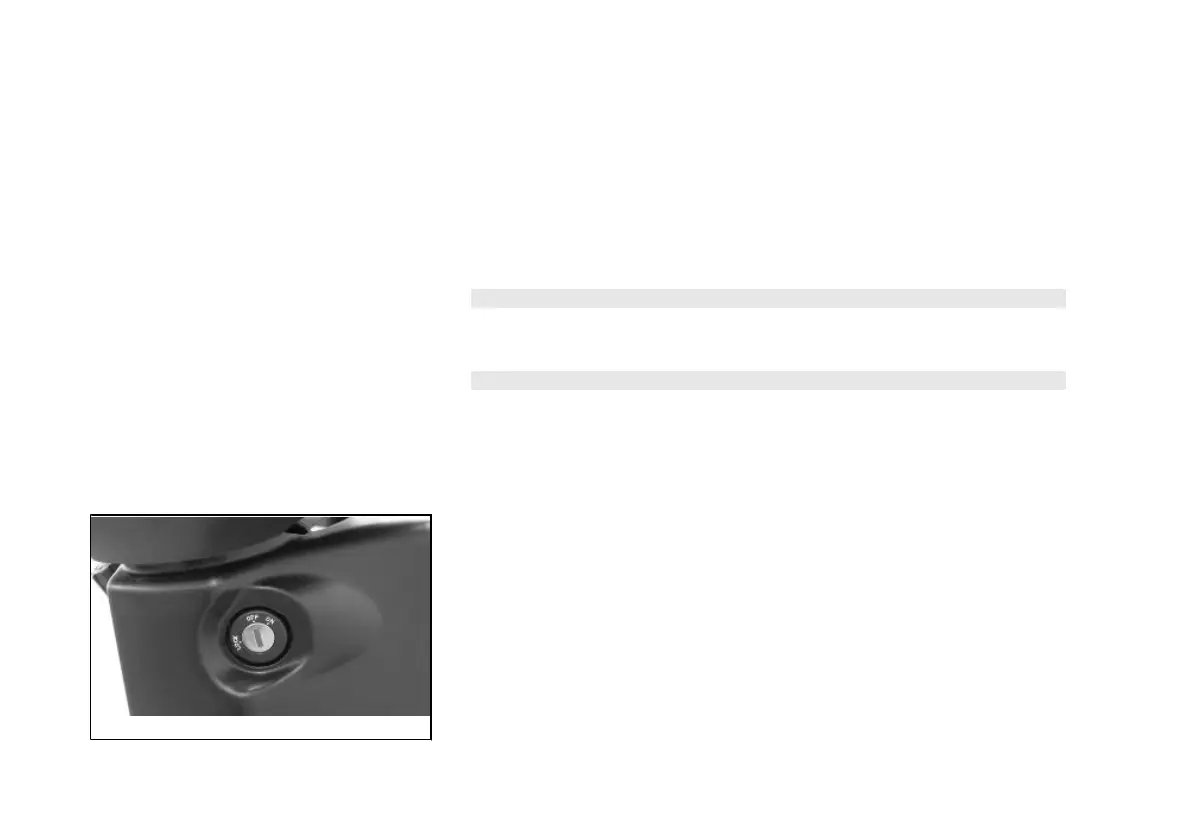
01_04
Keyswitch (01_04)
LOCK = Ignition disabled, extractable key, steering lock engaged, seat cannot be
opened.
OFF = Ignition disabled, extractable key, steering lock disengaged, seat can be
opened.
ON = Ignition enabled, antitheft protection disconnected, non-extractable key, seat
can be opened.
To open the seat the key switch must be set to either the «OFF» or «ON» position.
12



 To Next Page