- 5 -
4 DESCRIPTION
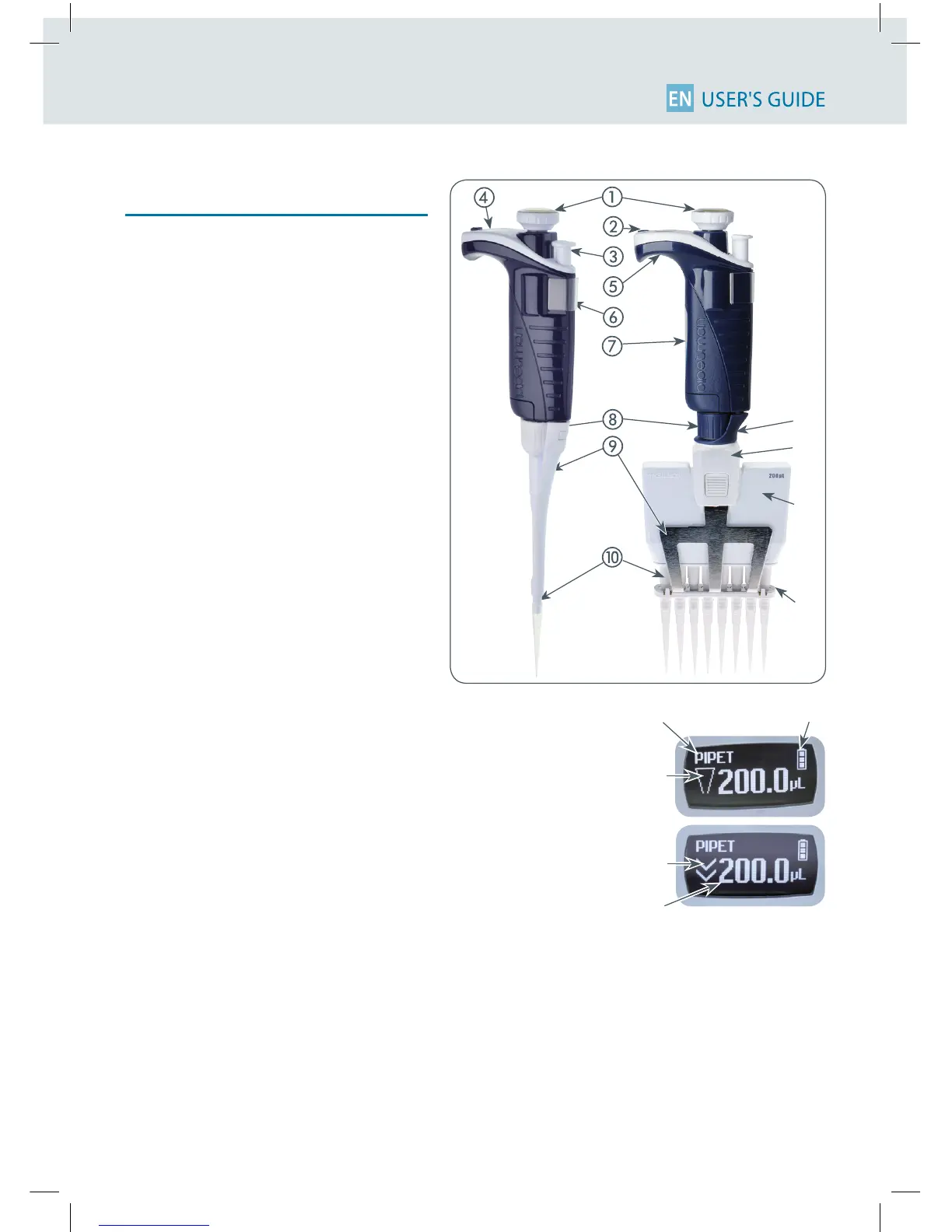
PIPETMAN M Single and Multichannel
models
Upperpart
Push-button and volume adjustment knob
Mode-button: direct access to all menu
functions
Tip ejector button
Display
Elastomer plug to cover the battery
charging port
Identity-tag clip
Identity-tag window
Connecting nut – attaches handle to
lower part
Tip ejector: removable to access tip-holder
Optimizedtip-holdertoreducetiptting
and ejection forces, removable for clean-
ing and servicing
Ejector clip
Ejector support
Cover
Ejector spacer
Reset:
To reinitialize your pipette, simultaneously
press on the push- and mode- button
for at least 5 seconds
Switch O:
To switch o your PIPETMAN M, press the
push-button for at least 5 sec.
Display
The PIPETMANMdisplayisanOLEDscreen.
Usually, it shows the current mode and opera-
tion step, pipetting volume, battery indicator
and piston status (aspirated and dispensed
volume) in real time.
Pipetting Mode
Indicator for aspiration
and dispense
Batterystatus
Purge
Volume
Warning messages appear in the
place of volume.












 To Next Page