2-8
Installation 2
Electrical Setup
GSIOC Connection
If your VALVEMATE is part of a Gilson system,
use the GSIOC port to connect the VALVEMATE
along the Gilson Serial Input/Output Channel
(GSIOC). The GSIOC is a two-way communication
interface between the computer and most Gilson
modules.
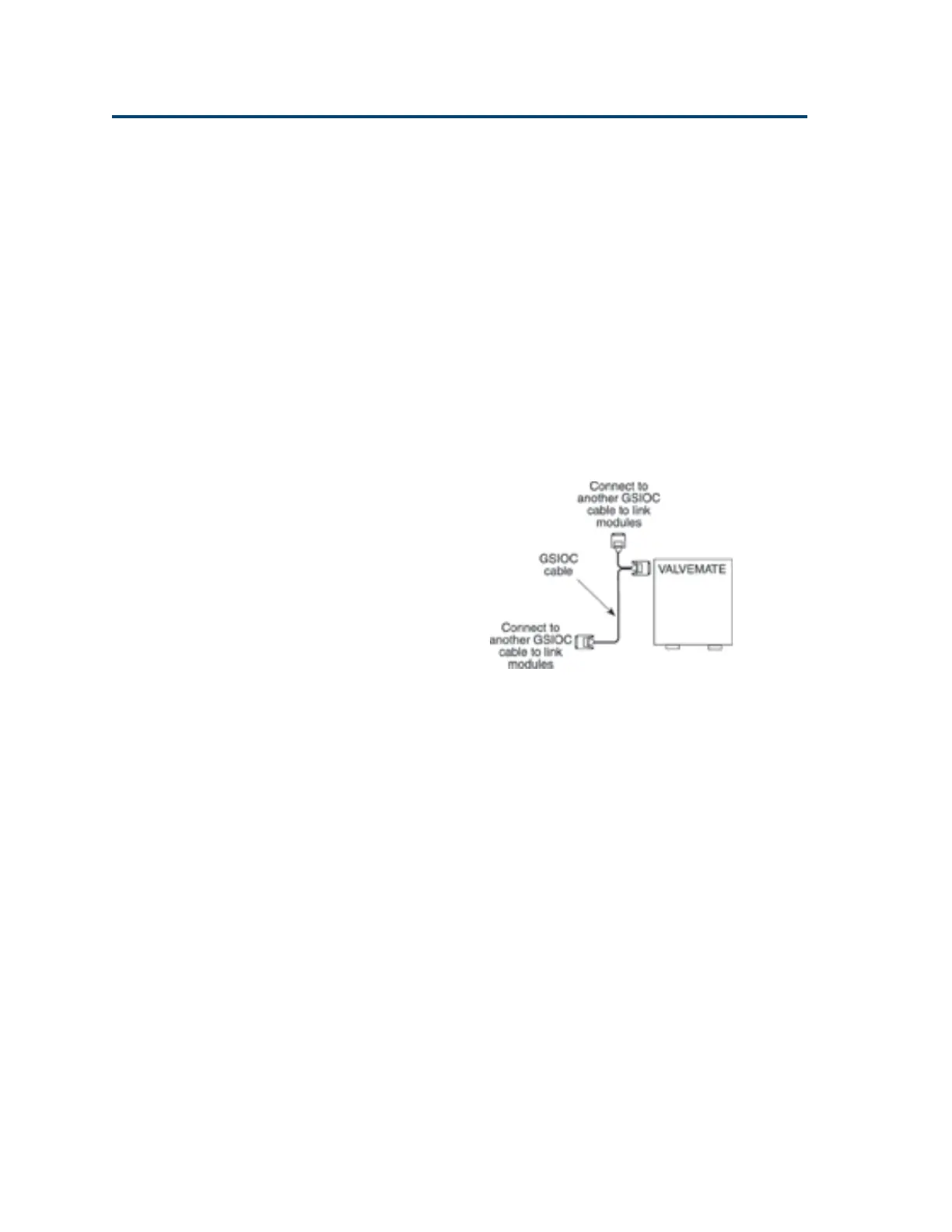
Connecting GSIOC cable
Use the GSIOC cable, supplied in the accessory
package, to link the VALVEMATE to other GSIOC
modules. Refer to the diagram below.
Use the female connector, located individually at
one end of the cable, to connect the GSIOC cable to
another GSIOC cable in the system. Tighten the
retaining screws.
Connect the other female connector, located on the
same end as the male connector, to the
VALVEMATE. Tighten the retaining screws.
Use the male connector to join another GSIOC
cable and make the necessary connection to the
next Gilson module.
Artisan Technology Group - Quality Instrumentation ... Guaranteed | (888) 88-SOURCE | www.artisantg.com


 To Next Page