2-18
Installation 2
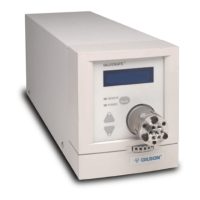
Valve Installation or Replacement
Removing the Installed Valve
To remove the currently installed valve:
1 Turn off and then turn on the VALVEMATE to
place the installed valve in its home position.
2 Turn the thumbscrew, located on the
VALVEMATE’s front panel, all the way to the
left to loosen the valve.
3 Locate the two access holes on the right side of
the VALVEMATE. Using the 7/16" Allen (hex)
wrench take turns loosening the internal
coupling screws. Just loosen the screws until the
valve can be removed. Do not over-loosen the
screws.
Selecting the Replacement Valve in
the VALVEMATE Software
Before inserting the replacement valve:
1 Press MODE until the display shows the type of
valve currently installed, its number of ports,
and its number of positions.
2 Use the up or down arrow key to display the
type of replacement valve.
3 Press MODE until the valve position display
appears.
If a 2-position valve is installed, position 0
should display.
If a multi-position valve is installed, position 1
should display.
Artisan Technology Group - Quality Instrumentation ... Guaranteed | (888) 88-SOURCE | www.artisantg.com


 To Next Page