11
Table 4-2-1
4.2.2 Alarm Setup
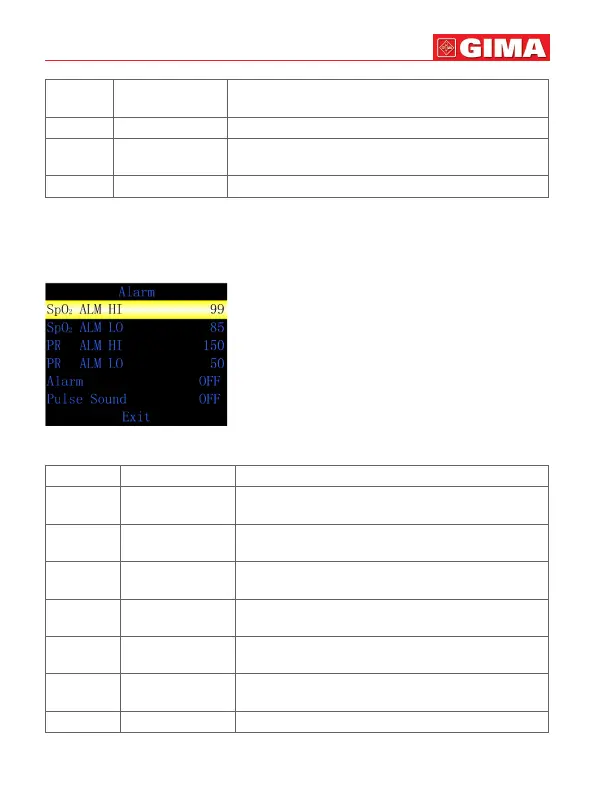
Alarm setup menu is showed as Figure 4-2-2.
Figure 4-2-2 Alarm setup menu
Table 4-2-2
ENGLISH
4 Record Record setup, long press “M” button to access
record setup menu.
5 DEMO Long press “M” button to enter DEMO interface.
6 Clock Time setup, long press “M” button to access
time setup menu.
7 Exit Exit to the measurement interface.
Callout Function Instruction
1 SpO2 ALM HI SpO2 alarm high limit, setup range is 1~100,
default is 99(unit:%).
2 SpO2 ALM LO SpO2 alarm low limit, setup range is 0~99,
default is 85(unit:%).
3 PR ALM HI Pulse rate alarm high limit, setup range is
1~254, default is 150 (unit:bpm).
4 PR ALM LO Pulse rate alarm low limit,setup range is 0~253,
default is 50 (unit:bpm).
5 Alarm Alarm setup, ON or OFF can be selectable,
default is OFF.
6 Pulse Sound Pulse sound setup, ON or OFF can be
selectable, default is OFF.
7 Exit Exit to the upper-level menu.



 To Next Page