10
4 Device Operation Explanation
4.1 Button Operation
Power on / Power off / Awake button:
Powering on operation: Long press the button , then the green indicator light
is on, LOGO is displayed and enter the measurement interface.
Powering off operation: Long press the button without recording, the screen
displays “Bye-Bye!”, and then the work indicator light is off.
Screen awaking operation: In recording status, if there is no button operation for
60 seconds,the screen will be shut up automatically to enter power-saving status.
Short press the button to awake the LCD to display.
Menu / Conrm button:
In measurement interface,long press button “M” to enter the main menu.
You can look through the menu by short pressing button “M”,and access the
submenu or set up the selected item by long pressing.
4.2 Menu Operation
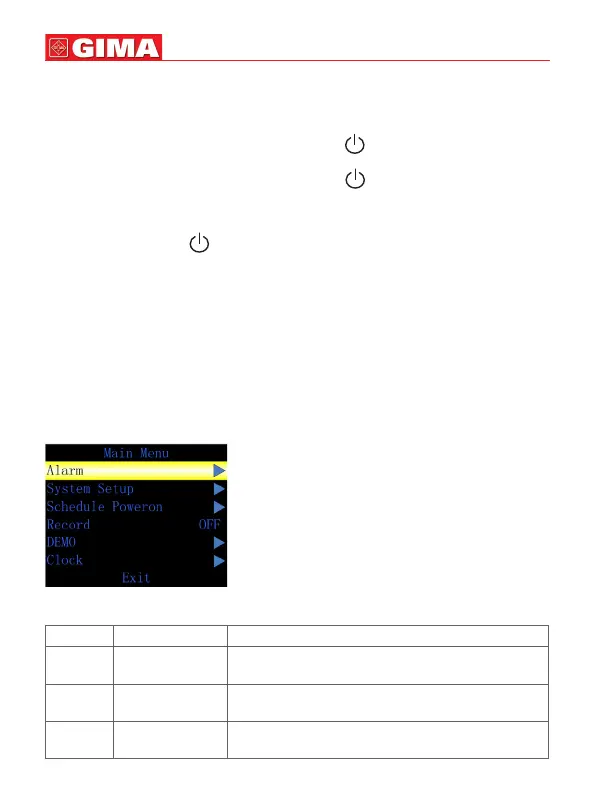
4.2.1 Main Menu
In measurement interface, long press button “M” to enter the main menu, as Fig-
ure 4-2-1.
Figure 4-2-1 Main menu
ENGLISH
Callout Function Instruction
1 Alarm Alarm setup,long press “M” button to access
alarm setup menu.
2 System Setup Long press “M” button to access system setup
menu.
3 Schedule
Power on
Auto poweron Setup, long press “M” button to
access Auto poweron Setup menu.



 To Next Page