17
5.2 AUTOSWITCH AND PRIORITY FUNCTION
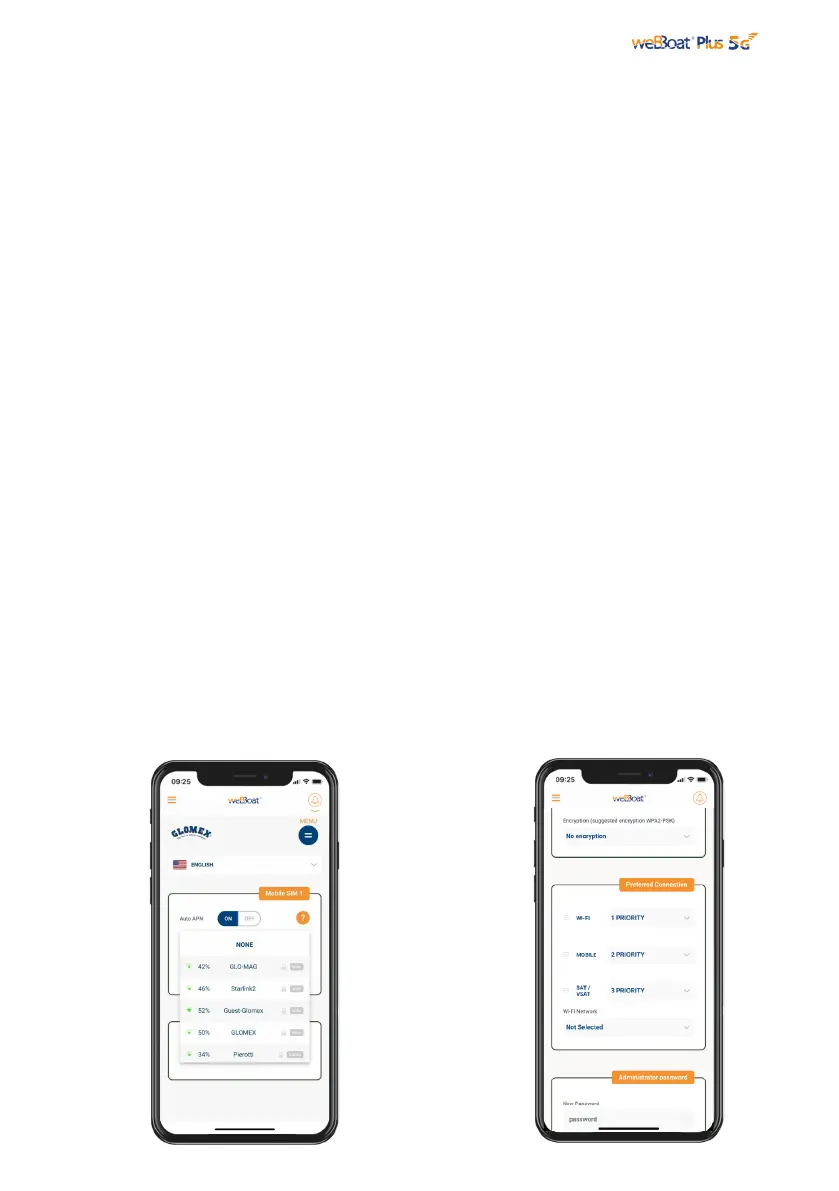
Fig. 15
Fig. 16
In “Setup Wizard”, it is possible to connect to an external Wi-Fi just selecting from a
dropdown list. In this mode weBBoat® Plus 5G is able to switch automatically from
Wi-Fi to 5G/4G/3G if the external Wi-Fi Hotspot signal (i.e. marina Wi-Fi) is lost.
While using the 5G/4G/3G connection, if the same external Wi-Fi Hotspot (i.e. marina
Wi-Fi) is detected again, weBBoat® Plus 5G will switch the connection back from
5G/4G/3G to Wi-Fi automatically. To enable this option, tap “Enable” button (Fig.
13). Tap Wi-Fi Scan button (Fig. 15), select one of the available external Wi-Fi
networks. Tap OK button to join the network and then enter the password (if
required). Tap “Save” button to proceed (Fig.17).
WARNING:
During the Autoswitch configuration, the connection between the mobile device
and weBBoat® Plus 5G will be lost. Please check the connection
between the devices and reconnect before proceeding if needed.
To skip the Setup Wizard, tap “Skip” button (not recommended).
IMPORTANT: Tap "Save” button in “Setup Wizard” to save all configuration settings
(Fig. 15). In the “Advanced Settings” section there is a “Prefered Connection”
section (Fig. 16) in which it is possible to customize the operation of the “Autoswitch”
mode by redefining the priority of the various internet sources: Wi-Fi (Default Priority
1), Mobile (Default Priority 2) and SAT (Default Priority 3). You can enable the Priority
function to choose which connection type is used and in which assigned priority order.
Typically, the highest priority links will be the cheaper high bandwidth connections
(marina Wi-Fi, then Cellular) with the lowest priority link being the more expensive
satellite internet connection. With weBBoat® Plus 5G you can choose also to
enable only one internet connection methods, for example the marina Wi-Fi to reduce
the cellular or satellite internet data consumption and costs (see paragraph 5.3).



 To Next Page