Glow T180
Tankless Condensing Water Heater
19
2.7 Service Menu
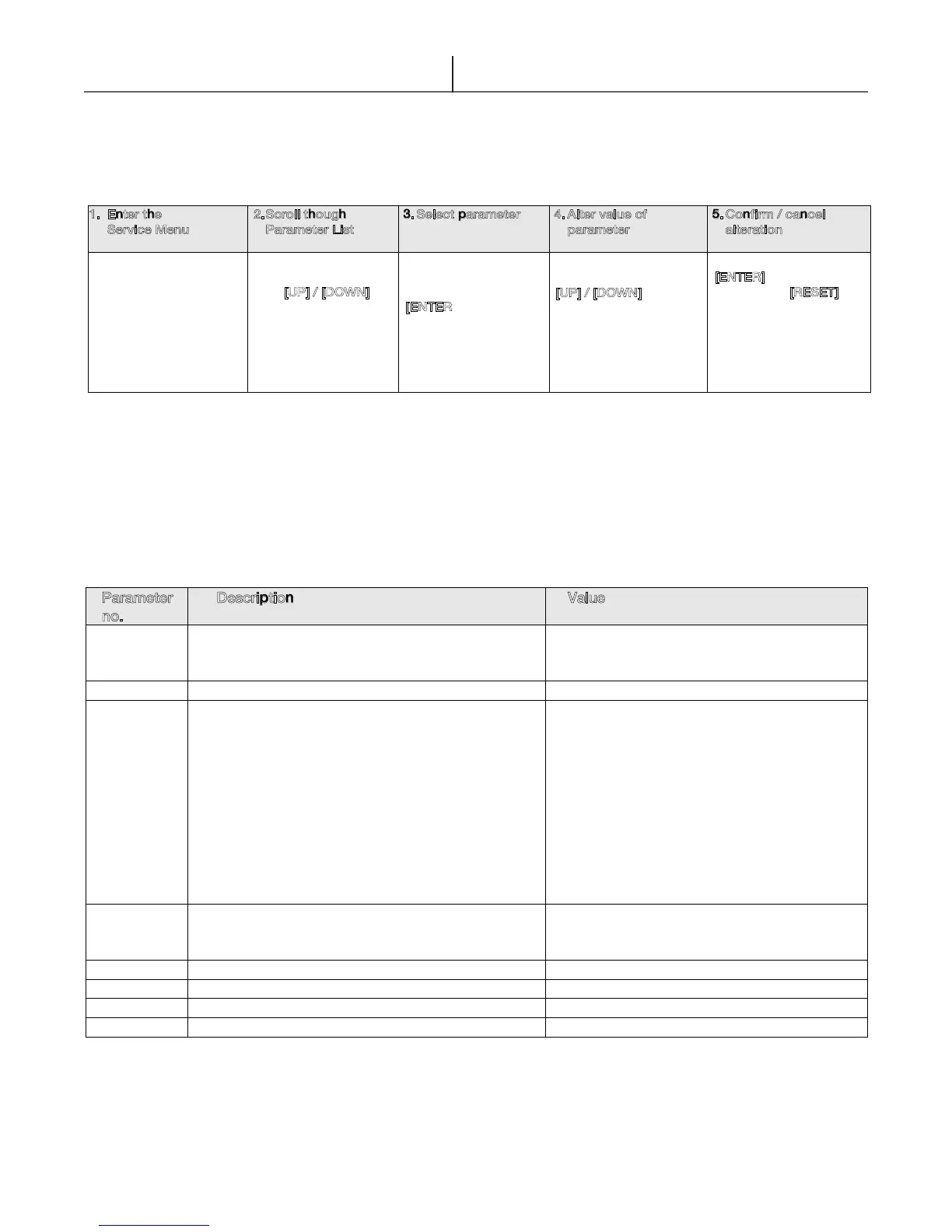
The scheme below schematically shows how to operate the Service Menu in some simple steps:
* If these buttons are no longer operated for 2 sec. the parameter no. and the current value displayed will show with intervals of 2 sec.
** In case of a non-adjustable parameter, the current value will be displayed continuously.
Parameter
no.
Description Value
207 Set point (Default 120°F/49°C) Min.102°F - Max 145°F
(Min. 39°C - Max. 63°C).
208 Rest Function ON (default), OFF
210 System test power
OFF: Don’t apply
rEg: Don’t apply
FAn: Fan rotates at maximum RPM
(Flow water through heater for following
tests)
Lou: Burner fires at minimum power
Ign: Burner fires at Ignition power
Hig: Burner fires at maximum power
214 Display test (when [UP] button is pushed all
icons and LEDs will
light-on. Press [RESET]
to go back to the settings menu. *
260 Don’t Apply
261 Don’t Apply
280 Service Reminder. Status jumps back. ON, OFF, rSt (Reset)
281 Service Reminder setting Days (in steps of 5)
Table 2.9
Table 2.10
The following table shows the available parameters in the Service menu.
1. Enter the
Service Menu
2. Scroll though
Parameter List
3. Select parameter 4. Alter value of
parameter
5. Confirm / cancel
alteration
Hold [MENU] for 5
seconds.
Display will alternately
flash parameter 207
and its value set point.
Scroll through the
parameter list with
the [
UP] / [DOWN]
buttons*
10 seconds of no
action automatically
return to the status
screen.
Select a parameter to
alter/read-out it’s
value by pressing
[
ENTER]* *
10 seconds of no
action automatically
return to the status
screen.
Alter a value of the
parameter with the
[
UP] / [DOWN] buttons.
When the parameter is
being altered, the value
on the display will
blink.
Confirm (save) with
[
ENTER]
or
Cancel with [
RESET]
After saving/cancelling
you automatically
return to the installer
selection (1).


 To Next Page