German Light Products GmbH JDC1
User Manual Rev. 1.0 7
2.4 Color
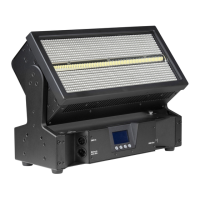
The JDC1 provides two large-array RGB color plates surrounding the strobe tube.
Each plate is divided into six independently controllable 110 LED ‘pixels’ that
flash and operate continuously, providing a wide (148°) color wash.
2.5 Dimming and Shutter Effects
Three dimming curves are available: linear, soft, and extra soft. Select the
desired mode from the control panel.
2.6 Tilt
The JDC1 head tilts through 185° with coarse and fine control channels and self-
correcting position feedback. Position feedback can be disabled and control
can be reversed from the control panel.
2.7 Changing Settings by DMX
The Control Channel (7 in Normal DMX Mode) provides the ability to adjust the
pulse width modulation (PWM) frequency in 1 Hz increments from 582 to 618 Hz,
or set to 1200 or 2400 Hz. It also provides commands to toggle FX/Pattern Color
Priority on/off, and perform a fixture reset.
2.8 Display
The illuminated graphic LCD display with self-charging battery allows you to
change fixture settings quickly and intuitively under any conditions, even when
the power is off. See Chapter 4 for settings, readouts, and related information.
2.9 Clamp Attachment
The base provides Camlock attachment points for easy fastening of an omega
clamp attachment bracket that accepts two half-coupler clamps.


 To Next Page