28
60040-00325 ∙ 00 ∙ 08/2022
Product description GO2 RH3
EN
cameras, baby monitors, etc�) nearby, the manoeuvring
system comes to an imediate standstill for safety re-
asons if radio frequency interference occurs� It is im-
possible for other radio signals to set the manoeuvring
system in motion�
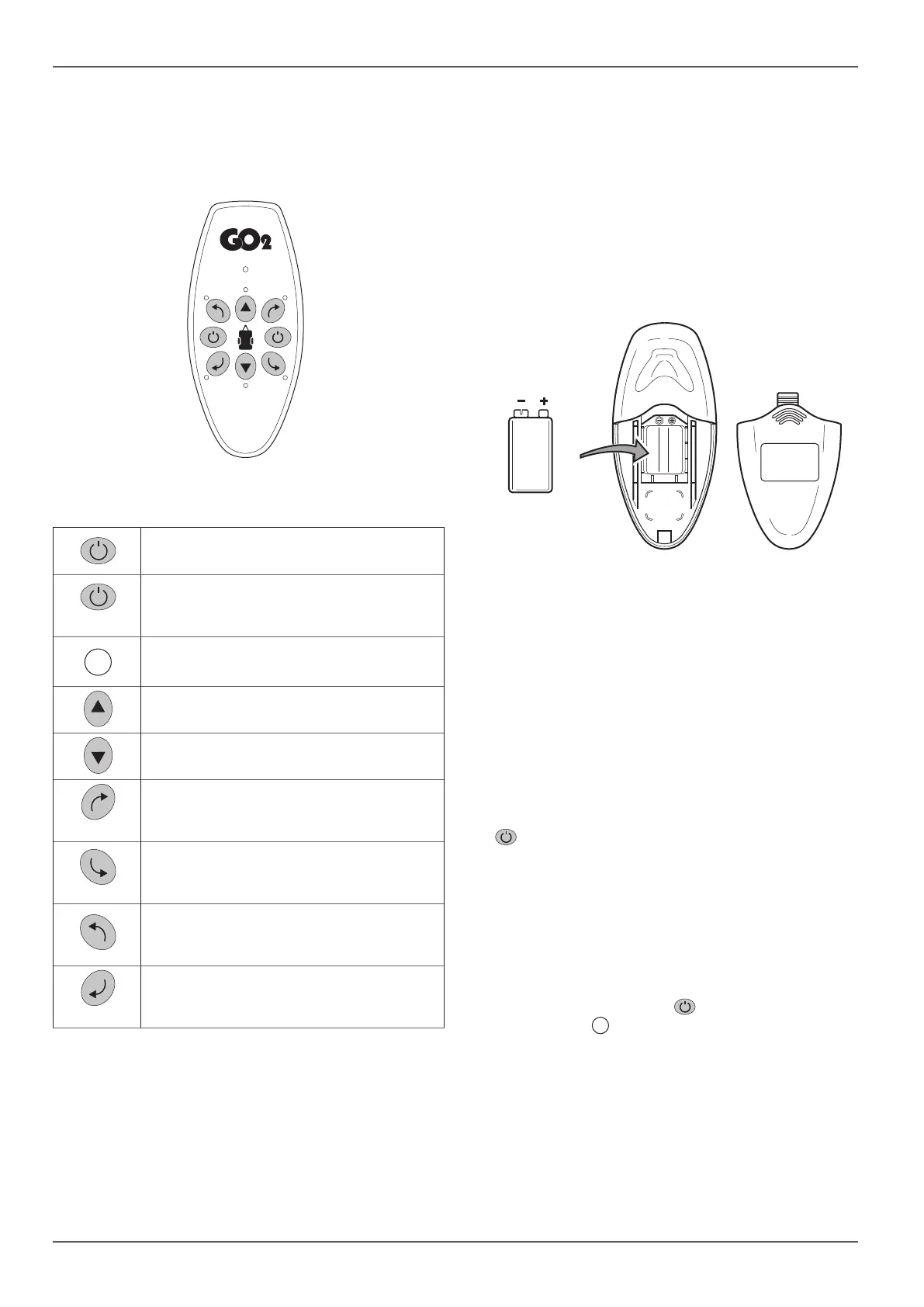
Fig. 6
ON
Switch on (green button)
OFF
Switch off (red button) / emergency stop
switch
LED
FORWARD
Drive forward
REVERSE
Drive in reverse
RIGHT FORWARD
Turn in a clockwise direction when mo-
ving forwards
RIGHT BACK
Turn in an anti-clockwise direction when
reversing
LEFT FORWARD
Turn in an anti-clockwise direction when
moving forwards
LEFT BACK
Turn in a clockwise direction when
reversing
4.5.2 Replacing remote control batteries
NOTICE
Damage to the remote control due to lea-
king batteries
Leaking batteries can damage the remote con-
trol� Then, the manoeuvring system can no lon-
ger be used�
Use leak-proof batteries�
If the remote control is not being used for an
extended period of time, remove the batte-
ries from the remote control�
Different types of batteries or new and used batte-
ries must not be used together�
Flat batteries must be removed from the remote
control and disposed of safely�
Use only leak-proof 9V batteries (MN1604)�
The red LEDs on the remote control flash when the
battery is too weak�
Fig. 7
Open the battery cover
Remove used batteries and insert new ones (pay at-
tention to the positive and negative terminals)
Close the battery cover again
No warranty is given for damage caused by leaking
batteries�
4.5.3 The remote control’s automatic switch-off
The remote control switches itself off automatically
after approx� 3 minutes if none of the buttons are
pressed�
To reactivate the remote control, press the green ON
button�
There is no “On / Off” switch on the caravan itself�
4.5.4 Switching off the remote control (emergen-
cy stop)
When you switch off the remote control, this imme-
diately stops all current processes (e�g� engaging
and manoeuvring)� When it is switched on again,
these functions can be continued�
Press the red OFF button on the remote con-
trol� The LED goes out
Disposal of batteries is described in Kapitel 9�2�



 To Next Page