SmartBox
®
4 / SmartBox
®
4 PRO
part no. 28 400 57 d 9 / 28
SmartBox
®
4 / SmartBox
®
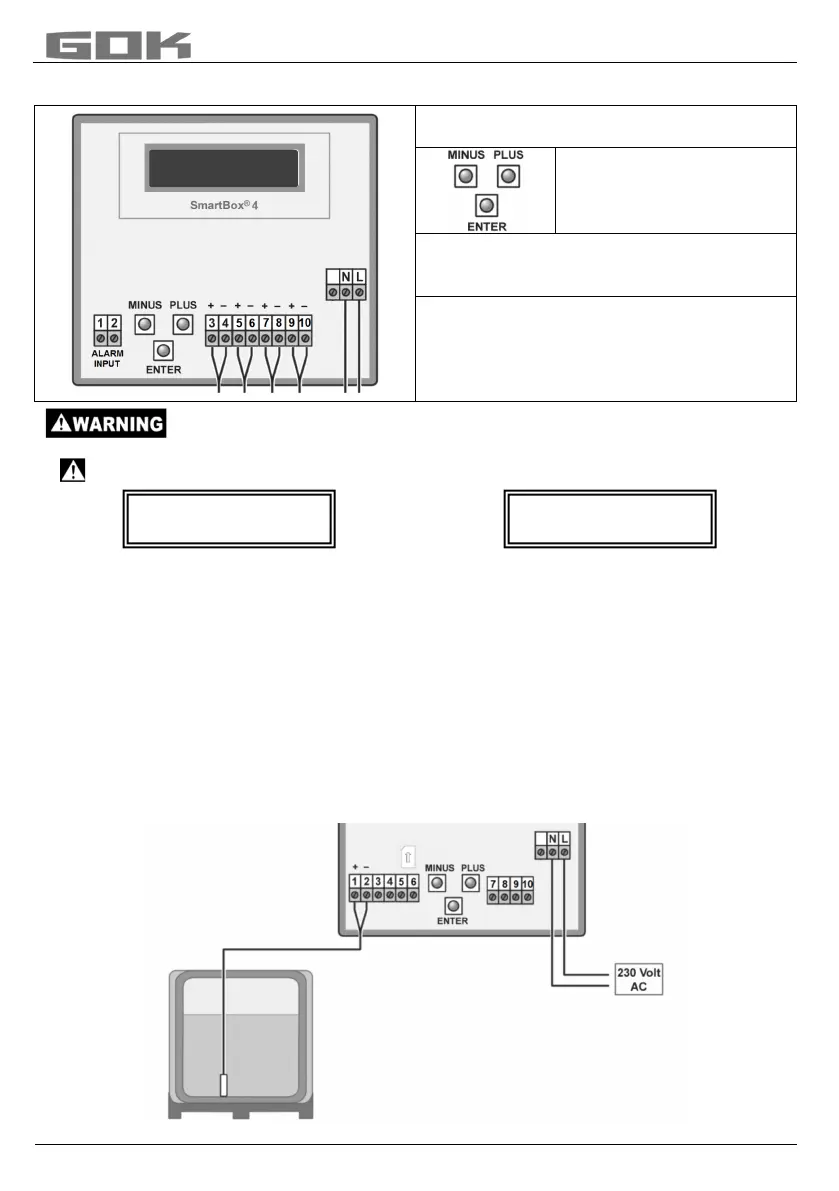
4 PRO has the following display:
The device is adjusted via the three small
blue buttons:
motherboard between the
terminals.
Choosing the language (German, English
French or Spanish) in Step ”18.
Activating power supply:
Keep away from the area of the 230 V terminal!
• Activate power supply – the following is displayed alternately
• After some seconds, “PIN:” appears - now, enter the PIN code for the SIM card (you need
to do this only once). Set the code with PLUS and confirm with ENTER
([+] _ [Enter] [+] _ [Enter] [+] _ [Enter] [+] _ [Enter])
• The device saves the entered PIN code for the next dial-in. It will be available also after a
power failure.
A
fter you have entered the PIN code, the SmartBox
®
automatically
at
tempts to log into the
mobile network. This takes approx. 1 - 2 minutes, Display “Netzsuche..” (Mobile network
login). When the dial-up is successful, “Netzsuche..” (Mobile network login) is no longer
displayed. If login is impossible, the error message “ErrorM5” (see page 26) will be indicated.
In problematic cases, login to the mobile network should be possible after installation of an
external additional antenna. (HF antenna with wall bracket and 5 m connecting cable).
Fuel oil tank - wiring example SmartBox
®
4


 To Next Page