14
DUTY CYCLE
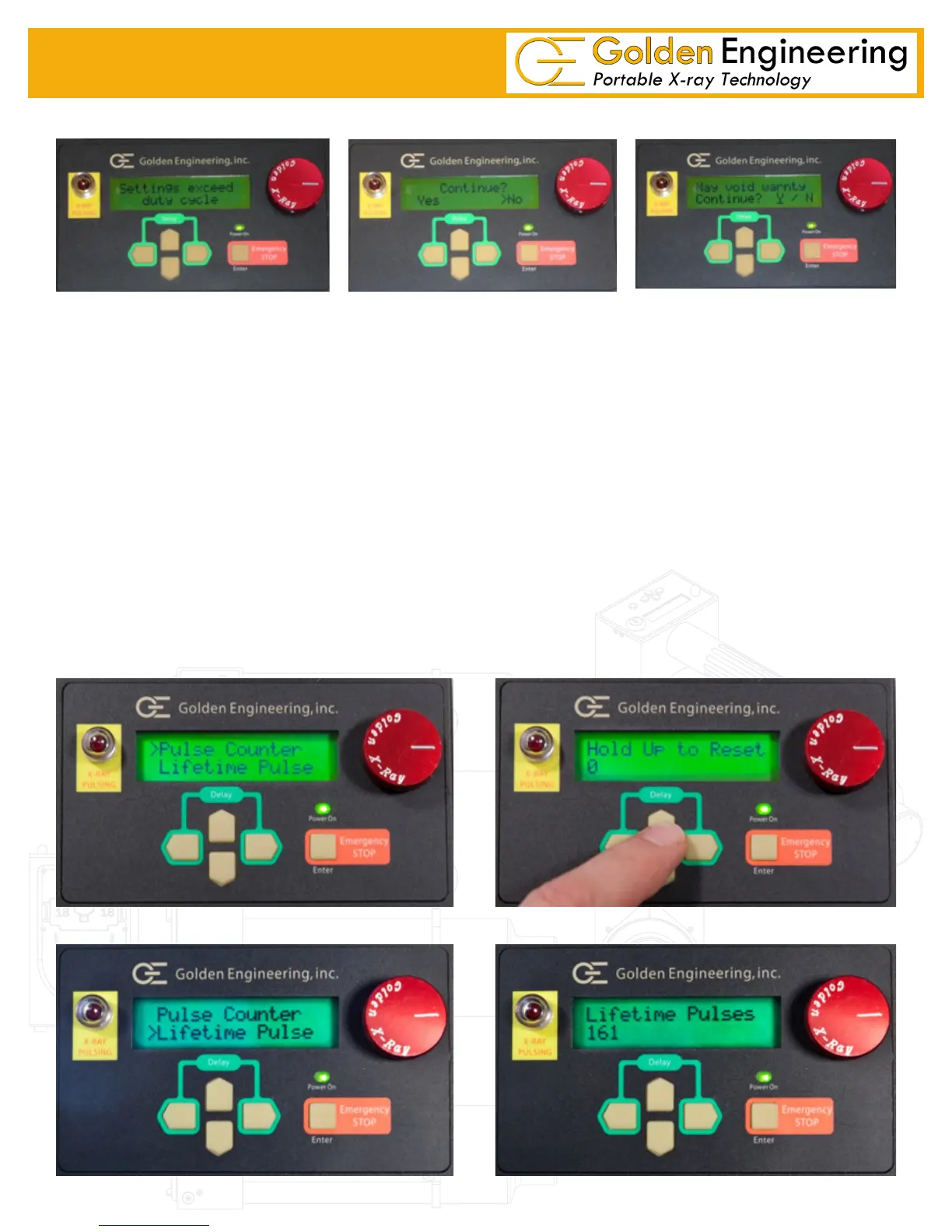
If operator selects multiple pulse trains that exceed the duty cycle of 200 pulses in 4 minutes the LCD will display:
Setting exceed duty cycle for four seconds followed by Continue? Yes/No screen. If the operator selects No the
Unit will default to a single pulse train. If the operator selects Yes on the continue screen the LCD will display a
second warning May void Warnty Continue? If operator selects Y the pulse count will remain with the multiple
pulse trains in place. When the unit is returned for repair Golden Engineering can see how many times the duty
cycle had been exceeded. If the repairs required to the machine are caused by excessive use the warranty may
be voided.
PULSE COUNTERS
XRS4 contains two pulse counter options. The rst pulse counter can be reset to zero by selecting Pulse Counter
then pressing the UP ARROW to reset. This feature allows the operator to track the number of pulses red from
a desired event like the last tube change or total number of pulses for a specic job. The Lifetime Pulse option
displays the total number of pulses on the machine and cannot be reset. Unlike previous versions there is no multi-
plier – the number displayed on the LCD is the exact number of pulses on the machine.


 To Next Page