4
CONTROLS
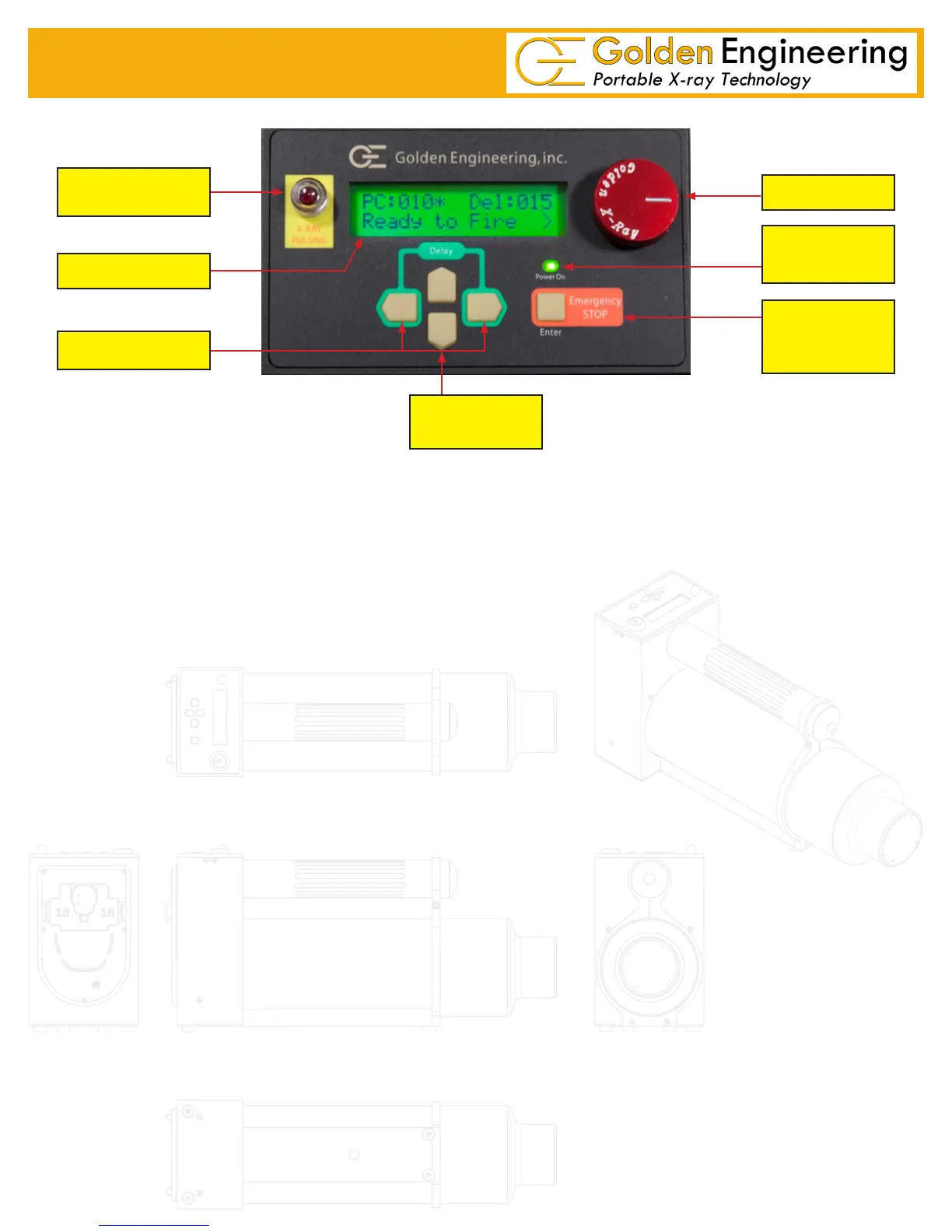
RED X-RAY PULSING LIGHT:
¾ Blinks after time delay button or remote cable button is pressed AND between multiple pulse trains.
¾ Stays on continuously while the XRS4 pulses.
¾ Blinks at a slower rate between multiple pulse trains.
¾ This is a failsafe warning light. If the light does not work the X-ray unit will not pulse.
LIQUID CRYSTAL DISPLAY (LCD): 32 character LCD. Home screen displays Pulse count (PC), Multiple pulse
trains (*), Time Delay (DEL), and Ready to Fire. See instructions for menu options.
DELAY SWITCH: Initiates time delay mode count down when left and right arrows pressed simultaneously.
POWER ON LIGHT: Illuminates when battery voltage is applied to control module.
ENTER/ EMERGENCY STOP SWITCH: ENTER used when menu options are selected.
EMERGENCY STOP stops the unit during delay count down mode or between multiple pulse trains.
DIRECTIONAL ARROWS: Left, Right, Up, Down used to navigate through LCD and menu options.
X-RAY PULSING
LIGHTS
LCD
DELAY SWITCH
KEY
DIRECTIONAL
ARROWS
ENTER /
EMERGENCY
STOP
POWER ON
LIGHT


 To Next Page