44
User Manual V1.6-2022-01-05 03 OTHERS
These servicing instructions are for use by qualied personnel only. To
reduce the risk of electric shock, do not perform any servicing other than
that specied in the operating instructions.
Ces instructions d’entretien sont destinées uniquement au personnel
qualié. Pour réduire le risque de choc électrique, n’eectuez aucun
service autre que celui spécié dans les instructions d’exploitation.
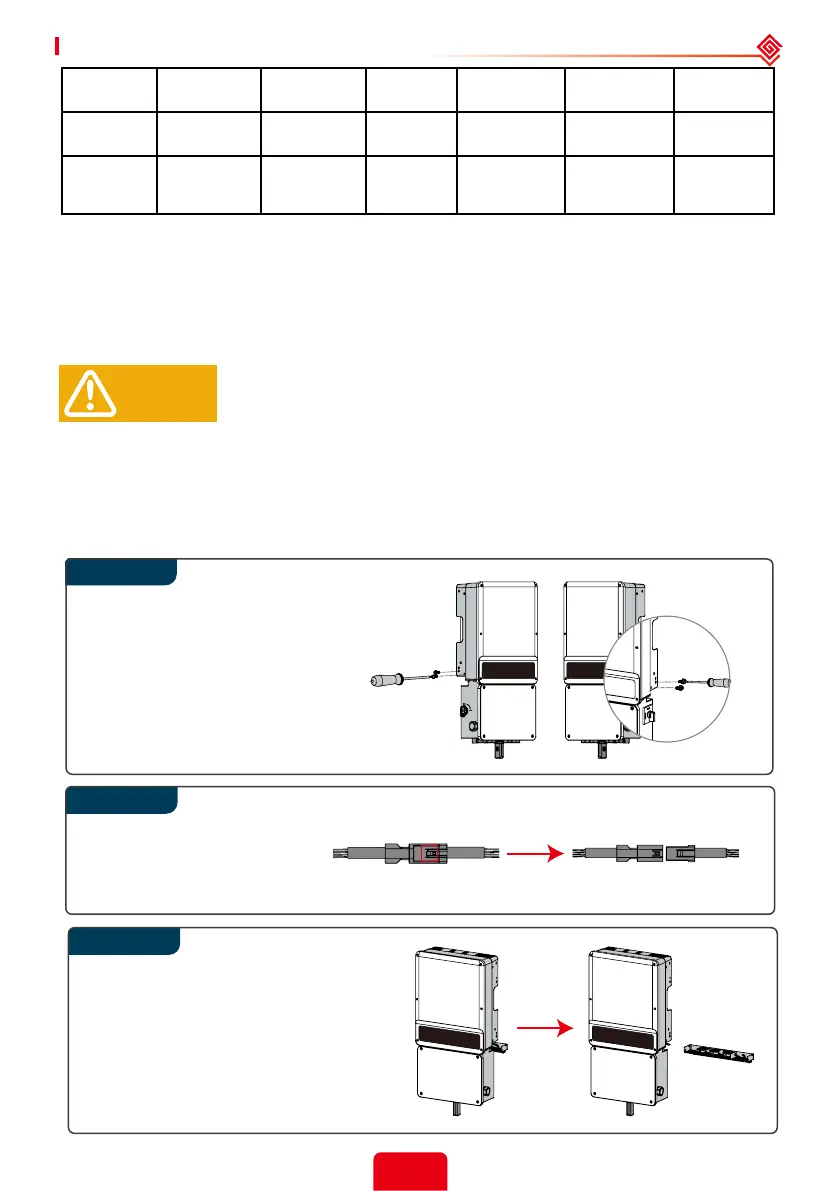
3.5.1 Clearing and Replacing Fans
A-ES inverter is equipped with two or three fans on its back side. The fans should be cleared
yearly. Before clearing or replacing the fans, turn o all switches including battery switch and AC
breaker switch.
Separate the plug terminal
by pressing the buckle.
Rotate DC switch in “OFF” position.
Remove 4 screws by cross
screwdriver.
Clean the ventilation grid and the
fan with soft brush, paint brush, or
compressed air.
Reassemble the fans into the cabinet.
If there is something wrong with
the fan and need to be repaired
or replaced, disassemble the fans
following the above steps.
WARNING!
3.5 Maintenance
Step 2
Step 3
a Measurement accuracy requirements specied in this table are applicable for voltage THD <
2.5% and individual voltage harmonics < 1.5%.
b Accuracy requirements for frequency are applicable only when the fundamental voltage is
greater than 30% of the nominal voltage.
Active Power (± 5% S
rated
) 10 cycles
0.2 p.u. < P <
1.0 p.u.
Not required N/A N/A
Reactive
Power
(± 5% S
rated
) 10 cycles
0.2 p.u. < Q <
1.0 p.u.
Not required N/A N/A
Time
1% of
measured
duration
N/A 5s to 600s 2 cycles N/A 100 ms < 5 s



 To Next Page