45
03 OTHERS User Manual V1.6-2022-01-05
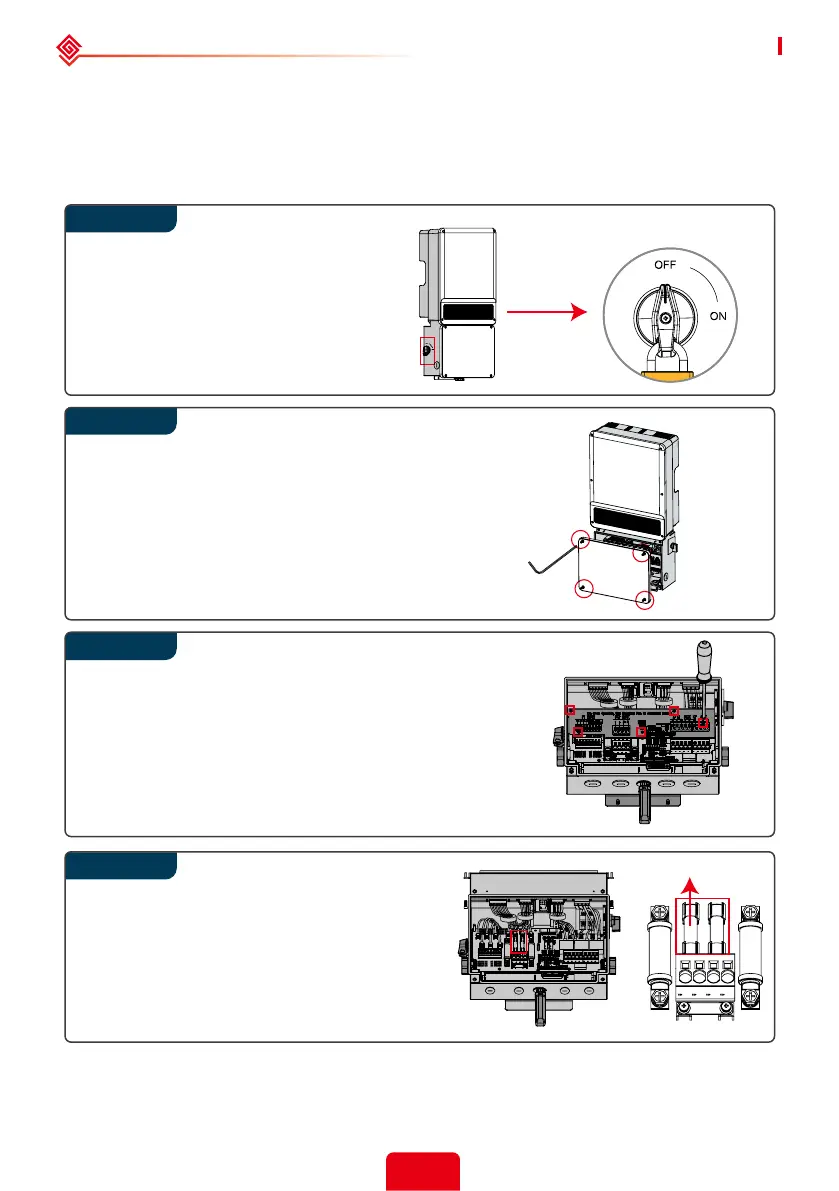
Remove the broken fuses in the middle
on vertical direction which is shown in
the left gure and don't remove fuses
by prying or other methods.
Replace the fuses on vertical direction.
Step 1
Remove the 4 screws by Allen Wrench.
Remove the cover.
Remove 5 screws by cross screwdriver.
Remove the black plastic board.
Conrm that the fuses are broken.
Rotate DC switch in “OFF” position.
Turn o all switches including battery
switch and AC breaker switch.
Install a lock on DC switch.
Wait at least 5 minutes to do the next
operation.
Step 2
3.5.2 Fuse Replacement
If the inverter fuses are broken, replace them quickly. Before the replacement, all the power (PV,
battery, AC) connected by A-ES must be turned o. Otherwise it will bring danger. The fuse must
be of the same size, the current specication must be the same as the original fuse or higher,
not less than the original specication. Steps are as follows:



 To Next Page