22
860-7100-19 DTU Operation Manual
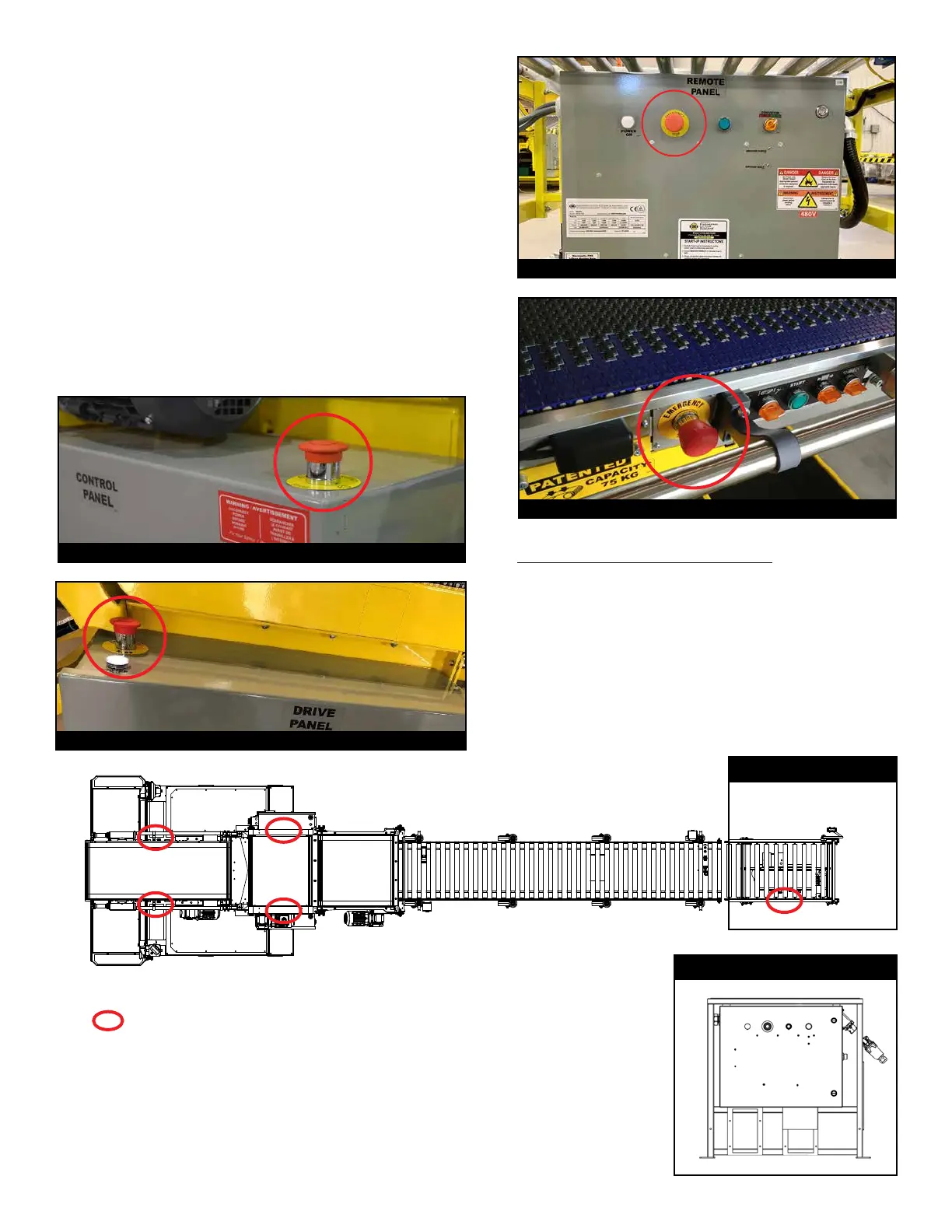
EMERGENCY STOP (E-STOP) BUTTONS
There are 5 E-Stop buttons on each unit. E-Stop buttons are
located on the control panel, drive panel, remote panel and both
sides of front pivoting conveyor. Pressing an E-Stop button will
stop all machine motion immediately. Rotate E-Stop buttons
gently to release. TO AVOID DAMAGE, NEVER PULL.
Activate the E-Stop whenever an accident, breakdown or other
operational failure occurs. After trained and qualied personnel
resolve the issue, follow the “Recover from an E-Stop” process to
resume normal operation.
To reset from an E-Stop condition, release all E-Stop buttons
(by rotating clockwise) and press Start button on remote panel,
followed by Start button on pivoting conveyor. NEVER use
E-Stops as a control stop for moving belts. Power down machine
using proper procedures - See Shut Down Instructions under
USING YOUR MACHINE.
E-Stop on Control Panel
HOW TO RECOVER FROM AN E-STOP:
1. Release all 5 E-Stops (by rotating clockwise).
2. Press Start button on remote panel. If power is present,
cable connections and ground conductors are in
place, then the green Start button remains illuminated.
3. Press Start button on either side of pivoting conveyor. If
green light remains ON, machine has started properly.
E-Stop on Remote Panel
E-Stop on Pivoting Conveyor
E-Stop on Drive Panel
Emergency E-Stops
Remote Panel (Mobile)
Remote Panel (Anchored)


 To Next Page