32
860-7100-19 DTU Operation Manual
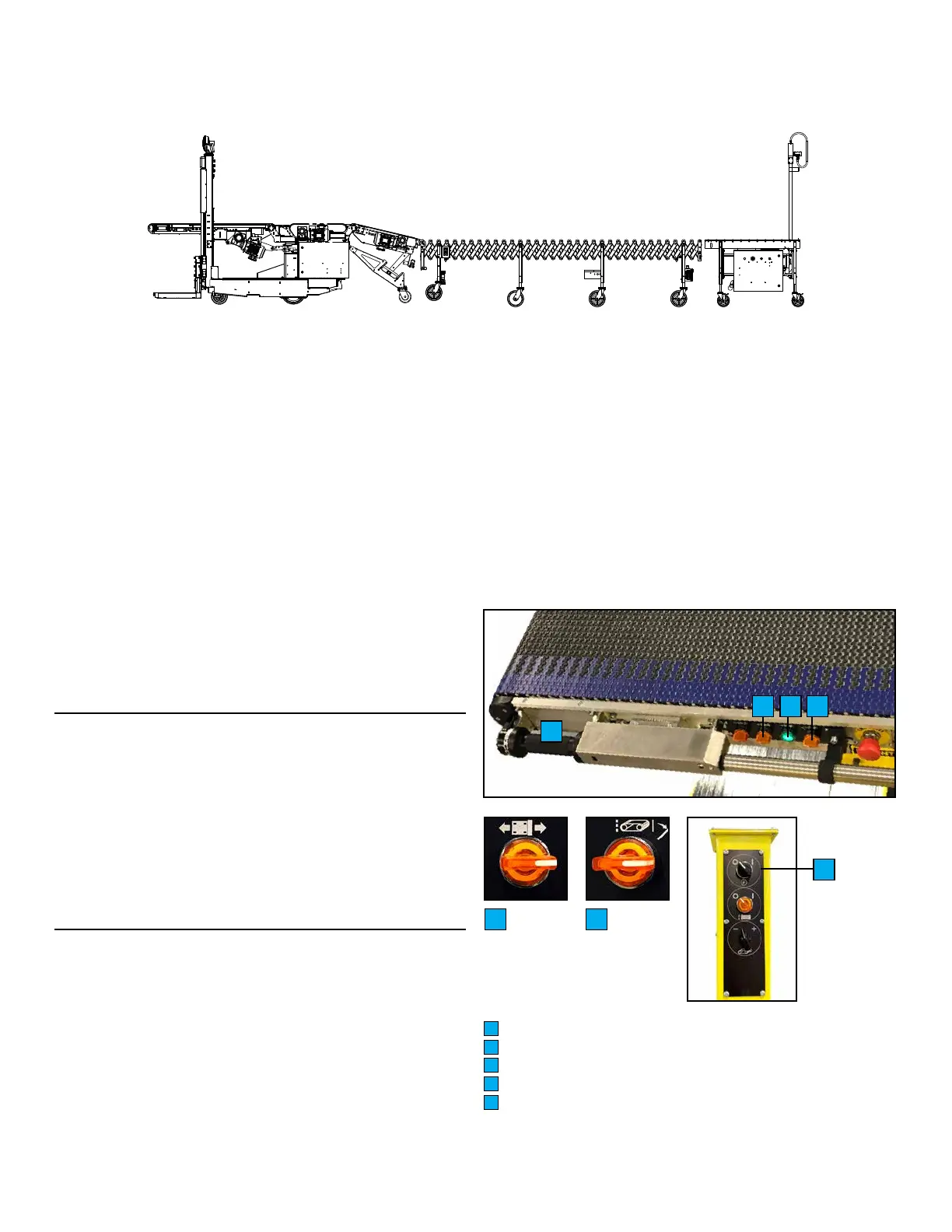
QUICK START GUIDE WITH FLEXIBLE CONVEYOR
WARNING: DO NOT operate the Destu-it
TM
machine without
proper authorization. Failure to avoid this hazard could
result in serious injury. ENSURE MACHINE IS CONNECTED
PROPERLY PRIOR TO STARTING.
Carefully read and completely understand the Operation Manual
and all warnings and instruction labels on the Destu-it
TM
. This
page does not replace the operator instructions found in this
Operation Manual. Before operating the Destu-it
TM
machine,
perform the following steps:
1. Connect all multipin connectors on machine and conveyor.
2. Ensure AC and DC Disconnects at drive panel (located on
machine) are in the ON position. AC and DC Disconnects
should remain ON at all times.
3. Release 4 E-Stops on machine (by rotating clockwise).
4. Turn AC On/O selector switch (located on machine left mast)
to the ON position.
5. Release E-Stop on remote panel (by rotating clockwise).
6. Press Start button on remote panel. Start button remains
illuminated green.
7. Mount operator platform. Press Start button (C). If green light
remains on, machine has started properly. Wait 20 seconds
for machine diagnostics.
8. To move the machine, grasp rotary handle (A) with one hand
and with the other rotate Forward/Reverse Selector Switch
(B) to move in the direction of choice. Rotate Rotary Handle
to steer.
9. Prior to starting the belts, the sensing mats must be reset.
Turn the Belt Motion Selector Switch towards the back; hold
for two seconds; the blue light on the right mast will turn o
if the sensing mats have been reset. Sensing Mats must be
reset for belts to run.
10. To start conveyor, rotate the Belt Motion Control Switch (D).
Check that the conveyor belt direction is moving according to
operation activity.
11. Perform visual and daily maintenance inspections. If any of
the following occurs, contact maintenance immediately:
• Does not appear to be working properly.
• Has been damaged or appears to have worn or
missing parts.
• Has alterations or modications not approved by
the manufacturer.
• Has safety devices which have been altered or
disabled.
• Has been tagged or blocked out for non-use or
repair.
Rotary Handle
Forward/Reverse Selector Switch
Start Button
Belts Motion Selector Switch
AC On/O Selector Switch (left mast)
A
B
C
D
E
B D
NOTE: The white power light on the Remote Panel will turn on if
3 phase power is present. If cable connections are correct and
the AC Selector Switch at the left mast is turned to ON, the green
LED/Ground Check Indicator on the Remote Panel illuminates.
If the green Ground Check Indicator does not illuminate, ensure
that all multipin connectors are secure and the AC On/O Selector
Switch is turned to ON. If the red LED/Ground Fault Indicator
illuminates, there is a Ground Fault which must be corrected
before proceeding. Contact Maintenance.
The green LED/Ground Check Indicator must be illuminated
or the system will not run.
A
B C D
E


 To Next Page