42
860-7100-19 DTU Operation Manual
PREVENTING BATTERY RUNDOWN (FOR
LONG TERM STORAGE)
Machines that will be parked/stored for more than 2 weeks must
either be maintained by the onboard battery charger or discon-
nected. The battery charger must be plugged into a 120V wall
outlet with an extension cord. The battery charger will automati-
cally maintain the batteries. If this option is not feasible, the bat-
teries must be disconnected. Simply turning o the DC disconnect
switch does not eliminate the parasitic draw on the batteries on
certain machines.
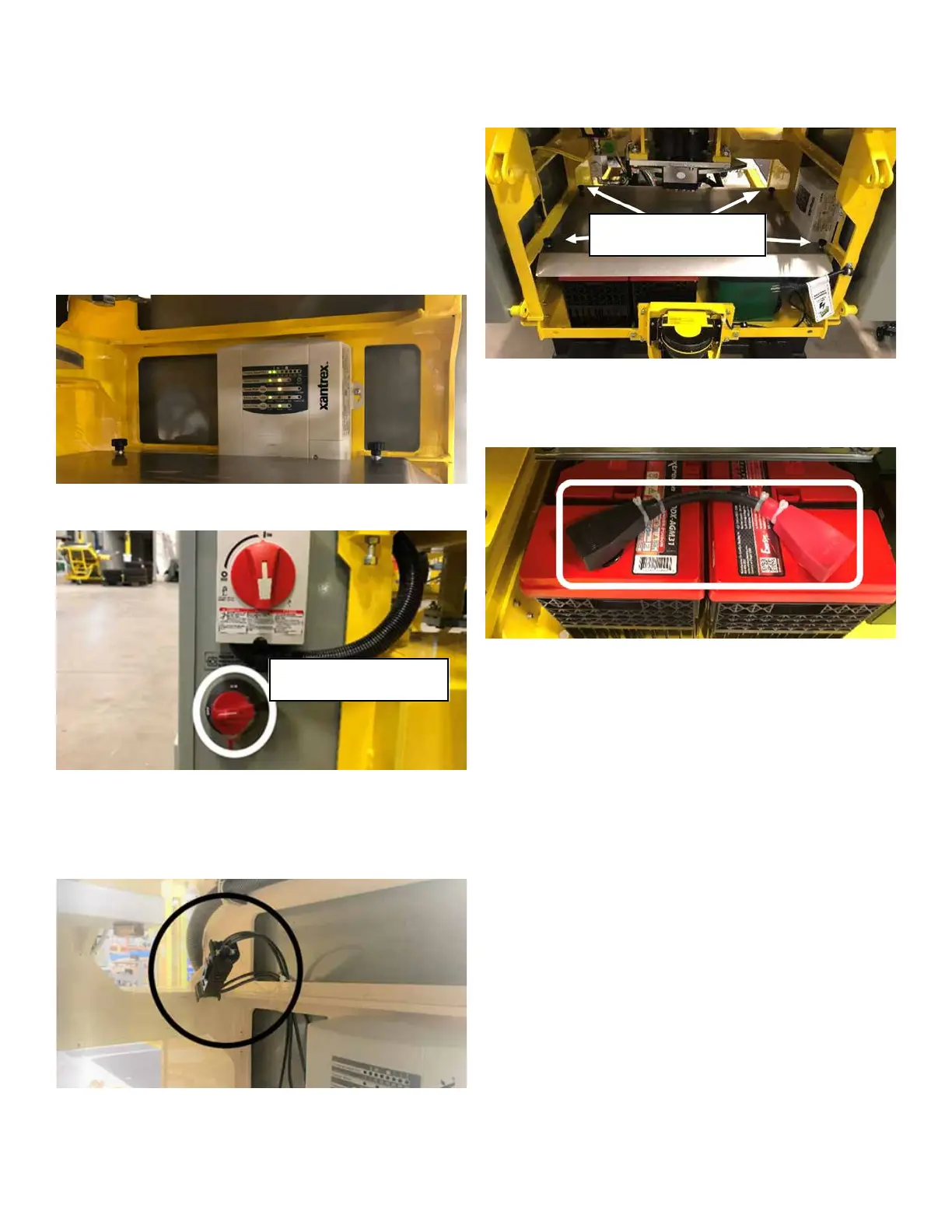
For machines with Xantrex Battery Charger:
Turn OFF the DC disconnect switch on the Drive panel.
Check if there is a connector on the battery charger output, if so,
squeeze the two catches on the one connector to disconnect them
from each other. The machine is now ready for storage. If the
machine doesn’t have this connector proceed to Step 1.
Step 1 - Ensure the DC disconnect switch on the Drive panel is
OFF.
Step 2 - Remove the 4 thumb screw knobs and washers that
secure the guard over top of the batteries. Remove the guard
and place it on the machine in a safe place. Reinstall the thumb
screws and washers to prevent them from being lost.
Step 3 - Remove the battery cable that joins the two batteries to-
gether. Place the jumper cable with the guard previously removed.
Spin the two nuts used to secure the cable to the battery, back
onto the battery terminal studs to prevent them from being lost.
The machine is now ready for storage.
Prior to the machine being taken out of long storage, reverse the
process so the machine can start.
For machines with NOCO Battery Charger:
Turn OFF the DC disconnect switch on the side of the Drive
Panel, no other steps are necessary. The machine is now ready
for storage.
REMOVING A UNIT FROM STORAGE
Prior to placing a unit back into service after either short-term or
long-term storage, the operator must complete an overall in-
spection of the machine to ensure it is in proper working condi-
tion. Use of the “Daily Operation Checklist” in this manual is
recommended for this purpose. Beware that this checklist is not
a complete list of items that should be inspected. The operator
should perform other inspections as appropriate per each indi-
vidual situation.
Ensure the machine is clean and free of debris prior to plac-
ing back in service. Directions for this cleaning process can be
located in the “Cleaning Instructions” section of this manual.
Operators are ultimately responsible for ensuring unit is in proper
working condition in accordance with manufacturer’s speci-
cations. Do not operate or move the machine if problems are
detected. Report defects to your supervisor immediately.
DC Disconnect
4 Thumb Screws


 To Next Page