Introduction
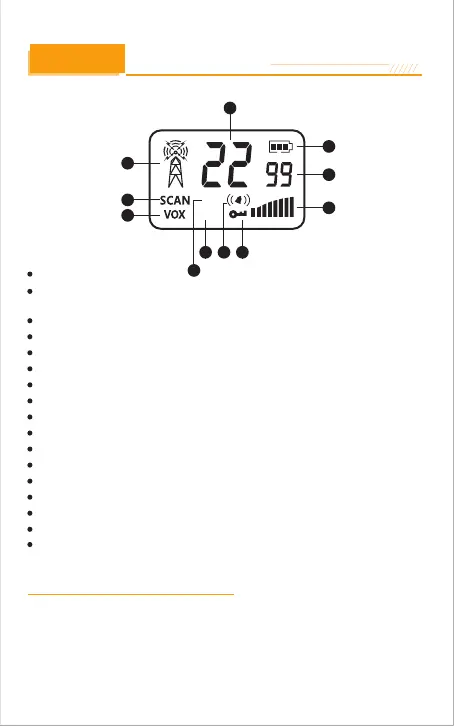
1. Transmit/Receive status
2. Channel Numbers
3. Battery Level Indicator
4. DCS /CTCSS Privacy Code
Numbers
5. Volume leveling
6. Lock Icon
7. Vibra Icon
8.High Power
9.Low Power
10. VOX Icon
11. SCAN Icon
HI
LO
Backlit LCD Display
1
2
3
4
5
6
10
11
7
8
9
Features
22 Channels
99 Privacy Codes
(38 CTCSS codes/61 DCS codes)
IP67 Water Proof and Dust Proof Rating
Hands-Free Operation (VOX)
Backlit LCD Dispiay
Button Lock
Speaker/ Microphone/Charge Jack
Roger Beep
Battery/Power Saver
Keystroke Tones
Battery Level indicator
High / Low Power
Low Battery Audible Alert
Auto Squelch
Scan Mode
Monitoring Mode
Holster
Caring for Your Radio
Your radio will give you years of trouble-free service if cared for properly.
Handle the radio gently. Keep the radio away from dust. Never put the radio in
water or in a damp place.
Avoid exposure to extreme temperatures.
-7



 To Next Page