TLM Display
6 3A9522A
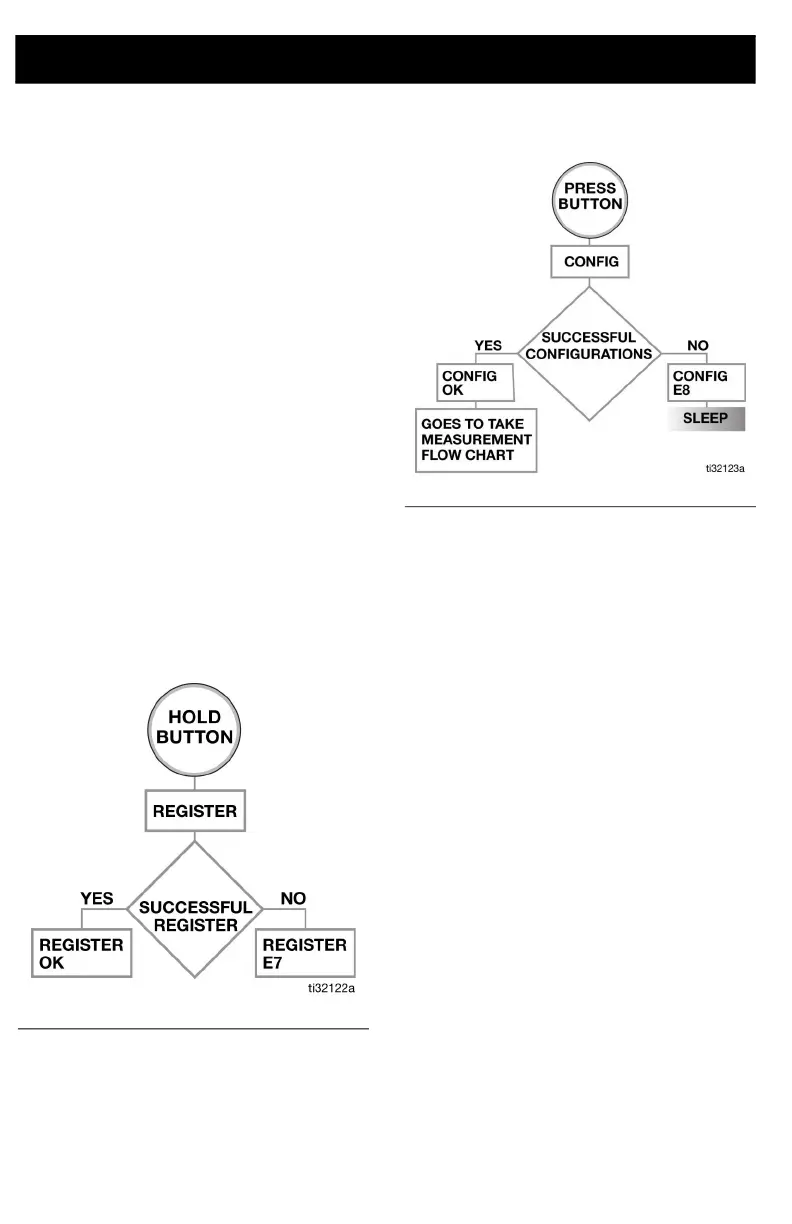
If the TLM does not register with the
Pulse software, the error message
REGISTER E7 displays (see Step ,
F
IG. 3).
Configure the TLM
NOTE: Attach the sensor in order to
configure the TLM.
4. Press the Display button (A) again to
configure the TLM with a new profile.
5. CONFIG OK displays, as shown in F
IG.
4, page 6, after the TLM is configured
with the new profile.
If the TLM does not configure with a new
profile by the Pulse software, the error
message CONFIG E8 displays (Step 5,
F
IG. 4).
TLM Registration Process
Step 1: Connect Device
Step 2: Load Initial Profile
TLM Display
Registration
Displays REGISTER. Successful registration
adds a second line: OK. While registration
failure adds the second line: E#.
Profile
Displays CONFIG. Successful configuration
adds a second line OK. While unsuccessful
configuration adds the second line E#.
Measurement Reporting
Displays REPORT. If data is successfully
transmitted, adds a second line OK. If data is
not successfully transmitted, adds a second
line E#.
Sensor Communication Error
Displays SENSOR E#. If the sensor does not
respond to commands before timeout, a
communication error is flagged.
FIG. 3
FIG. 4



 To Next Page