Service
14 3A9522A
Service
After installation of the TLM, the only
additional maintenance or service needed is
to change the batteries.
Replace the Batteries
Always replace all four of the TLM batteries
with four, new, AA, alkaline batteries.
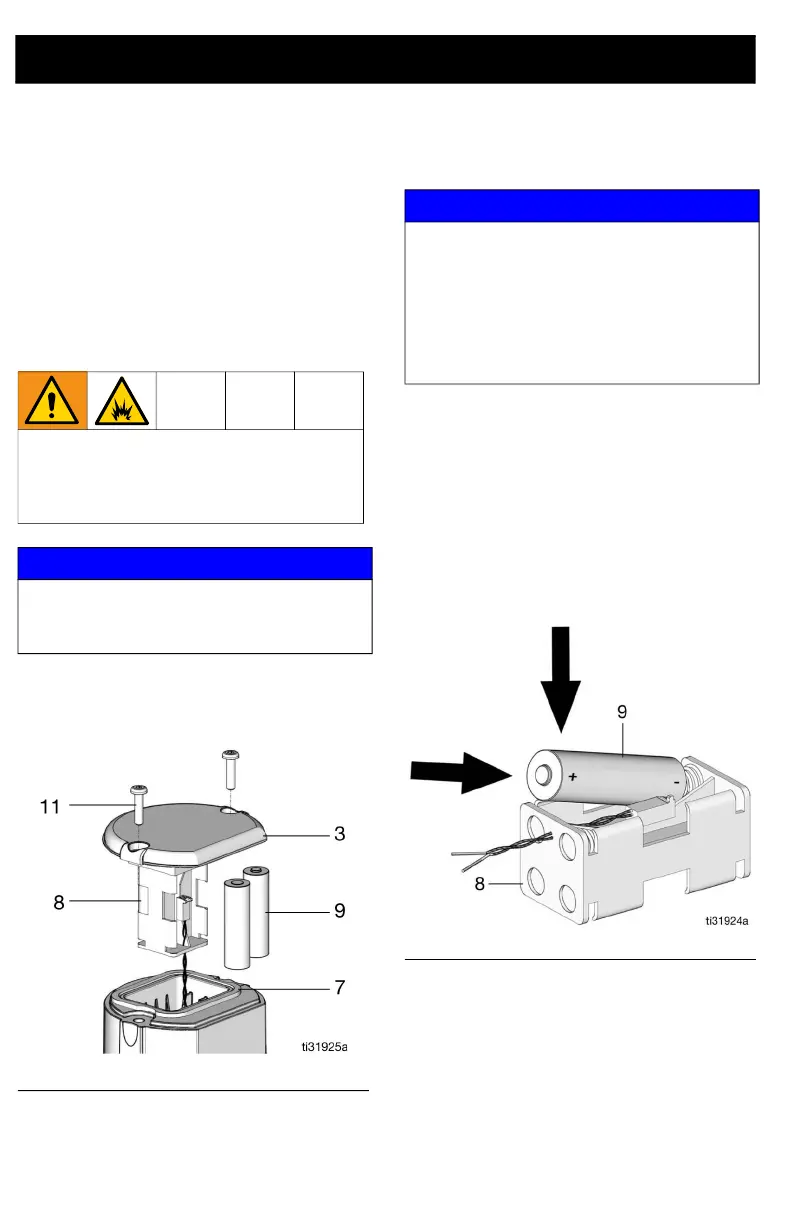
1. Remove the two screws (11) and the
cover (3) (F
IG. 10).
2. Carefully pull the battery holder (8) just
far enough out of the TLM to install the
batteries (F
IG. 10).
3. Remove all four AA batteries from the
battery holder (8). Discard batteries in
an approved battery disposal con-
tainer.
4. Install four, AA, alkaline batteries (9) in
the battery holder (8), as shown in
F
IG. 11. Make sure batteries lie flat in
the holder.
5. Remove the seal (7) from the housing
(1), if necessary. Make sure the seal is
installed onto the cover (3). Apply a thin
film of oil or grease to the seal to lubri-
cate for installation (F
IG. 12).
Sparking can occur when changing bat-
teries. Only replace the batteries in a
non-hazardous location away from flam-
mable fluids and fumes.
NOTICE
After battery replacement, press the display
button to synchronize the TLM internal clock
to maintain scheduled TLM readings.
FIG. 10
NOTICE
Do not attempt to separate the battery
holder from the TLM. The power and ground
wires are secured to the bottom of the
battery holder. Attempting to remove the
battery holder from the TLM will break this
connection and disconnect the power to the
TLM.
FIG. 11



 To Next Page