EasyManua.ls Logo

Graflex 35 - img013

Graflex 35
30 pages
Print Icon
To Next Page IconTo Next Page
To Previous Page IconTo Previous Page
Loading...
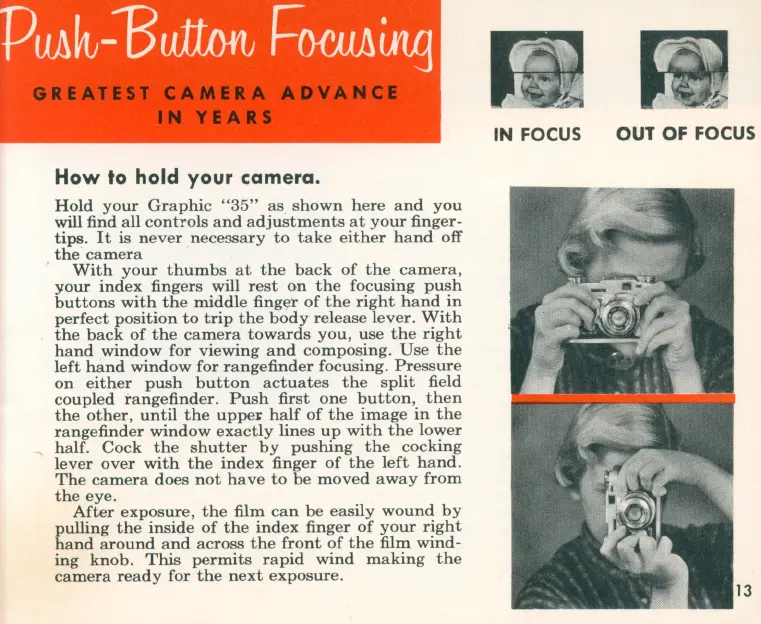
How
to hold your camera.
Hold
your
Graphic
"35"
as
shown
here
and
you
will find all
controls
and
adjustments
at
your
finger-
tips.
It
is
never
nece3Sary
to
take
either
hand
off
the
camera
With
your
thumbs
at
the
back
of
the
camera,
your
index
fingers will
rest
on
the
focusing
push
buttons
with
the
middle
fing~r
of
the
right
hand
in
perfect
position
to
trip
the
body
release
lever.
With
the
back
of
the
camera
towards
you,
use
the
right
hand
window
for
viewing
and
composing.
Use
the
left
hand
window
for
rangefinder
focusing.
Pressure
on
either
push
button
actuates
the
split
field
coupled
rangefinder.
Push
first
one
button,
then
the
other,
until
the
uppe~
half
of
the
image
in
the
range
finder
window
exactly
lines
up
with
the
lower
half.
Cock
the
shutter
by
pushing
the
cocking
lever
over
with
the
index
finger
of
the
left
hand
.
The
camera
does
not
have
to
be
moved
away
from
the
eye.
After
exposure,
the
film
can
be
easily
wound
by
pulling
the
inside
of
the
index
finger
of
your
right
hand
around
and
across
the
front
of
the
film
wind-
ing
knob.
This
permits
rapid
wind
making
the
camera
ready
for
the
next
exposure.
IN FOCUS
OUT OF FOCUS

Related product manuals