EasyManua.ls Logo

Graflex 35 - img019

Graflex 35
30 pages
Print Icon
To Next Page IconTo Next Page
To Previous Page IconTo Previous Page
Loading...
HOW
TO
REMOVE
THE
FILM
FROM
THE
CAMERA
When
the
exposure
dial
on
your
Graphic
35
reads
"zero"
you
will
have
taken
all
the
pictures
on
the
roll.
Usually
,
it
will
be
impossible
to
wind
the
film
past
this
point.
The
exposed film
must
now
be
rewound
back
into
the
light
-
tight
cartridge
before
removing
from
camera.
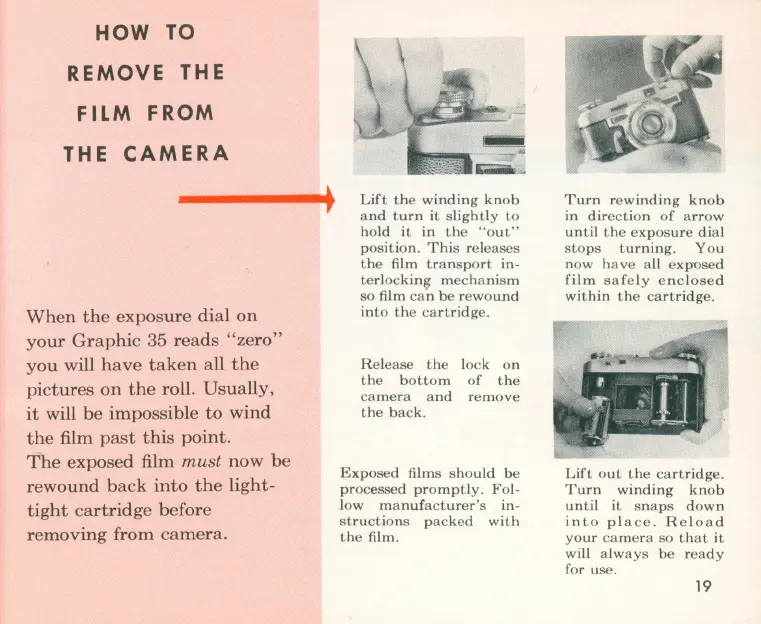
Lift
the
winding
knob
and
turn
it
slightly
to
hold
it
in
th
e
"o
ut"
position
.
This
re
leases
the
film
transport
in-
terlockin~
mechanism
so
film
ca
n
be
rewound
into
the
cartridge.
Release
the
lock
on
the
bottom
of
the
camera
and
remove
the
back.
Exposed
films
should
be
processed
promptly
.
Fol-
l
ow
manufacturer's
in-
structions
packed
with
the
film.
Turn
rewinding
knob
in
direction
of
arrow
until
the
exposure
dial
stops
turning.
You
now
have
all
expused
film
safely
enclosed
within
the
cartridge.
Lift
out
the
cartridge.
Turn
winding
knob
until
it
snaps
down
into
place.
Reload
your
camera
so
that
it
will
always
be
ready
for
use.
19

Related product manuals