EasyManua.ls Logo

Graflex 35 - img020

Graflex 35
30 pages
Print Icon
To Next Page IconTo Next Page
To Previous Page IconTo Previous Page
Loading...
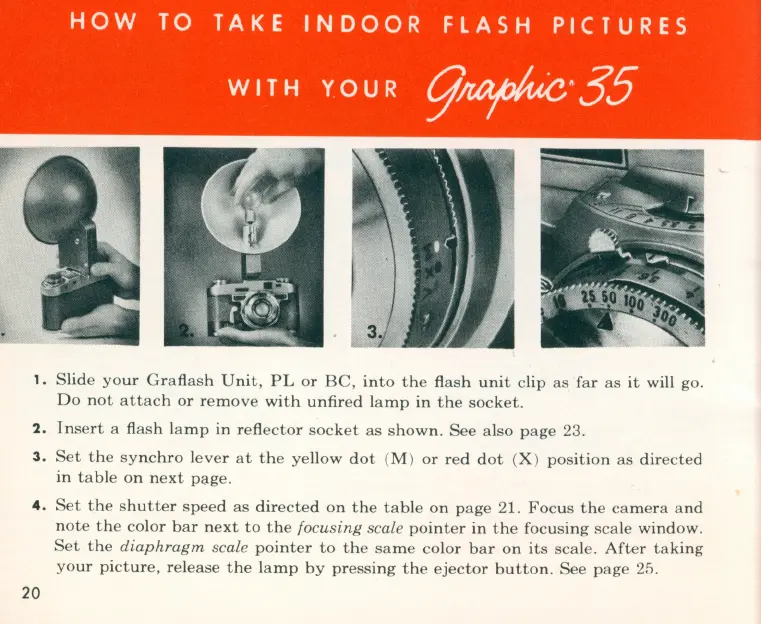
1.
Slide
your
Graflash
Unit,
PL
or
Be,
into
the
flash
unit
clip
as
far
as
it
will go.
Do
not
attach
or
remove
with
unfired
l
amp
in
the
socket.
2.
Insert
a flash
lamp
in
reflector
socket
as
shown.
See
al
so
page
23.
3.
Set
the
synchro
lever
at
the
yellow
dot
(M )
or
red
dot
(X )
position
as
directed
in
tab
le
on
next
p:;lge.
4 .
Set
the
shutter
speed
as
directed
on
the
tab
le
on
page
21.
Focus
the
camera
and
note
the
color
bar
next
to
the
focusing
scale
pointer
in
the
focusing
sca
le
window.
Set
the
diaphragm
scale
pointer
to
the
same
co
l
or
bar
on
its
scale.
After
taking
your
picture,
release
the
lamp
by
pressing
the
ejector
button.
See
page
25.
20

Related product manuals