
EasyManua.ls Logo

Grant Primo - User Manual

Grant Primo
72 pages
Print Icon
To Next Page IconTo Next Page
Loading...
User Guide
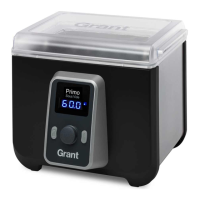
Primo sous vide water bath
EN FR DE IT ES

Questions and Answers

  • G
    Gwendolyn AndersonAug 2, 2025
    What to do if my Grant Kitchen Appliances Primo display is showing ‘TRIP’?
    • C
      Christian HeathAug 2, 2025
      If the Primo display shows ‘TRIP’, it means the over-temperature protection has activated because the unit has overheated. Unplug the Primo and let it cool down for 10 minutes. Then, fill it with water and follow the setup instructions.
  • L
    laguilarAug 13, 2025
    How to fix a Grant Kitchen Appliances Primo display showing ‘DRY’?
    • E
      Ethan GibsonAug 13, 2025
      If the Primo display shows ‘DRY’, it indicates that you started the Primo without water or it boiled dry during operation. Unplug the Primo and allow it to cool down for 10 minutes. Then, fill it with water and follow the setup instructions.
  • J
    joann18Aug 21, 2025
    Why does my Grant Kitchen Appliances Primo display show ‘POST’?
    • C
      colemanpamelaAug 22, 2025
      If the Primo display shows ‘POST’, it means the unit is still too hot to operate. Unplug the Primo and allow it to cool for another 20 minutes. If the display continues to show ‘POST’, the unit might be damaged and should be returned for repair or replacement.

Summary

Important Safeguards

General Safety Precautions

Crucial safety instructions for safe operation, handling, and electrical protection.

Important Safeguards

Operational & User Restrictions

Safety guidelines on appliance usage, power sources, and user suitability.

Food safety guidelines

Sous Vide Cooking Safety

Guidelines for food-safe bags, temperature, and handling hot liquids/food.

Quick start guide

Primo at a glance

Setting up Primo

Setting the temperature

Set Temperature Scale

How to select between Celsius and Fahrenheit display.

Set Cooking Temperature

Steps to set and save the desired cooking temperature.

Setting the timer

Countdown Timer Function

Explanation of the countdown timer and its operation.

Setting the Timer

Procedure for setting hours, minutes, and confirming the timer.

Troubleshooting

Display Shows DRY

What to do if the unit shows 'DRY' due to lack of water.

Display Shows TRIP

Troubleshooting steps for when the over-temperature protection trips.

Display Shows POST

Resolution for the 'POST' error message indicating the unit is too hot.

Change Temperature Scale

Instructions on how to switch between Celsius and Fahrenheit.

Specifications

Time & temperature info

Contact us

Grant Primo Specifications

General IconGeneral
MaterialStainless Steel
Auto Shut-offYes
Boil-dry ProtectionYes
Water Level IndicatorYes
Removable FilterYes
Product TypeKettle
Capacity1.7 liters
Power2200 W
Voltage220-240 volts