Microprocessor Controller for DOAS 21
®
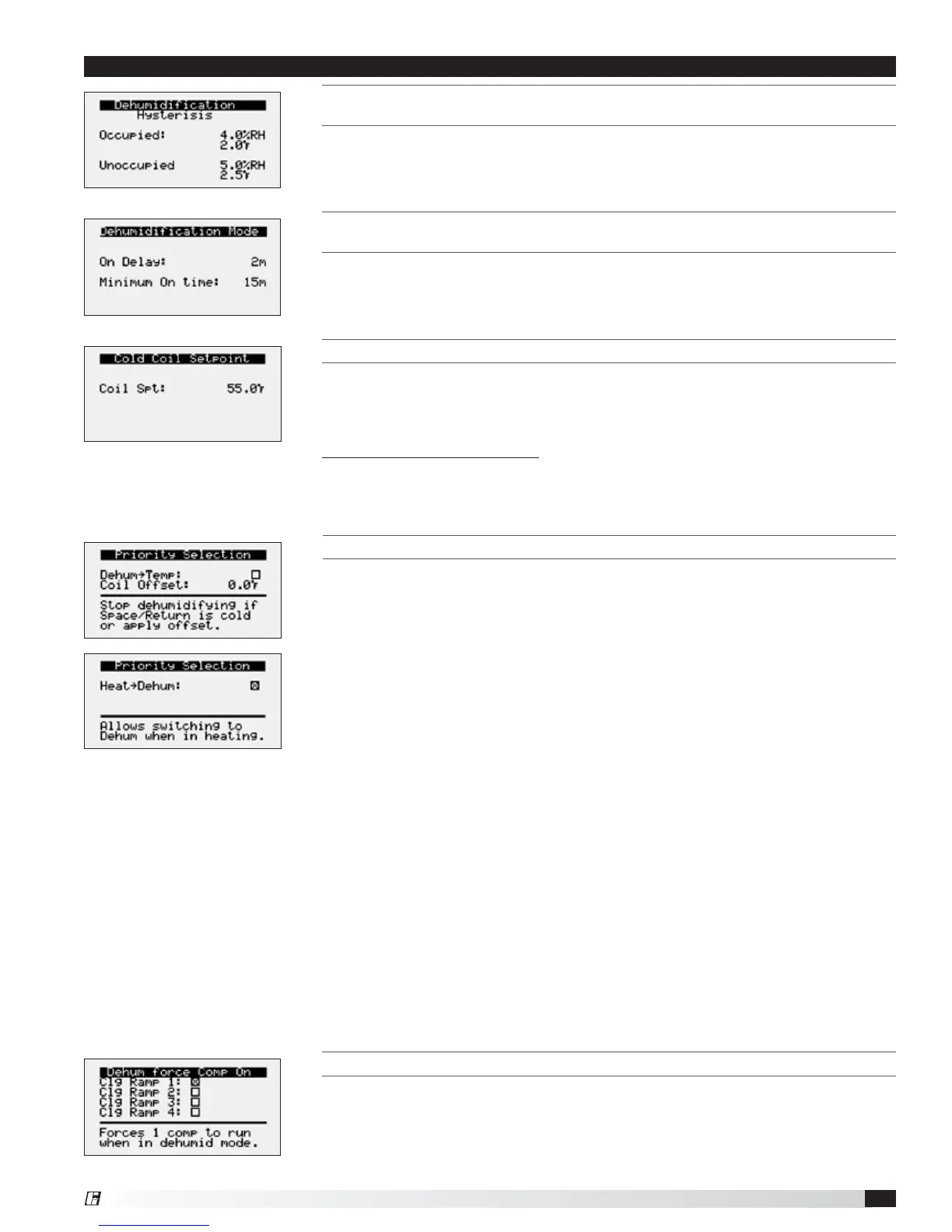
THIS SCREEN ALLOWS ADJUSTMENT FOR DELAY AND MINIMUM ON TIME FOR
DEHUMIDIFICATION MODE.
Times are in place to prevent short cycling between dehumidification and other
control modes.
THIS SCREEN DISPLAYS THE TEMPERATURE SETPOINTS FOR THE COOLING COIL.
This screen only appears if the unit is equipped with cooling.
When in dehumidification mode, the controller will maintain the active cold coil set
point. The active set point will be determined by the set point source.
Possible Set Point Sources:
Local – The supply set point will be constant; set from screen (e.g. 55°F).
BMS – The cold coil leaving air temperature set point can be adjusted over the
BMS via the dehumidification set point (Reference Points List).
THIS SCREEN DISPLAYS HYSTERESIS FOR ENABLING DEHUMIDIFICATION DURING
O
CCUPIED AND UNOCCUPIED CONDITIONS.
%RH for indoor RH control and ºF for indoor dew point control. Example: If indoor
RH setpoint = 50%, dehumidification is enabled when indoor RH equals 50% and
above. Dehumidification is disabled when indoor RH is below 44%.
THESE SCREENS DISPLAY DEHUMIDIFICATION PRIORITY SELECTIONS.
The following priorities are used to determine what is more important in the unit:
temperature over dehumidification or heating over dehumidification. Both priority
selections determine when the unit is allowed to dehumidify.
1. Temperature over Dehumidification
Determines when the unit is allowed to dehumidify based on the space/return
air temperatures.
a. Temperature - If temperature is set as the priority and the space or return
air is over cooled, dehumidification is locked out until the space or return
temperature is no longer over cooled.
b. Dehumidification - If the priority is dehumidification and the space or return
air is over cooled, the coil offset will be added to the coil leaving setpoint.
(Default 0ºF offset).
c. Over Cooled - If space or return reset is enabled, the target is considered
over cooled when it is 4°F below setpoint for 5 minutes. It remains over cooled
until the target is at setpoint and over cooled has been active for a minimum of
5 minutes.
2. Heating over Dehumidification
Determines when the unit is allowed to dehumidify when heating is active.
a. Heating - If priority is set to heating, the unit locks out dehumidification while
heating is active.
b. Dehumidification - If priority is set to dehumidification, the unit is allowed to
switch to dehumidification when heating is active.
THIS SCREEN DISPLAYS THE COMPRESSOR DEHUMIDIFICATION FORCE.
In dehumidification mode, the lead compressor will continue to run as long as
the dehumidification mode sequence has been enabled in order to prevent
compressor cycling and potential reevaporation of moisture. To disable this
operation and allow the compressor to cycle in dehumidification mode, uncheck
the applicable cooling ramps.
Menu


 To Next Page