Microprocessor Controller for DOAS18
®
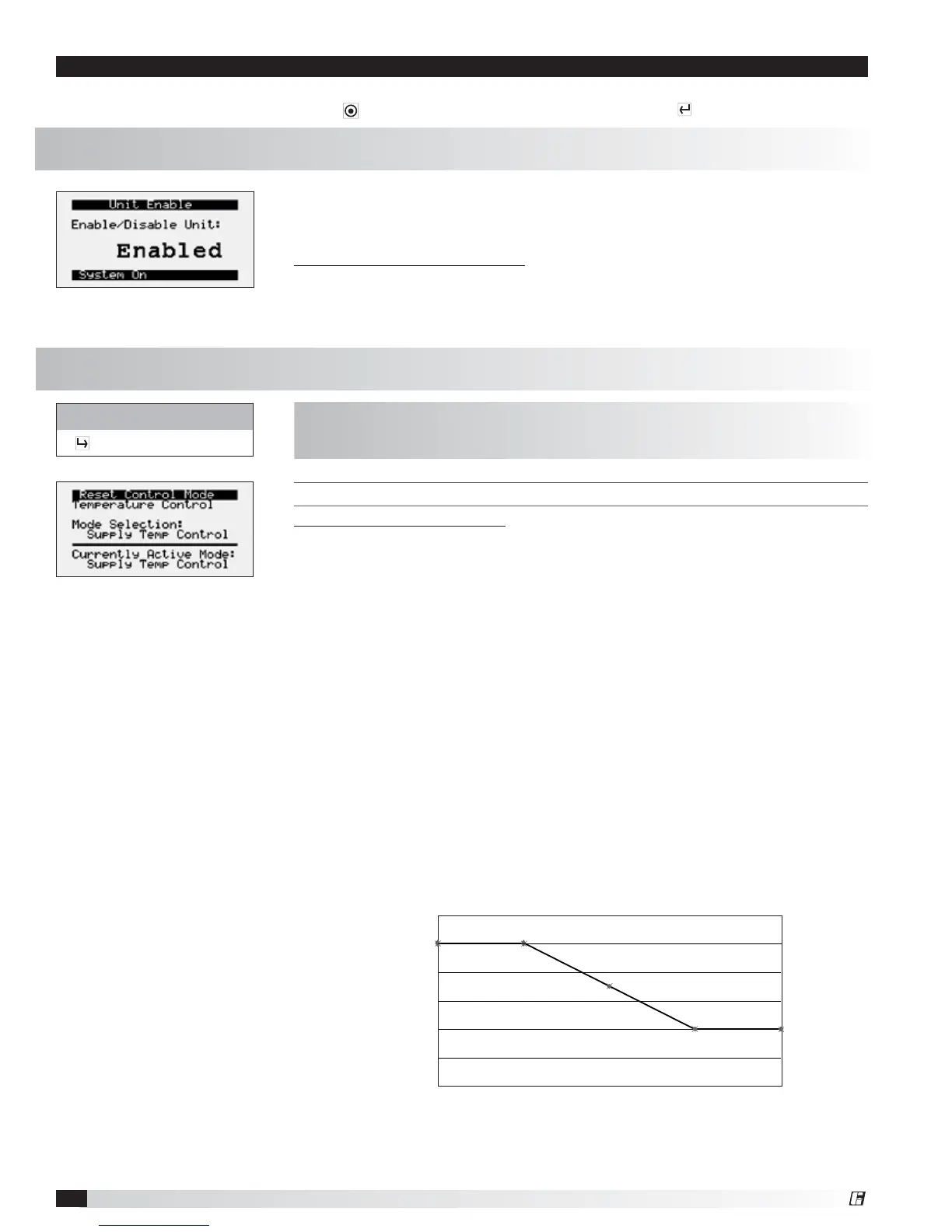
Unit Enable
The controller is equipped with several menus to help guide users with altering program parameters. The following
menus can be accessed by pressing the
button. To enter the desired menu, press the button.
The Unit Enable menu allows the user to enable and disable the unit through the
controller. Reference sequence of operation for additional unit starts/stop details.
The unit ships from the factory in a disabled state. To allow the unit to operate,
the controller must receive a run command from digital input ID4. Jumper unit
terminals R - G to allow the unit to operate.
Change to (Enabled/Disabled): Enables user to manually turn unit on/off via
display. Unit terminal G must have 24 VAC power to enable the unit.
Outdoor Air Reset Function
45°
50°
55°
60°
65°
50° 55° 60° 65° 70°
Outside Air Temperature (°F)
Supply Air Set Point (°F)
70°
75°
Control Variables
The Controls Variables menu allows the user to view and adjust unit control
parameters.
METHOD FOR TEMPERATURE CONTROL
Possible Setpoint Sources:
Supply Temp Control – The supply discharge setpoint to be a constant value (e.g.
72°F). Reference Temperature Setpoint screen for setpoint adjustment.
Space Reset – The controller will reset the supply air temperature set point to
maintain the room temperature set point (requires room temp sensor). Reference
the Temperature Setpoint screen for room setpoint adjustment.
Return Reset – The controller will reset the supply air temperature set point to
maintain the return air temperature set point (requires duct mounted return air
temp sensor). Reference the Temperature Setpoint screen for return air setpoint
adjustment.
OA Reset – The controller monitors the outdoor air temperature and adjusts the
desired supply temperature set point accordingly. For example, when the outdoor
air is below 55°F, the controller will change the supply set point to 70°F. If the
outdoor air is above 65°F, the controller will change the supply set point to 55°F.
If the outdoor air temperature is between 55°F and 65°F, the supply set point
changes according to the outdoor air reset function. A visual representation of
the outdoor air reset function is shown below. Reference Outside Setpoints for
minimum and maximum outside air limits.
Control Variables
Temp Control
The Temperature Control menu allows the user to view and adjust temperature
control conditions of the unit.
Menu


 To Next Page