Microprocessor Controller for DOAS28
®
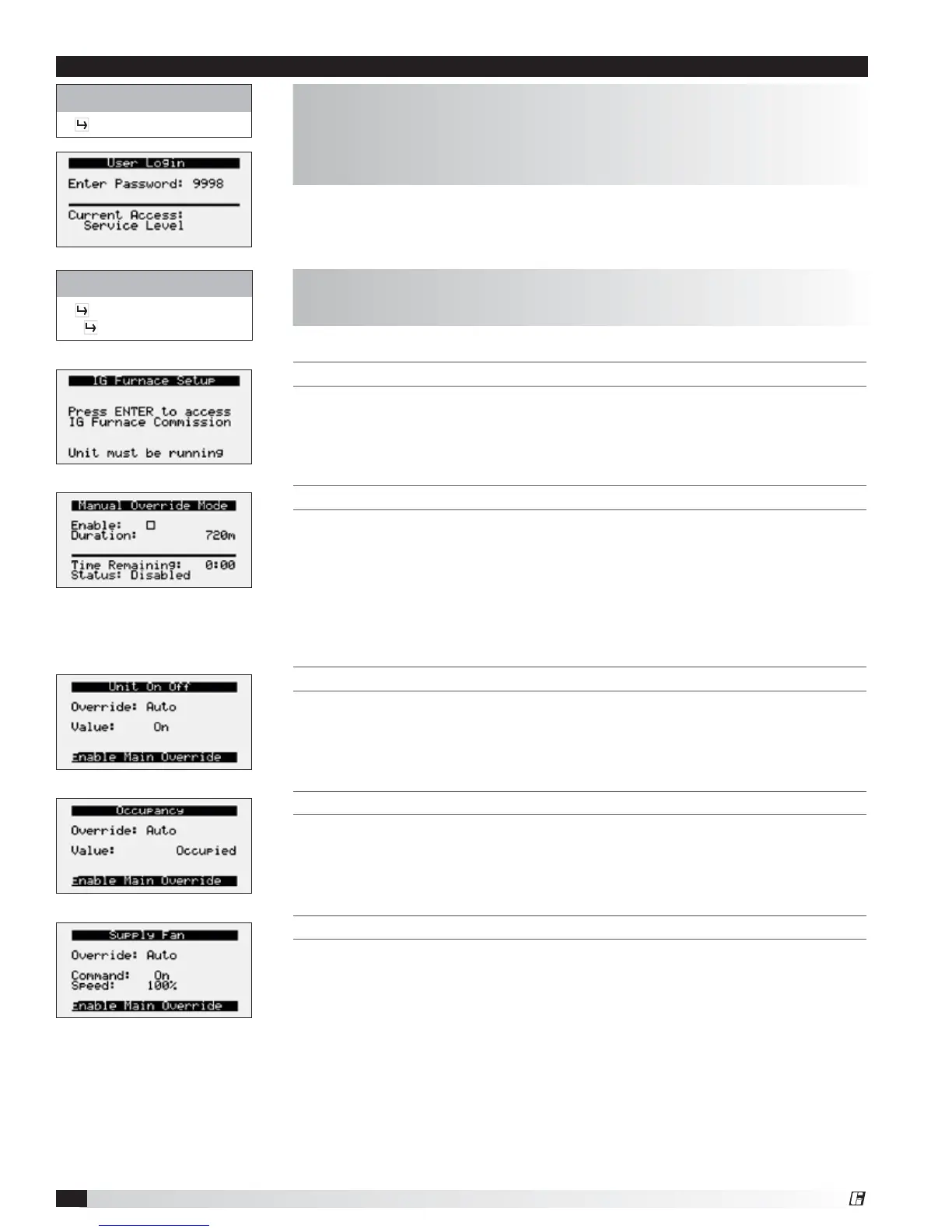
THIS SCREEN ALLOWS THE USER TO ACCESS THE IG FURNACE COMMISSIONING MENU.
This screen only appears if an indirect gas furnace was provided with the unit.
Entering the furnace commissioning menu will step the user through the furnace
start-up.
MANUAL OVERRIDE MODE
The Manual Overrides menu is for start-up, commissioning, and troubleshooting.
This menu allows the user to override the control loops and specific inputs and
outputs.
To access the Manual Overrides submenus, enter the service password (9998).
Manual overrides must be enabled at this screen to allow the user to override
control loops. Override options must be changed from Auto to Manual for manual
control.
THIS SCREEN ALLOWS THE USER TO OVERRIDE THE UNIT ON OR OFF.
When manual override is set to enable, use the arrow buttons to turn the unit on
or off.
THIS SCREEN ALLOWS THE USER TO OVERRIDE OCCUPANCY CONTROL.
When manual override is set to enable, use the arrow buttons to change
occupancy control.
THIS SCREEN ALLOWS THE USER TO OVERRIDE THE SUPPLY FAN VFD SPEED.
The speed is the proportional percentage of the analog output from the controller
to the VFD.
0% Speed = Min speed (determined by VFD)
100% Speed = Max speed (determined by VFD)
(Reference unit Installation and Operation Manual for VFD programming).
Control Variables
Advanced
Manual Overrides
The Manual Overrides menus are for start-up, commissioning, and
troubleshooting.
The Advanced menu allows the user to access several submenus regarding
controller information, controller overrides, network settings, I/O configuration,
and unit configuration. Submenu options are read only and will require the
user to input proper login criteria. The service password (9998) is required to
change service access menus. Consult factory for factory level access.
Control Variables
Advanced
Menu


 To Next Page