Microprocessor Controller for DOAS34
®
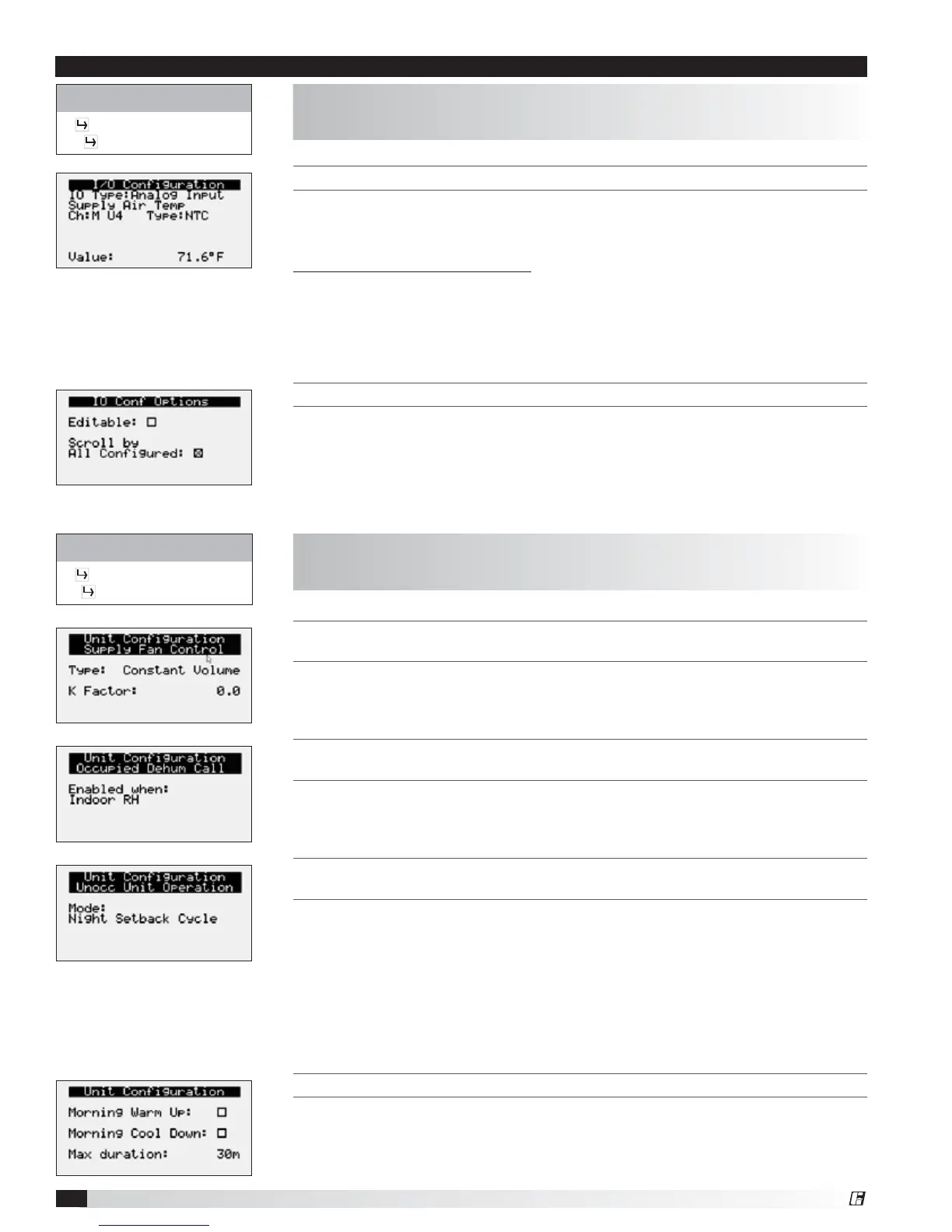
THIS SCREEN ALLOWS THE USER TO VIEW AND EDIT I/O POINTS.
This screen is read only and will require the factory password to make changes.
Screen to the left is an example of an analog input configuration screen. Similar
screens appear for remaining I/O when selected.
To monitor individual I/O points:
1. Press the enter button to highlight the I/O type.
2. Press the up and down arrows to change the IO type.
3. Press the enter button to highlight the controller channel.
4. Press the up and down arrows to change the channel.
THIS SCREEN ALLOWS THE USER TO ENABLE I/O CONFIGURATION EDITS.
Changes to the IO configuration requires the factory login password. Consult
factory for IO configuration changes.
ADJUSTMENT OF I/O CONFIGURATION MUST ONLY BE DONE UNDER
FACTORY GUIDANCE! IMPROPER ADJUSTMENT MAY RESULT IN SYSTEM
DAMAGE!
Control Variables
Advanced
I/O Configuration
The IO Configuration Menu allows the user to view and modify controller input
and output points.
THIS SCREEN ALLOWS THE USER TO VIEW AND CHANGE THE EXHAUST FAN CONTROL
T
YPE.
Reference control variables for possible exhaust fan control methods.
THIS SCREEN ALLOWS THE USER TO VIEW AND CHANGE THE UNOCCUPIED
DEHUMIDIFICATION CALL.
Reference control variables for possible unoccupied dehumidification call
methods.
THIS SCREEN ALLOWS THE USER TO VIEW AND CHANGE THE UNOCCUPIED UNIT
OPERATION.
Possible unoccupied unit operation methods include:
• Unit Off
• Night Setback Cycle*
• Recirculation with Unoccupied Setpoints*
• Normal Operation with Unoccupied Setpoints
Note: An askterisk indicates method is only available if the unit is equipped with
an unoccupied recirculation damper.
THIS SCREEN ALLOWS THE USER TO ENABLE MORNING WARM UP AND COOL DOWN.
The user can enable morning warm up, morning cool down, and set the duration
for the sequence.
Control Variables
Advanced
Unit Configuration
The Unit Configuration menus allows the user to view unit configuration
provided from factory. Configuration menus listed below can be altered with the
factory password. Consult factory for unit configuration changes!
Menu


 To Next Page