Boston Scientific (User’s Manual Template 8.5in x 11in Global, 91091755 Rev/Ver. AA), Manual, MB, XPS, Global, 50623316-01A_pretrans
Black (K) ∆E ≤5.0Black (K) ∆E ≤5.0
23
The console’s self-check mechanism will detect most problems with the console and alert the operating room staff. A message will appear on the
screenatthetimeofsystemmalfunction.Dependingontheseverityoftheproblem,theconsolewilleithermaintainstatusorrequireasolution
before reactivating. See Troubleshooting for the types of messages.
14.5 End of Useful Life
When the laser system reaches the end of its useful life, dispose of all products, accessories, tools, and packaging materials in accordance with hospital,
administrative,and/orlocalgovernmentpolicy.Usedproductsshouldbecollectedseparatelyandnotdisposedofasunsortedmunicipalwaste.
15 TROUBLESHOOTING
The console’s self-check mechanism will detect most problems with the console and alert the operating room staff. A message will appear on the
screenatthetimeofsystemmalfunction.Dependingontheseverityoftheproblem,theconsolewilleithermaintainstatusorrequireasolution
before reactivating.
Two types of messages are displayed:
• CourtesyMessagesalerttheuserofproblemconditionsthattheusercancorrect.
• ServicePromptsalerttheuserofproblemconditionsthatmayrequireaservicecall.
15.1 Courtesy Messages
When a condition requiring user action is detected, a blue box containing a message describing the condition is displayed on the screen. The
messages require that corrective action is taken.
Courtesy messages may display numerical information that may vary depending on the circumstances. In the below table, examples of such
additional information are shown in bold.
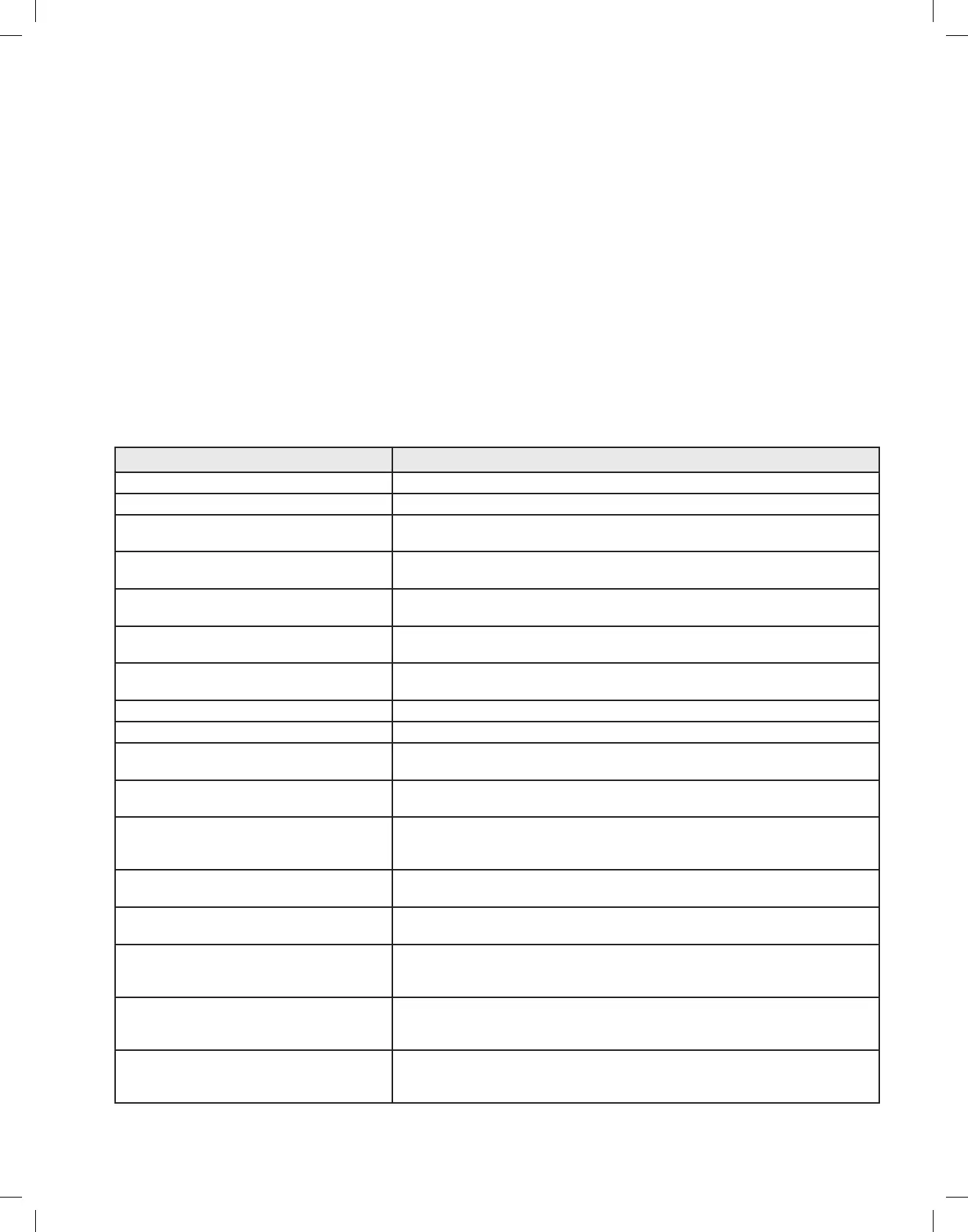
Table 5. Courtesy Messages
Message Corrective Action
Attach a Fiber Attach a fiber.
Insert Fiber Card A fiber card should be inserted.
Please fill chiller reservoir with deionized water Restore coolant level (see Coolant Refill Instructions). Turn system off and add distilled or
deionized water.
Fiber Approaching Joule Limit
Less than 50,000 joules remaining
The number of Joules remaining on the fiber is displayed. If the procedure requires
treatment beyond the limit, use a new fiber.
Fiber Expired
400,000 Joules used
The fiber has exceeded its rated Joule limit. The actual number of Joules used is
displayed. If the procedure requires treatment beyond the limit, use a new fiber.
Attach a Footswitch Plug the footswitch into the appropriate socket on the back of the unit. If this fails to
resolve the problem, contact BSC technical support.
Release Footswitch
Only one footswitch may be pressed at a time
User should reposition his or her foot, to contact only one footswitch.
Vapor footswitch disabled when in Standby PresstheReady/Standbybuttononthescreenoronthefootswitch.
Coag footswitch disabled when in Standby PresstheReady/Standbybuttononthescreenoronthefootswitch.
Fiber Port Overheated, try another fiber.
If problem persists, contact Customer Care Center
Wait for device port to cool off. If problem repeats, replace the fiber. Contact BSC
technical support if problem persists.
Check Fiber Card Insertion
Remove and then re-insert card
Remove and reinsert fiber card. If problem persists, contact BSC technical support.
Invalid Fiber Card
10-2079 not valid for this system
The fiber attached is not a valid GreenLight XPS™ Laser System device. The part
number of the invalid fiber is displayed. Replace the fiber with one approved for use with
GreenLight XPS Laser System.
Card Read Error
Remove and then re-insert card
Remove and reinsert fiber card. If problem persists, contact BSC technical support.
Fiber type does not match card type
Try another fiber or card
FiberIDdoesnotmatchFiberIDonfibercard.Makesurethatthefibercardbeingusedis
the one that was packaged with the fiber.
Fiber Connection Error
Check fiber connection or try another fiber
Usually this is caused by a bad fiber connector. If a second fiber gives the same message,
the fiber coupler or its cabling may be damaged. If problem persists, contact BSC
technical support.
Remote Interlock Opened If the remote interlock has been connected to the operating room door, make sure the
door is closed. Otherwise, make sure the remote interlock bypass connector is inserted
into the socket on the back panel of the system.
Excessive FiberLife Activity
Please clean and inspect fiber tip
FiberLife can detect if the fiber tip is overheating. Usually this is due to a dirty or damaged
fiber. If the problem persists after cleaning or if the fiber is damaged, replace the fiber with a
new one.


 To Next Page