14
Boston Scientific (User’s Manual Template 8.5in x 11in Global, 91091755 Rev/Ver. AA), Manual, MB, XPS, Global, 50623316-01A_pretrans
Process Black ΔE ≤5.0 / CMYK ImageProcess Black ΔE ≤5.0 / CMYK Image
12 INSTRUCTIONS FOR USE
12.1 Touchscreen and Footswitch
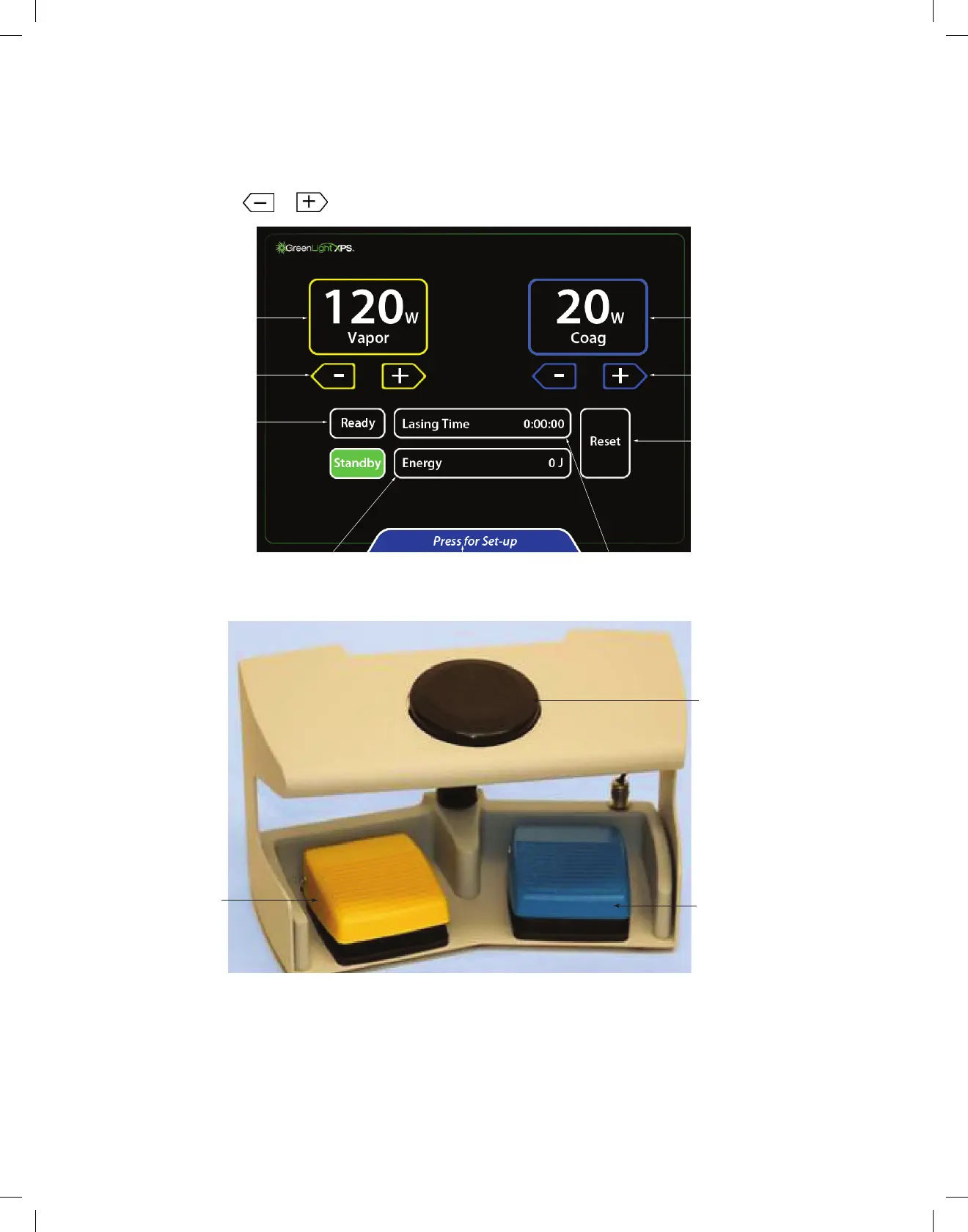
The touchscreen and footswitch are used to control the console. Laser parameters are selected and the console status is changed by using a
touchscreen. Use the button on top of the footswitch to go between Ready and Standby laser status. The aiming beam is activated when the
console is in the Ready mode or the surgical beam is activated. The surgical beam is activated by pressing a foot pedal. Press the yellow pedal for
VAPOR and the blue pedal for COAG.
Power is set by touching the
or buttons on the touchscreen. An audible tone will be heard when the buttons are pressed.
Vaporization
Power Indicator
Power Adjust
Buttons
Ready/Standby
Control and Indicators
Engery
Indicator
Changes to the
Set-up Screen
Lasing Time
Indicator
Coagulation Power
Indicator
Power Adjust
Buttons
Reset Engery and
Lasing Time
Figure 4. Touchscreen
Vapor Pedal
Coag Pedal
Ready/Standby
Button
Figure 5. Footswitch
12.2 Preparation
1. Ensure protective eyewear is worn by all personnel including the patient.
2. Ensure the circuit breaker on the back of the console is OFF and connect the power cord to an appropriate electrical outlet.
3. Turn the circuit breaker to ON. On the front of the console, turn the key switch to ON.
4. The console’s self-check mechanism detects most problems. A message will appear on the touchscreen to alert the user of problems. Courtesy
messages alert the user of problems that the user can correct. Service prompts alert the user of a problem that requires a service call.


 To Next Page