guessconnect.com
2
iOS USER MANUAL
Getting Started
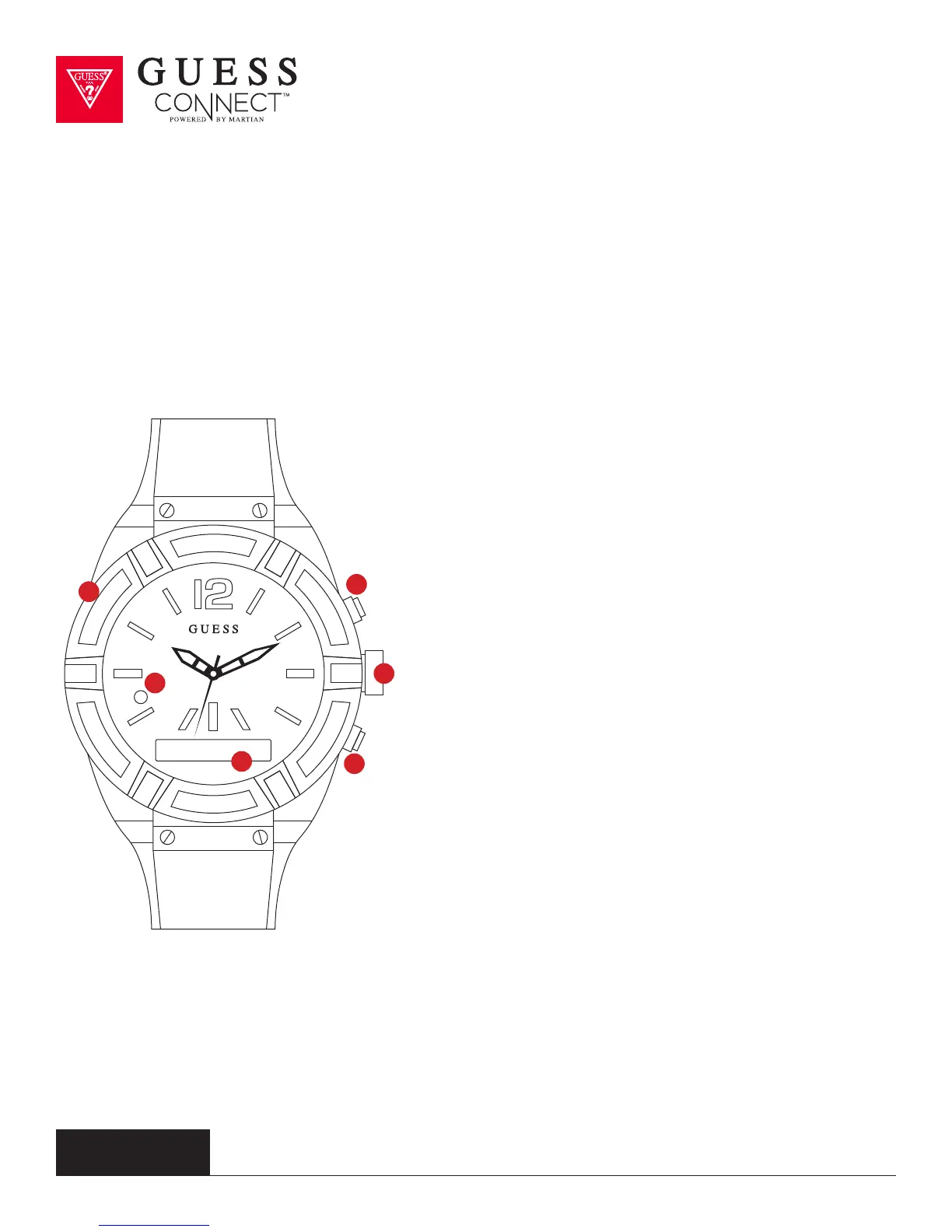
Product Overview
1 Charging Port
Micro USB Charging Port
2 LED Light
Notifies users of events
GREEN: Incoming Call
RED: Smart Movement Battery Low
or Charging
BLUE: Activating a voice command,
an incoming text or App notification
(Facebook, Twitter, email, weather,
calendar, etc.)
White: Used as a light in darkenss
3 OLED Screen
Shows incoming caller ID, texts and
notifications in a scrolling format. Also
displays battery life and menu options.
4 Answer / End / Initiates
Top pusher, also known as command button,
answers incoming calls, disconnects calls
when finished and initiates voice commands.
5 Set / Change Analog Time
Pull out the crown and turn it clockwise or
counterclockwise to set the correct time for
the analog movement.
6 Rejects / Toggles Volume / Menu
Bottom button rejects incoming calls,
toggles through volume and provides
access to the menu.
1
3
5
2
4
6



 To Next Page