guessconnect.com
42
iOS USER MANUAL
Settings & Support
Reset Your Watch
This process does not aect your wireless
Bluetooth connection. You will need to manually
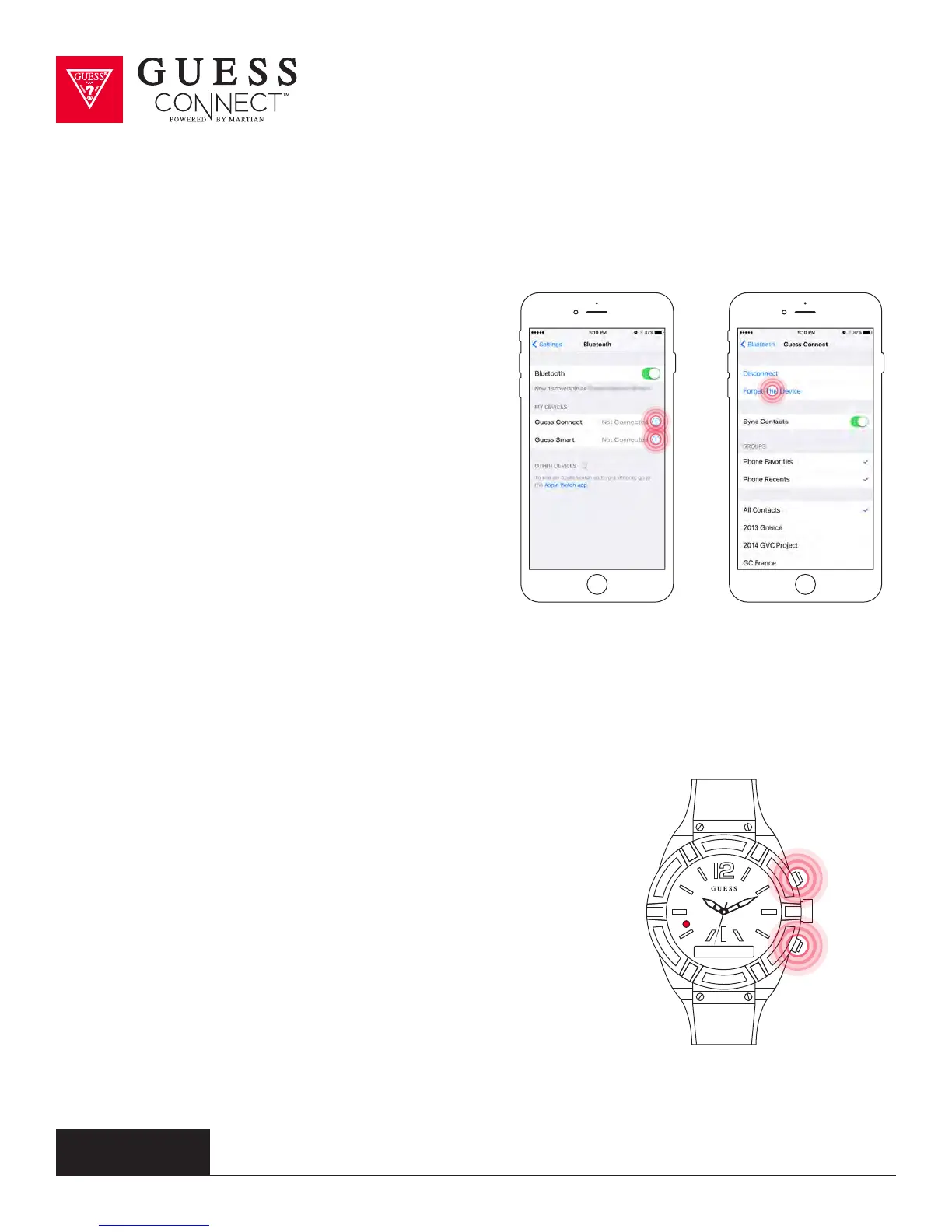
unpair your watch from your device. To do this,
go into your iOS device’s General Settings then
Bluetooth and in the My Devices list, you will see
“GUESS Connect” and “GUESS Smart.” These are
the two separate connections between your watch
and phone. Select “GUESS Connect” by tapping on
the information icon to the right of the screen. This
takes you to additional options where you will tap
Forget This Device. Follow the same process for
“GUESS Smart.”
After forgetting both settings, you will now be able
to pair your watch to your iOS device once again.
There is no limit or restriction as to how often you
can repeat this process.
If you find that your watch is not responsive or want to pair it to a
dierent device, it is suggested that you “restore” your watch to its
original factory settings. To do so, hold down the top and bottom
buttons of the watch, at the same time for about 6 seconds. You
will see the word “restored” on the OLED screen with a solid RED
light on the LED. You will now be required to pair the watch to
your device.
Performing both the hardware and the software factory restore
procedures will likely resolve most issues you might be having. For
additional information about your GUESS Connect watch, visit the
support area at guessconnect.com
Restored



 To Next Page