Serial lnterface
1
18.
RS232C
lnterface
The following circulator functions can be controlled by
a
computer via the interfaces:
9
6
Setting the desired set temperature, the upper and
lower limit temperatures and correction factor is pos-
sible;
the actual temperature can be read off;
the circulator can be reset, started or stopped;
any fault messages can also be displayed.
The
RS232C
interface uses separate lines for sending and
receiving data.
18.1
Connecting to a computer with RS232C interface
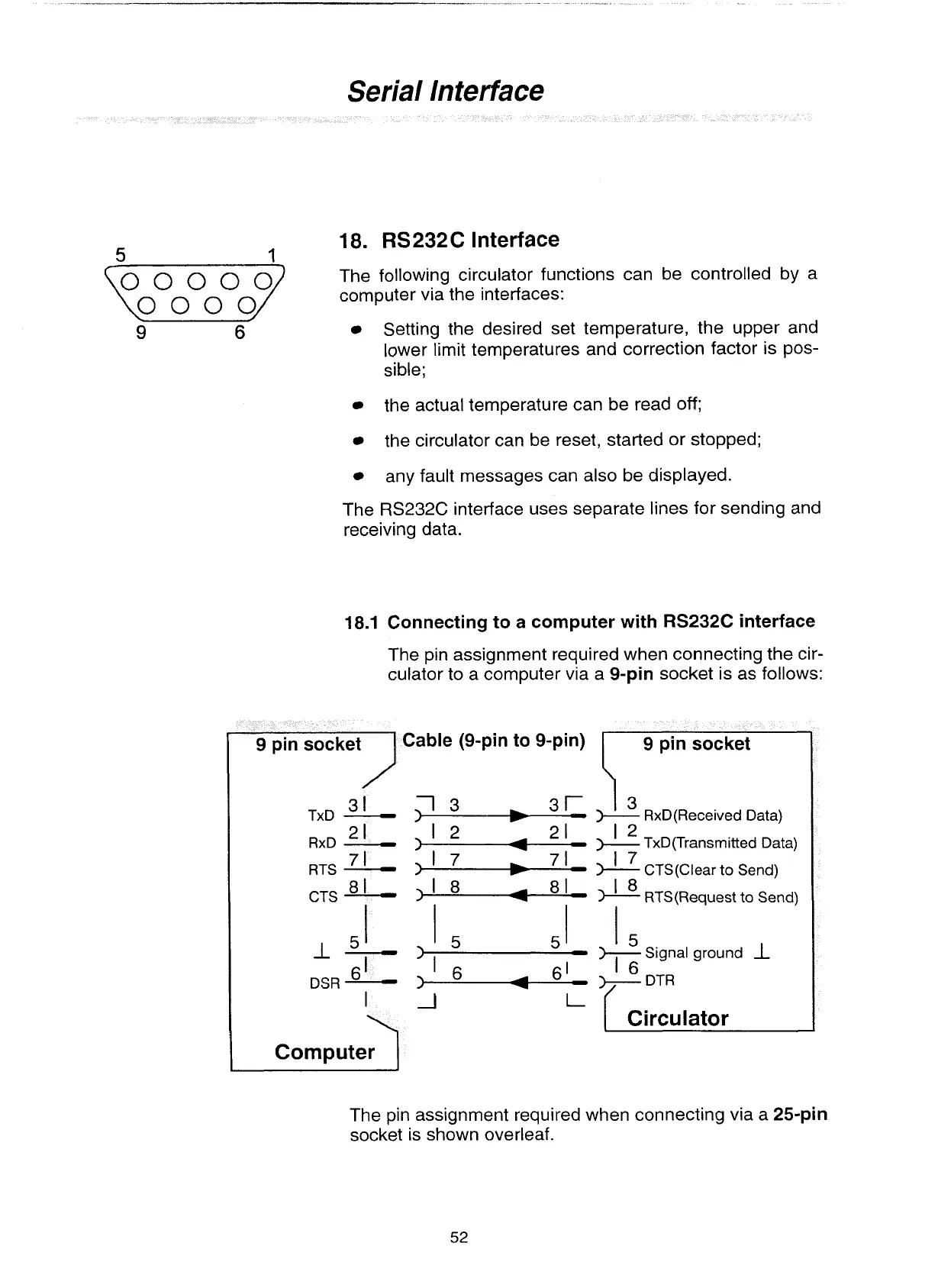
The pin assignment required when connecting the cir-
culator to a computer via a
9-pin
socket is as follows:
Cable (9-pin to 9-pin)
3
1
TxD
-
)1
3
7
1
RTS
-
CTS
81
)I
8
81_
DSR
1
Computer
1
13
+
RxD(Received Data)
12
+
TxD(Transmitted Data)
17
CTS(Clear to Send)
18
*
RTS(Request
to
Send)
I
I
Circulator
The pin assignment required when connecting via a
25-pin
socket is shown overleaf.
Artisan Technology Group - Quality Instrumentation ... Guaranteed | (888) 88-SOURCE | www.artisantg.com


 To Next Page