Serial Interface
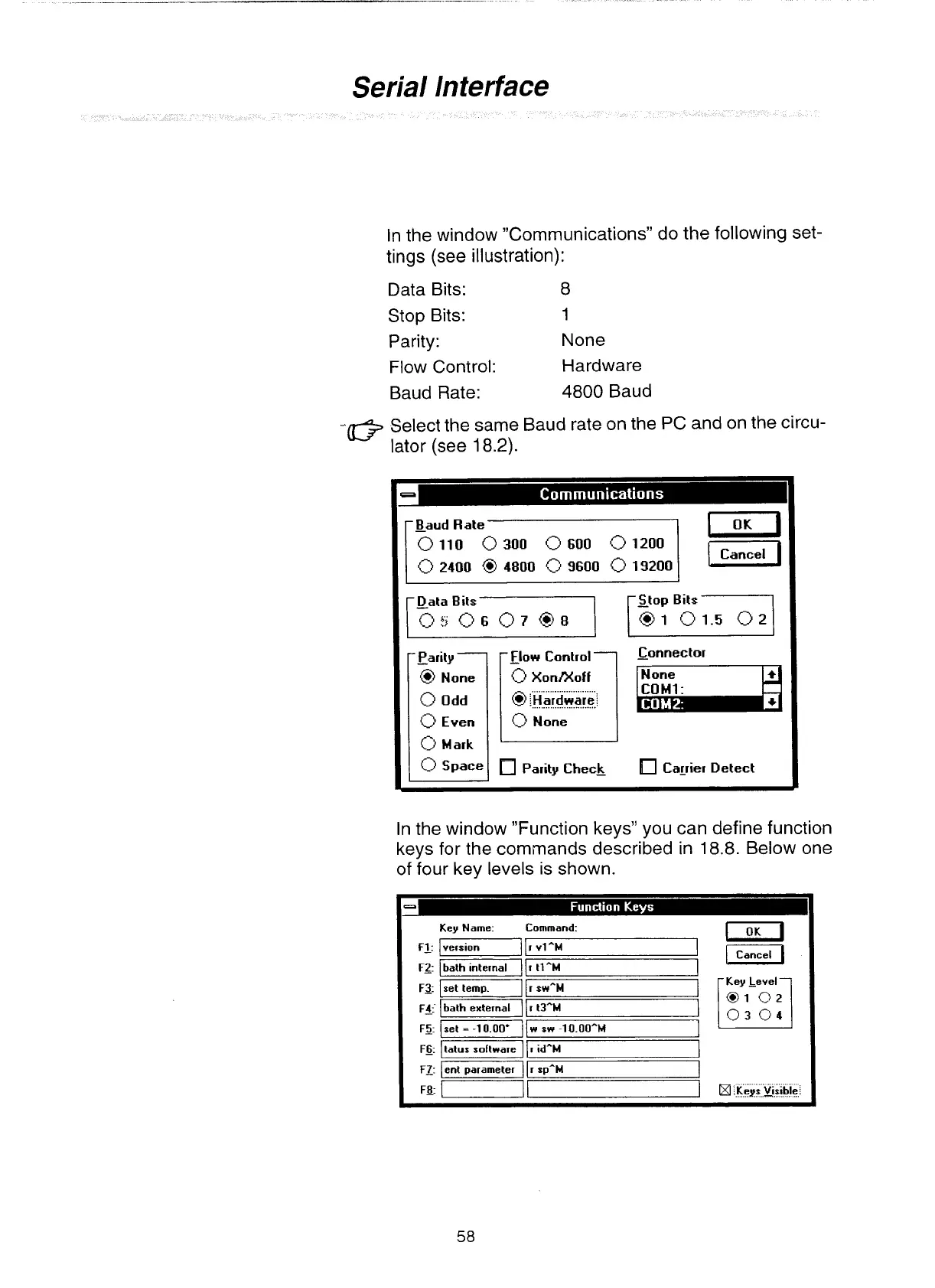
In the window "Communications" do the following set-
tings (see illustration):
Data Bits: 8
Stop Bits: 1
Parity: None
Flow Control: Hardware
Baud Rate: 4800 Baud
-.IT%
Select the same Baud rate on the PC and on the circu-
\gj
lator (see
18.2).
Parity
-
@
None
Flow Control-
0
XonMoff
.
.
. .
.
.
. . .
.
.
. . . . .
.
. . . . .
@
::Hardvrarel
1:
None
Parity Check
Connector
-
Cagier Detect
In the window "Function keys" you can define function
keys for the commands described in 18.8. Below one
of four key levels is shown.
Key Name: Command:
1
version
I
I
vlAM
-
pczGq
r
tlAM
-1
I
swAM
1
bath external
I
r
t3-M
/I
w s* -1 0.00*"
Itatus software
I
I
idAM
I
Cancel
1
Key Level
I::
:i-l
Keys kssble
Artisan Technology Group - Quality Instrumentation ... Guaranteed | (888) 88-SOURCE | www.artisantg.com


 To Next Page