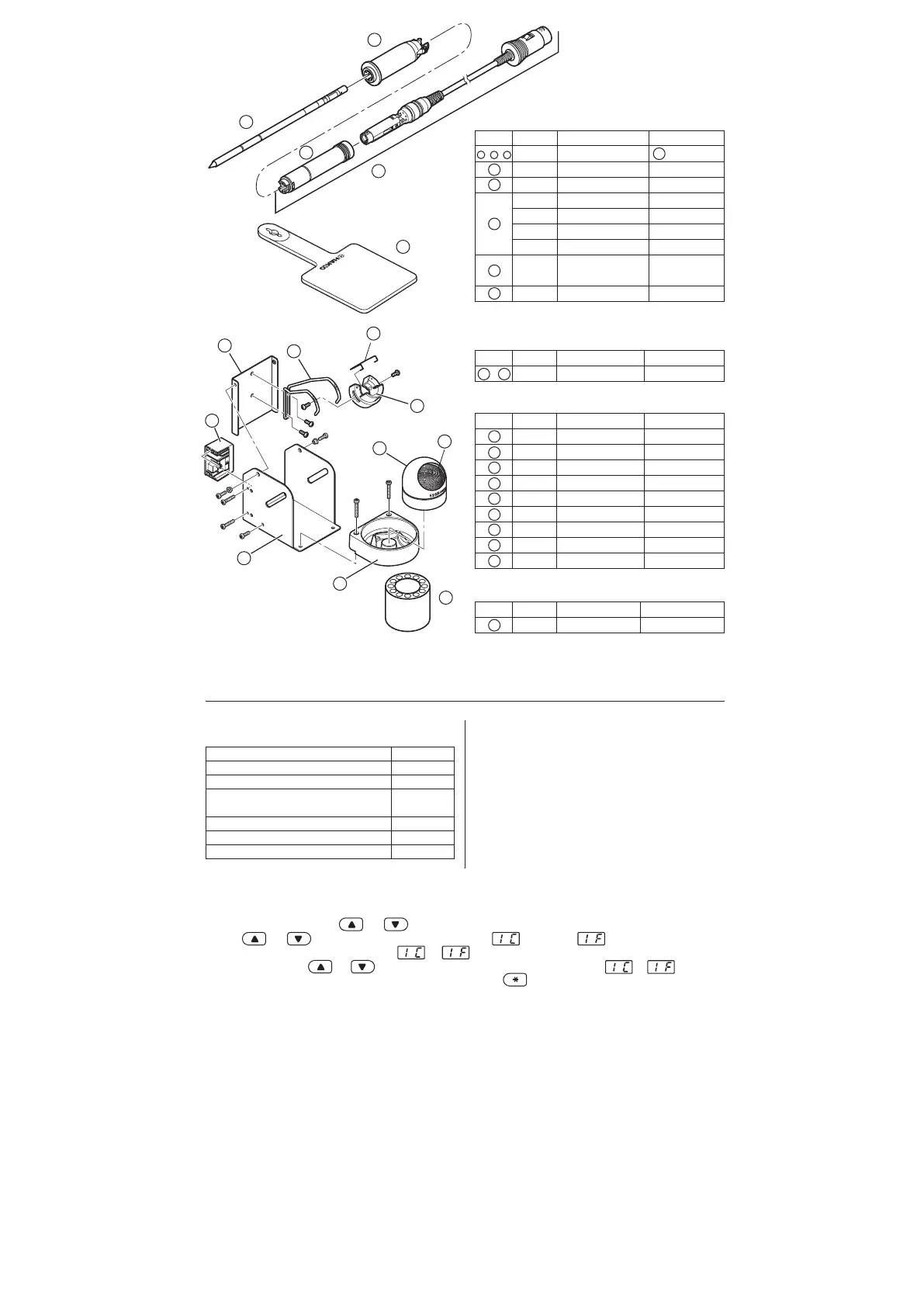
Part No.
FM2027-01
FM2027-02
B3215
B3216
B3217
B3218
B3219
B2300
Part Name
Conversion kit
Connector assembly
Connector cover
Sleeve assembly
Sleeve assembly
Sleeve assembly
Sleeve assembly
Tip
Heat resistant pad
Specifications
is yellow
Yellow
Orange
Blue
Green
3
See back page:
'TIP STYLES'
3
2
1
4
8
5
6
7
9
Item No.
1
2
3
4
5
6
7
8
Part No.
B3001
B2791
B3248
B3251
B3249
B3250
B3252
599B-02
599-029
Part Name
Iron receptacle
Tip fixing spring
Holder for iron receptacle
Iron holder base
Cleaner base
Stay
Switch case assembly
Tip cleaner
Cleaning wire
Specifications
With screws
With rubber feet
With rubber feet
●
Iron Holder Parts
9
3
2
4
5
1
1
●
Iron Holder
Item No.
1 , 3 , 5
1
2
3
4
5
●
HAKKO FM-2027
Item No.
1 9
Part No.
FH200-01
Part Name
Iron holder
Specifications
With 599B
●
Tip tray
Item No.
1
Part No.
B2756
Part Name
Tip tray
Specifications
-
The HAKKO FX-951 comes from the factory with
the following values preset.
Temperature scale
Power save
Low temperature alarm setting
Resetting the supervisor or
operator control setting
Setting temperature
Buzzer setting (C-E sound, S-E sound)
Buzzer setting (Set temperature alert)
Fahrenheit
0 min.
300°F
4 0
750°F
ON
ON
The HAKKO FX-951 has the following six parameters:
1) °C or °F temperature display selection
2) Power save
3) Low temperature alarm setting
4)
Resetting the supervisor/operator control setting
5) Buzzer setting (C-E sound, S-E sound)
6) Buzzer setting (Set temperature alert)
Once the station enters parameter mode, set the parameters
in the order shown below. After all the parameters have been
set, normal operation will be resumed.
● Entering the parameter
1 °C or °F temperature display
1. Turn power OFF.
2. Insert the control card into the card slot in the front of the unit.
3. Press and hold down the and buttons simultaneously, and then turn power ON.
4. Hold and buttons down until the display shows (Celsius) or (Fahrenheit).
When either the display shows either or , the station is in parameter input mode.
● Pressing either the and button will cause the display to alternate between or .
● When the desired scale is displayed, select by pressing the button. The system will automatically
sequence to power save mode.
2. PARAMETER SETTINGS















 To Next Page