8 © 2011 HAMILTON – INSTRUCTION MANUAL
3. Instructions for use
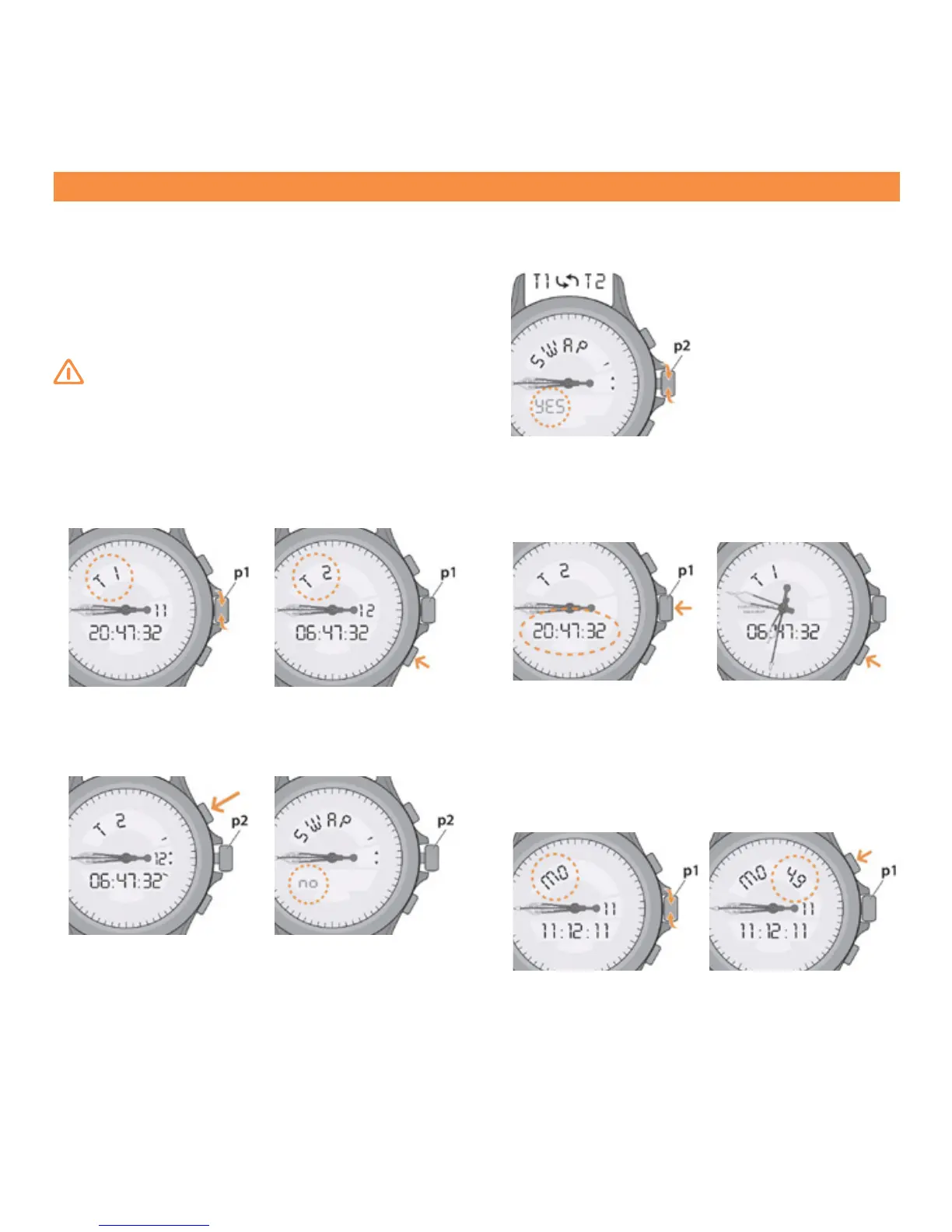
3.8 “SWAP” function
This function allows interchanging time zones “T1” and
“T2”, so that the secondary time zone becomes the main
time zone.
Note: It is not possible to use the “SWAP” function during
the logging of a ight.
NB: The hands and the alarms “AL/AG” are always
linked to the main time zone “T1”.
“SWAP” function
. In position (p1) turn the crown to access the display
“T1”.
. A short press of button B will display “T2”.
. Pull the crown out to position (p2).
. A long press on button A activates the “SWAP” func-
tion. The display ashes and indicates “no”.
. Turn the crown to choose “yes” to interchange time
zone “T1” with time zone “T2”.
. Push the crown back to position (p1). Time zones “T1”
and “T2” interchange and the hands take the position
of the new time “T1”.
. A short press of button B displays “T1”.
3.9 Perpetual calendar
Date display with name of the day
. In position (p1) turn the crown to access the calendar
display.
. A short press of button
A
activates or deactivates the
week number display.














 To Next Page