!
#
"
Planer-Thicknesser
A3-26 / A3-31 / A3-41
Note:
To compensate for the thread clearance, adjust the thicknessing table from bottom to top.
Use the digital display (accessory) to adjust the thicknessing height exactly.
(See assembly instructions „Digital clock“).
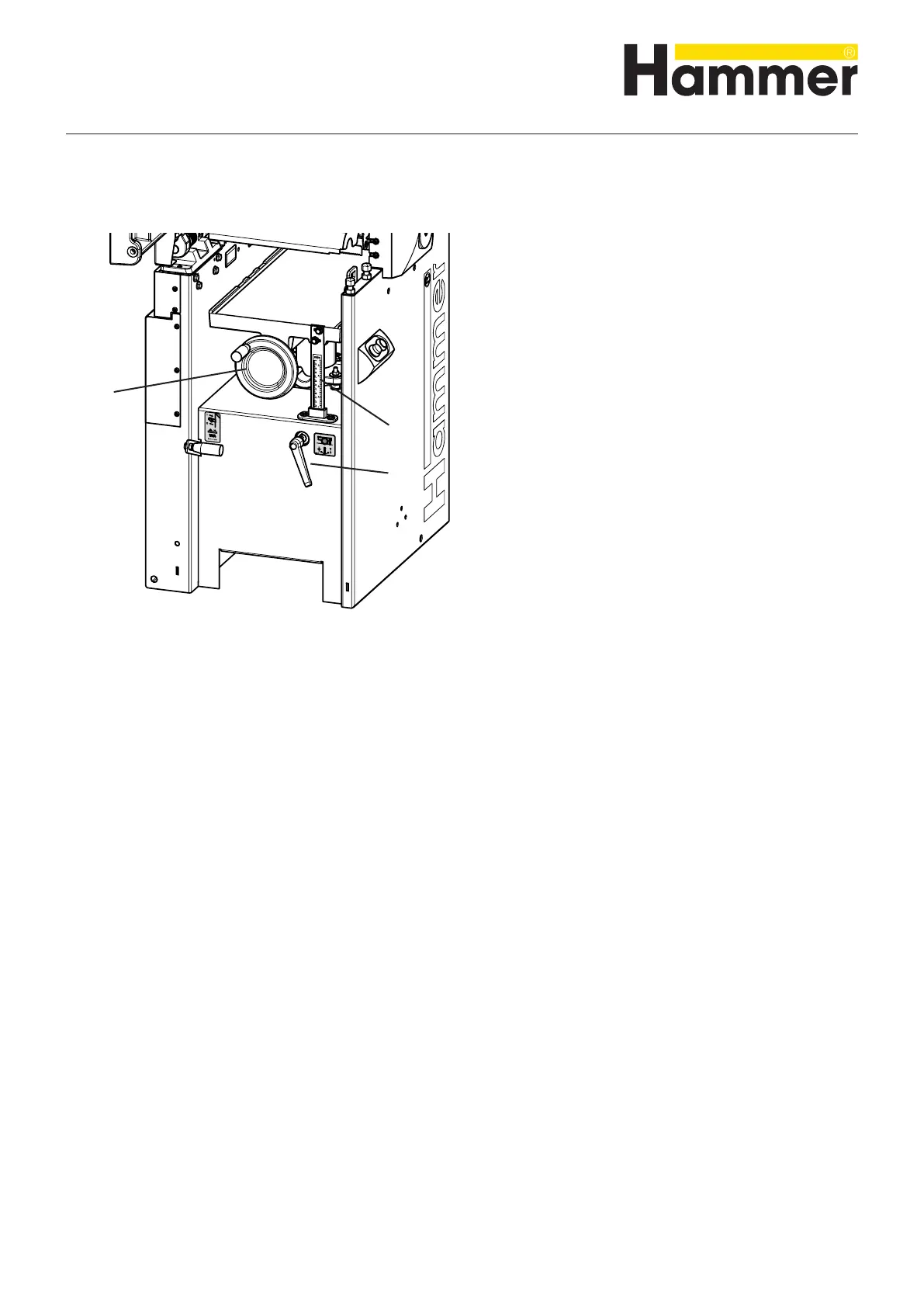
8.5 Adjust the thicknessing height
The cutting depth is adjusted by means of the thicknes-
sing table:
1. Switch off the machine
2. Measure the thickness of the workpiece.
3. Loosen the clamping lever.
4. Use the system handwheel to set the desired measure-
ment: thickness of the workpiece minus cutting depth
5. Clamp the clamping lever.
! System handwheel
" Scale
# Clamping lever
Fig. 8-6: Adjust the thicknessing height
Note:
The maximum chip thickness per work cycle is 4 mm.
When smooth planing, the maximum cutting depth is 1 mm.
The maximum depth of cut is directly related to the following factors:
• Panel width Panel intensity
• Type of wood (hardwood or softwood
• Wood dampness
• Feed rate
• Planer knives (SS, HS, HW)
• The motor power of your machine
Making adjustments and preparations



 To Next Page