Using the Control Panel
65
PLAY MODE
The PLAY MODE is the basic display for all the operations. The necessary informa-
tion for the normal play will be displayed.
To locate this mode:
1. Immediately after powering ON and the start up process is complete, the PLAY mode is
displayed.
2. If a different mode is displayed, press the [PLAY] button.
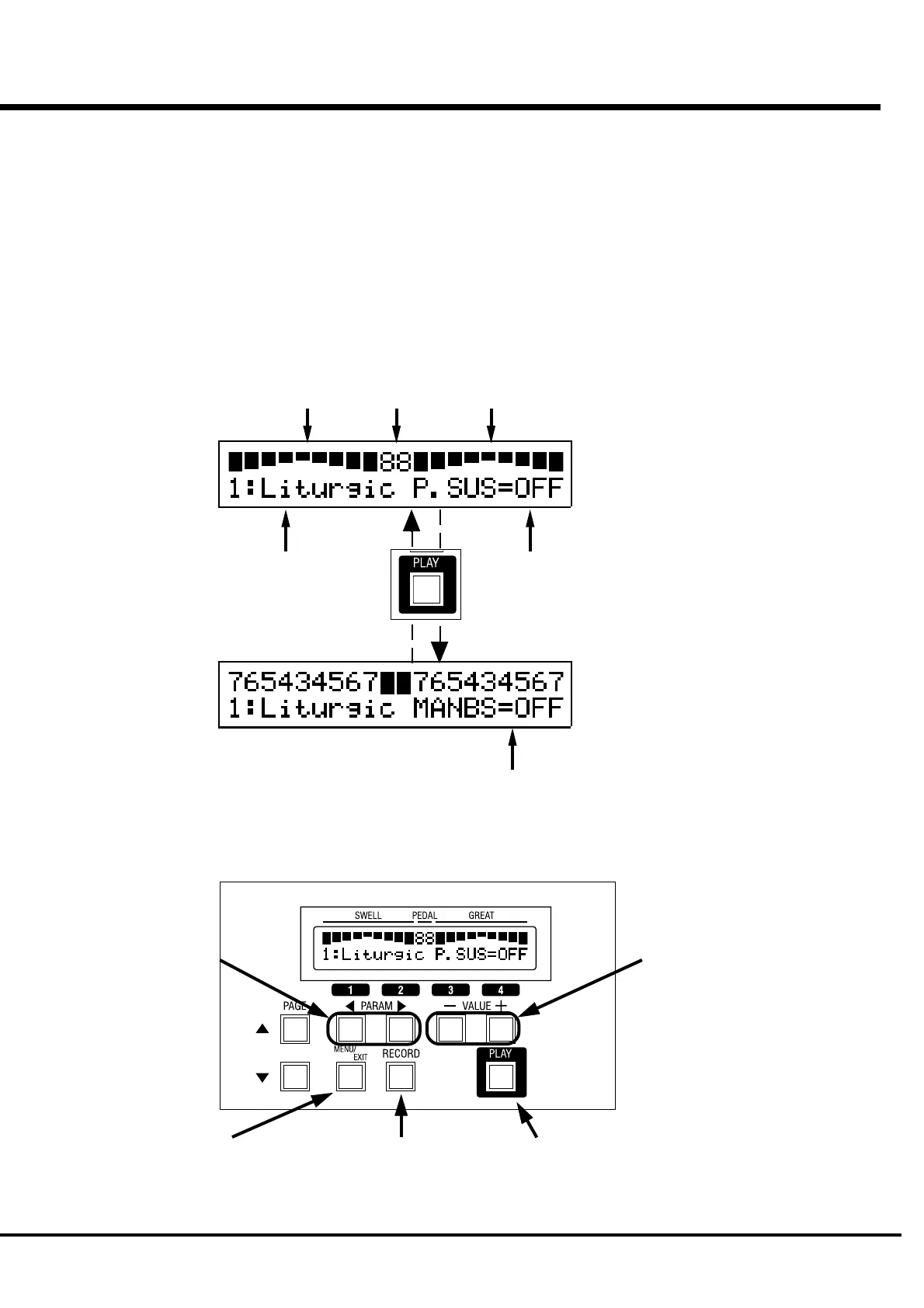
How to read the Display
BAR display
DIGITAL display
You can toggle the two PLAY mode displays (the
bar display and the digital display) by pressing the
[PLAY] button.
Drawbar registration
SWELL Kbd/ PEDAL Part/ GREAT Kbd
Preset Bank : Name
Pedal Sustain
Manual Bass
Button operation in this mode
Switch the Bank.
Display the Menu.
Record the Presets.
Switch the display, Bar or Digital.
Bar display:
turns on/off the Pedal Sustain.
Digital display:
turns on/off the Manual Bass function.


 To Next Page