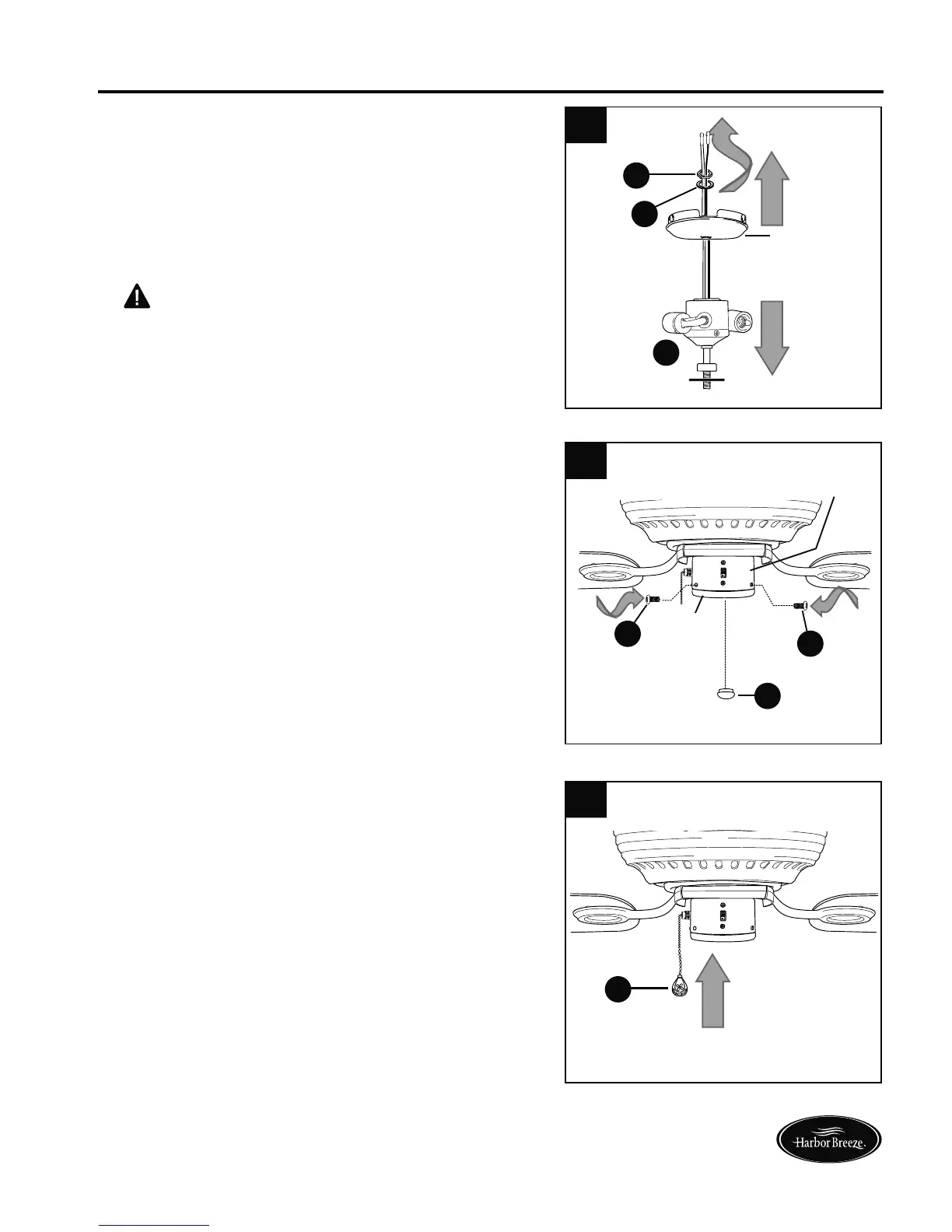
1.
INSTALLING FAN WITHOUT INCLUDED LIGHT KIT (OPTIONAL)
1
14
Lowes.com/harborbreeze
D
If you do NOT wish to use the light kit,
remove the hex nut (P) and lock washer (Q)
from the threaded rod at the top of the light kit
fitter (D). Unscrew the switch housing cap to
remove it from the light kit fitter (D), and then
gently feed the BLACK and WHITE wires from
the light kit fitter (D) through the hole in the
middle of the switch housing cap.
CAUTION: RISK OF SHOCK. The molex
safety caps should not be removed unless a
light kit will be immediately installed and the
power should be turned off prior to molex
safety cap removal and light kit installation.
Switch
Housing
Cap
WHITE
BLACK
2.
2
Locate cap (K) in one of the hardware packs
and place cap (K) firmly in hole in middle of
switch housing cap. Align holes in switch
housing cap with holes in switch housing and
secure switch housing cap with three switch
housing cap screws (U) that were removed in
Step 4 of “Final Installation” section (page 11).
Tighten all three switch housing cap screws (U)
securely.
3.
3
The pull chain extension (F) supplied in one of
the hardware packs or a custom pull chain
extension (not included) may be attached to
fan pull chain.
P
Q
Switch
Housing
U
U
K
F
Switch
Housing
Cap



 To Next Page
 Loading...