15
harman/kardon Service Bulletin
Service bulletin # H/K2001-01 June 2001 Warranty labor rate: MINOR repair
To: All harman/kardon Service Centers
Models: AVR110/210/310/510, AVR3000/4000/5000
Subject: Unit Goes into Protection
In the event you receive an AVR110,210,310,510,3000,4000 or 5000 A/V receiver with the complaint: “The
Receiver is going into protection (Red indicator in the power switch) as soon as it’s turned on, or after a
short delay”, check both items below for possible solutions:
AVR/210/310/510, AVR3000/4000
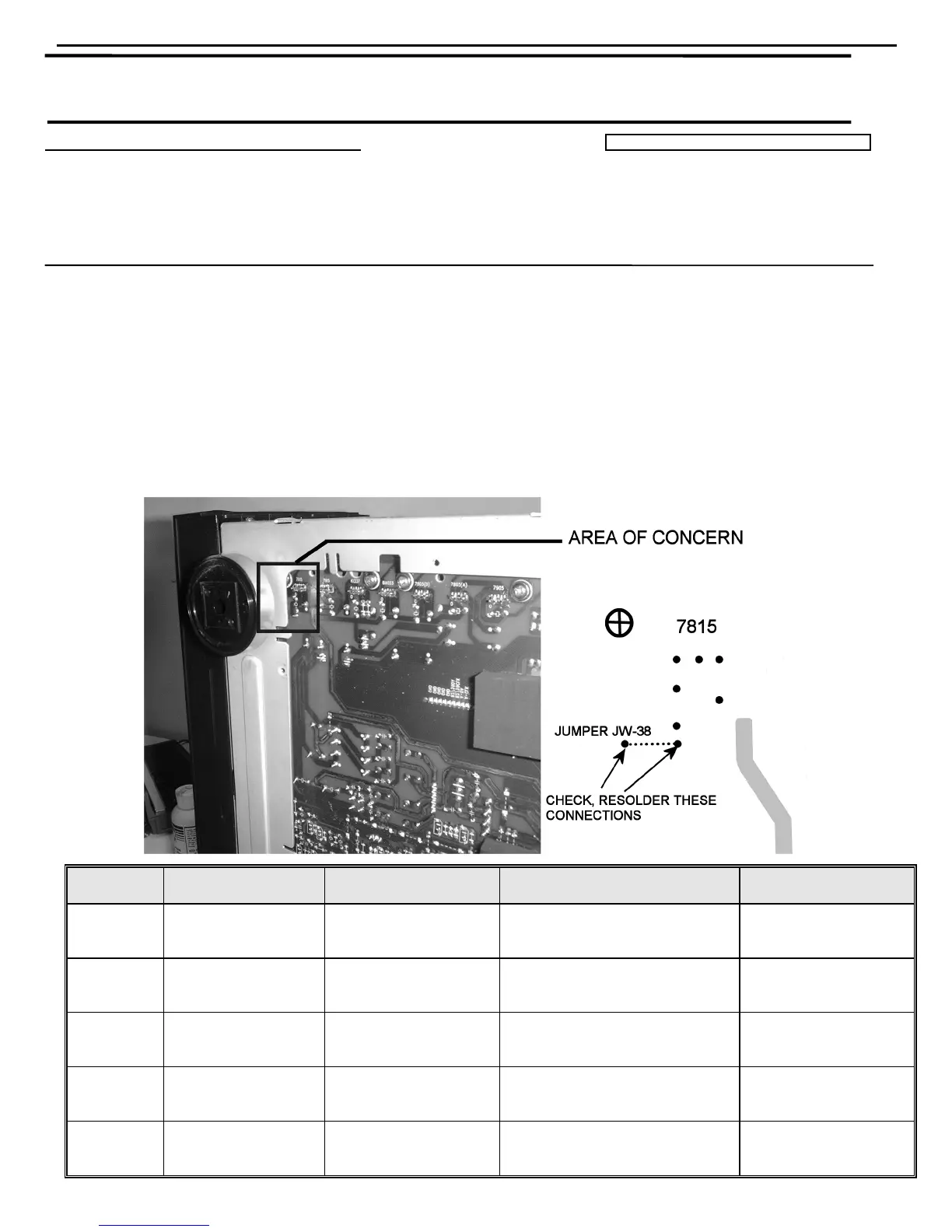
1. Possible bad solder connection at jumper JW-38 on main PCB:
a) Disconnect all external cables, lay unit on its left side on a padded surface.
b) Remove the (10) Phillips screws holding the bottom chassis grille on, exposing the Main PCB.
c) Refer to the illustration below; locate area of concern and resolder exposed ends of jumper JW-38 if
needed.
d) Reassemble and test unit.
Model
Serial Number
120V
Serial Number
230V RDS
STATUS ACTION
AVR210
TH0015~01001
to
TH0015~02966
n/a Check jumper JW-38 for solder
Resolder JW-38 if
needed
AVR310
TH0016~01001
to
TH0016~04408
n/a Check jumper JW-38 for solder
Resolder JW-38 if
needed
AVR510
TH0017~01001
to
TH0017~04403
n/a Check jumper JW-38 for solder
Resolder JW-38 if
needed
AVR3000 n/a
TH0019~01001
to
TH0019~03369
Check jumper JW-38 for solder
Resolder JW-38 if
needed
AVR4000 n/a
TH0020~01001
to
TH0020~03423
Check jumper JW-38 for solder
Resolder JW-38 if
needed
AVR310 harman/kardon




 To Next Page