69
Image Info
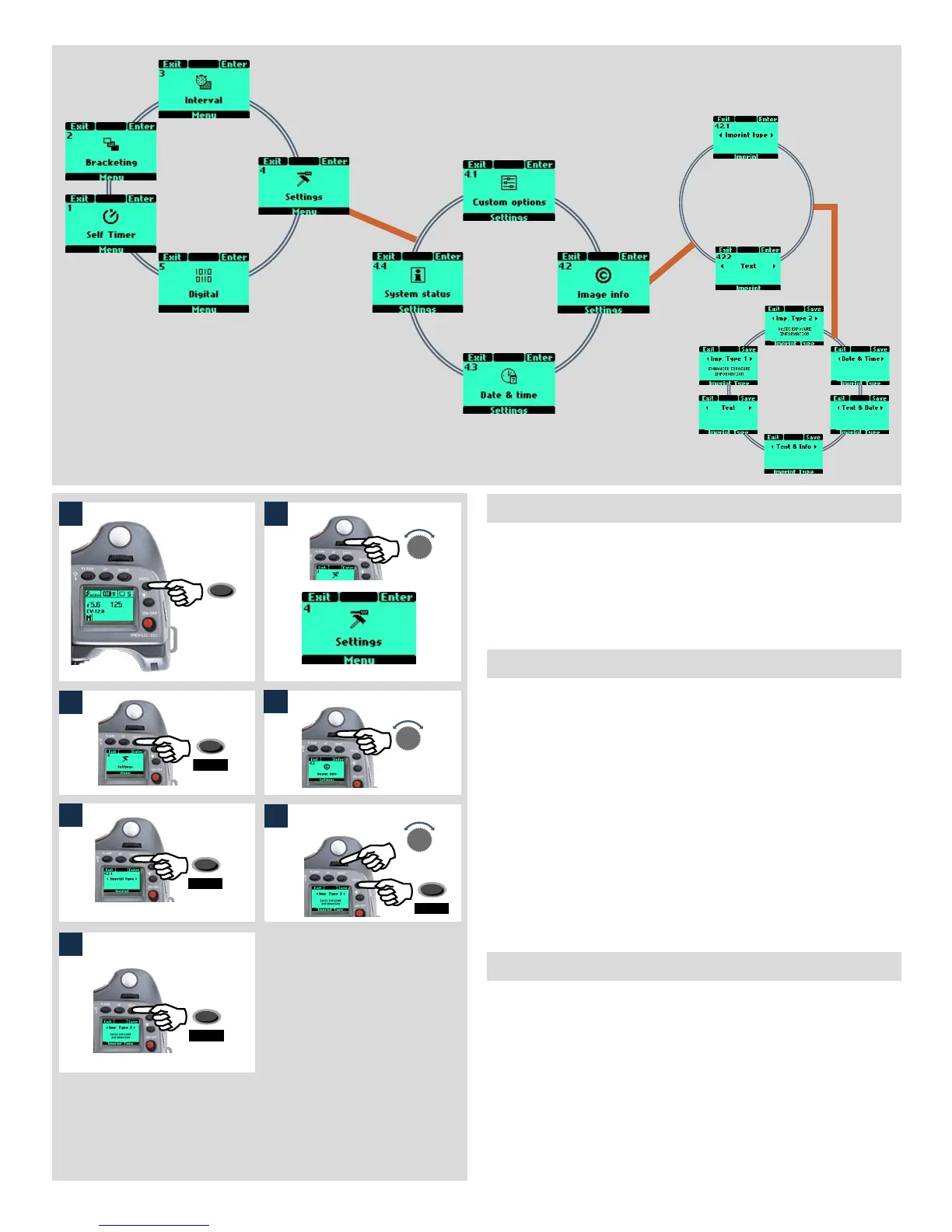
4.2 Image Info (film magazines only!)
The Imprint facility controls the text that will appear along the edge of
each frame on a film. It is possible to imprint approximately 40 characters
at one time.
Imprint Type records technical information automatically created by
the camera. Text records information created by the user.
4.2.1 Imprint type
The following can be chosen as an option:
• Imp. Type 1 prints the relevant information: aperture, shutter, meter-
ing mode, exposure mode, exposure compensation and
flash compensation.
• Imp. Type 2 prints the relevant basic information only: aperture, shut-
ter, and exposure correction.
• Date & Time prints date & time only (the correct date and time is set
through the Settings menu under ‘Date & Time’.)
• Text & Date prints text plus date
• Text & Info prints text plus basic info
• Text prints text only (that you have created in 4.2.2 Text)
Imprint type setting
1) Press the MENU button on the grip.
2) Turn the front control wheel until Settings appears.
3) Press Enter (DRIVE button) on the grip.
4) Turn the front control wheel to access 4.2 Image info.
5) Press Enter (DRIVE button) to 4.2.1 Imprint type.
6) Press Enter (DRIVE button) again and turn the front control
wheel to select the desired option.
8) Press Save (DRIVE button) on the grip.
5
6
7



 To Next Page