- 6 -
1.5.1 OperationbuttonsandIdentification
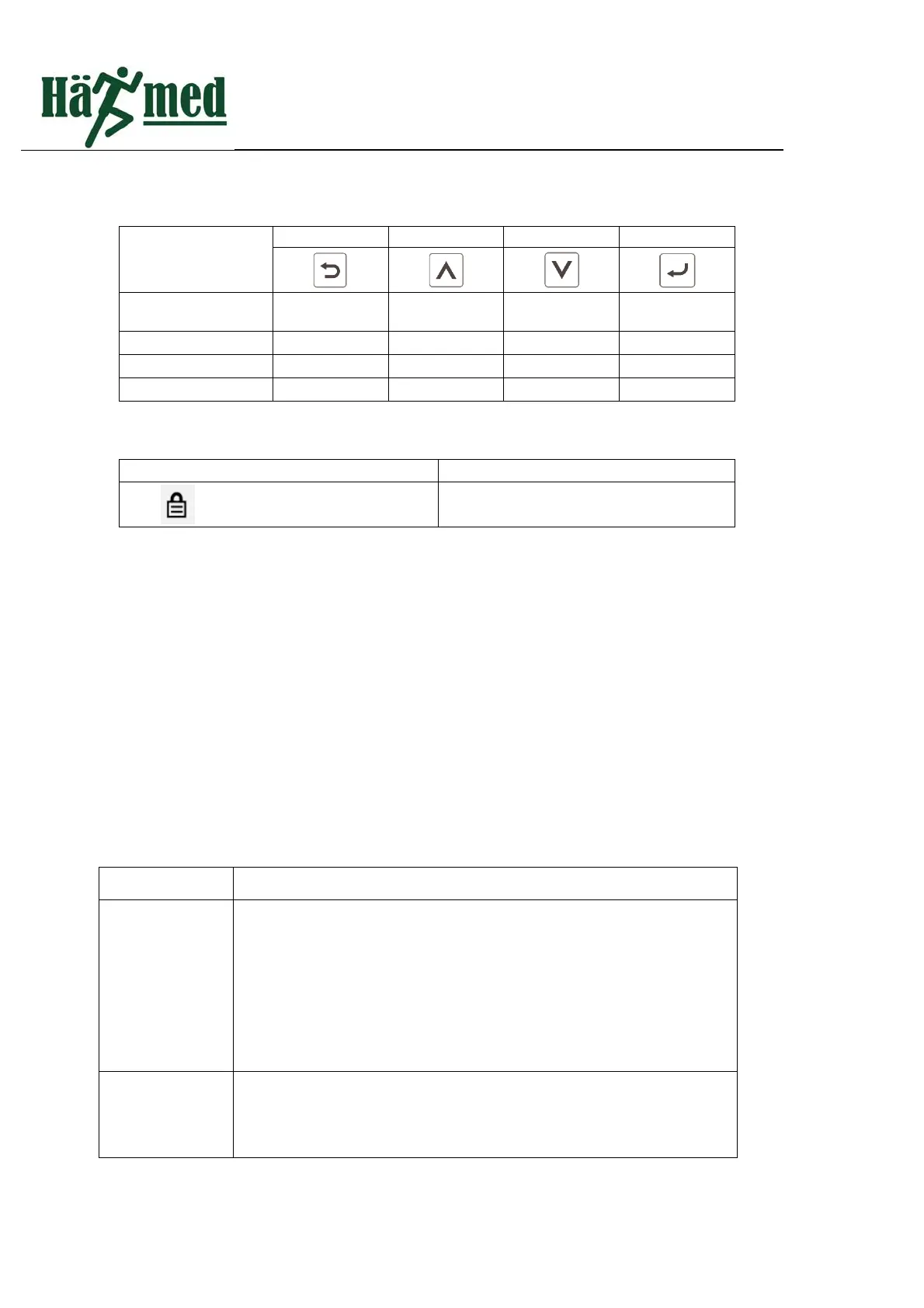
Theuseof4buttonsindifferentsituationsisasfollows:
Buttonposition
(Faceupfromleft
toright)
1 2 3
4
Whentheprogramis
selected
return
Previous
option
Nextoption Select
standbymode Openthedoor Startup
Programruntime Stop
WhensettingConfirm
Thereisaniconintheinterfacetodisplaythedoorlockstatus.
StatusIdentification Description
Doorlockstatus Thestatusofthedoorlock:onoroff
1.6 Emergencydooropeningdevice
Emergencyopeningisanunconventionalwaytoopenthedoorwhensterilizercannotbepoweredondueto
other reasons or the safety door failure.Please do not open thedoorinthiswayundernormalcircumstances.
Removethescrewontheemergencyprotectioncoveronthebackoftheproduct(Fig.1.4),thenusingyourright
handto grasp the white plasticdisc inside the protectivecover,gently pull(distance is about 1CM).At the same
time,useyourlefthandtoliftthedoorhandleuptoopenthedoor
1.7 EquipmentWorkflow
1.7.1 Sterilizationprogram
Sterilizationprocessconsistsof3stages,pre‐vacuum,sterilization,drying.Aftertheprogramisstarted,the
usercanseethestageoftheprogramrunningontheinterface.
Processname Description
1.Pre‐vacuum
Duringthestageofpre‐vacuum,theprocessofevacuatingandinjecting
steamisproceededrepeatedly,Asthemixtureofairandsteamis
continuouslyextracted,theairinthechamberisminimized.Thenumberof
thisprocessvariesaccordingtotheselectedprogram,standardsterilization
procedurerepeated3times,Helixprogramand134+programrepeated4
times.
2.Heating
Afterthepre‐vacuumistheheatingstage,steamiscontinuouslyinjected
intothechamber,thetemperatureandpressureinthechamberrise
continuouslyuntilthespecifiedvalueoftheselectedprogramisreached.



 To Next Page