- 25 -
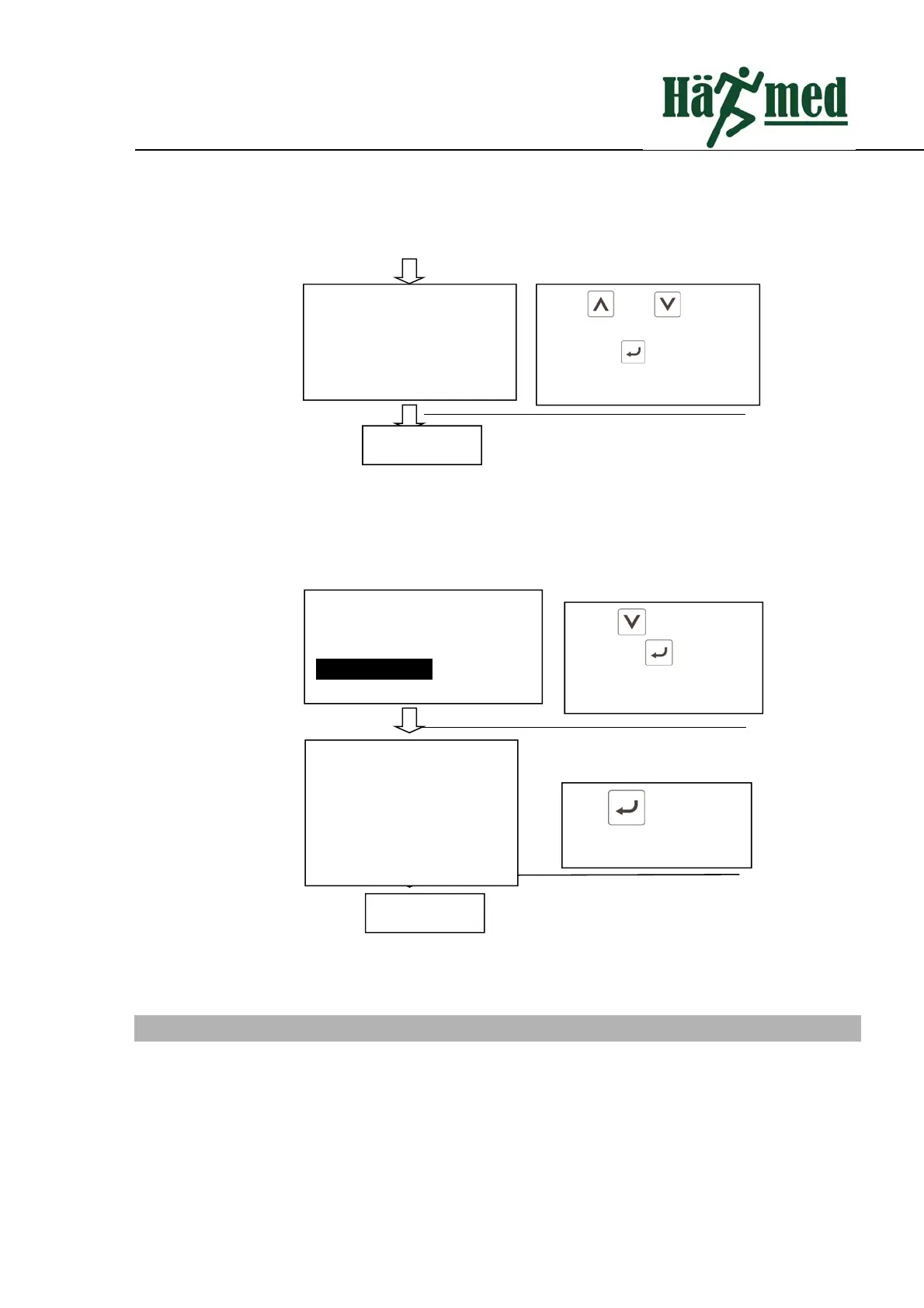
Fig6.9Systemresetinterface
6.9 SystemInformation
Systeminformationoperationisasfollows:
Fig6.9Systeminformationinterface
7 SterilizationLog
Thesterilizationlogrecordsandstoresreal‐timedataforeachphaseofthesterilizationprocess.Thememory
ofthisproductcanstoreuptotwoyearsofsterilizationrecords.Sterilizationrecordsarenamedafterserialnumbers,
suchas:0001.TXT,canbeexportedthroughtheUSBinterfaceorprintedbyaprinter.
Press and to select
whethertoperformasystem
reset.Press toexit afterthe
settingiscompleted.
Systemrest
YesNo
Completion
Press toselect system
reset.Press toenterinto
systemreset
Press to exit System
informationinterface.
Completion
Watersupplysetting
Systemreset
Administratorsetting.
Systemmessage
Systemmessage
MODEL:I‐P‐PRO
FW:00.02.19.00
HW:Qx3_V0.2
SN:65252120517050508
Back



 To Next Page