USE ONLY HAYWARD GENUINE REPLACEMENT PARTS
28
Starting a Theme
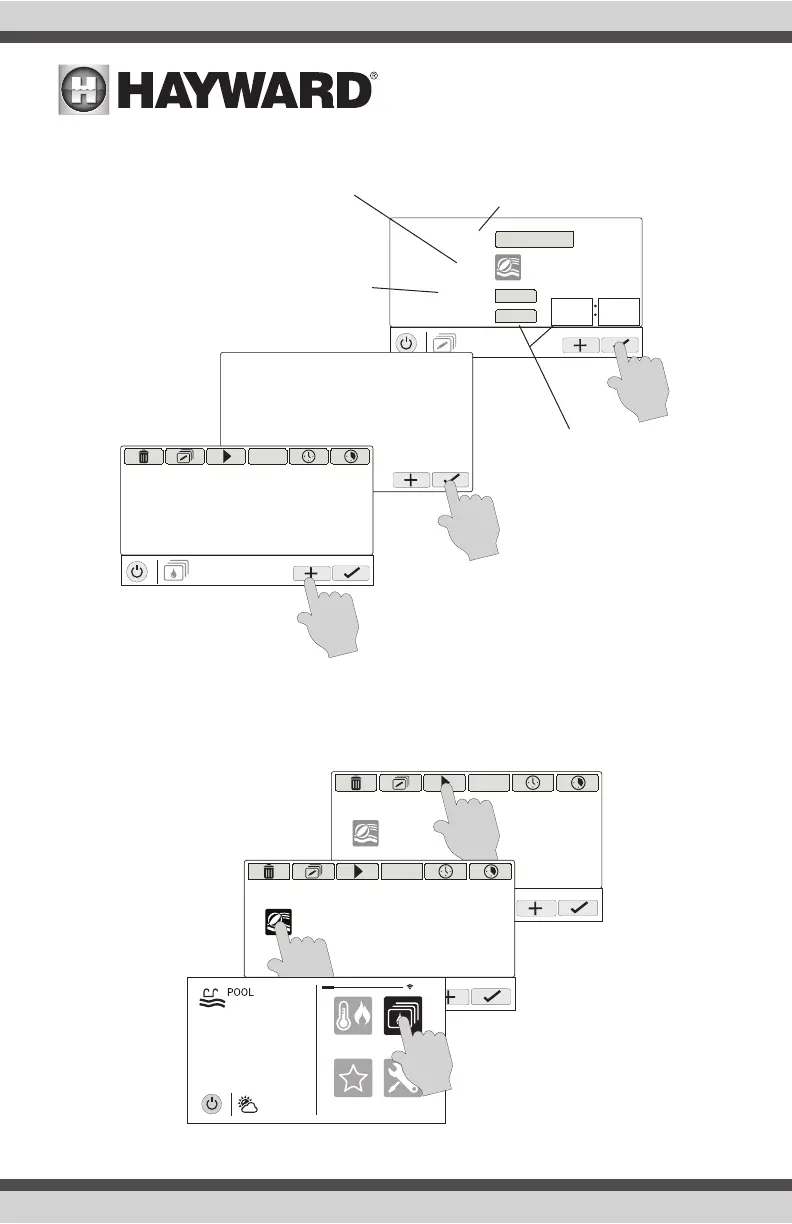
If a Favorite was created for the Theme, run the Theme just as you would any other Favorite. To
start a Theme within the “Manage Themes” screen, follow the procedure below. Note that only one
Theme can run at a time.
SETTING
theme
name
favorite
countdown timer
icon
pool party
yes
yes
00
11
Please ensure all the equipment
for this theme is currently ON.
MANAGE
themes
OFF
Name the Theme - Touching this button
will bring you to a keyboard where you can
enter a name for the theme. Saving the
name will bring you back to this screen.
Select an Icon - Touching this button will bring
you to an icon selection screen. Touch the advance
button to access more icons. Selecting and saving
the icon will bring you back to this screen.
Add the Theme to Favorites - Touching this
button will toggle the selection from Yes to
No. Select whether you want the new Theme
to be added to Favorites. If so, a new button
will be generated and added to Favorites.
You’ll be able to turn the Theme on/off with
the new Favorite button.
Countdown Timer - Touching
this button will toggle the selec-
tion from Yes to No. If Yes, you’ll
be allowed to set a run time for
the Theme. The Theme will be
allowed to run for this amount
of time only, then automatically
shut off.
MANAGE
themes
OFF
pool party
MANAGE
themes
OFF
pool party
favorites
heat/cool
themes
º
F
air
71º F
82
cong















 To Next Page