USE ONLY HAYWARD GENUINE REPLACEMENT PARTS
27
Themes
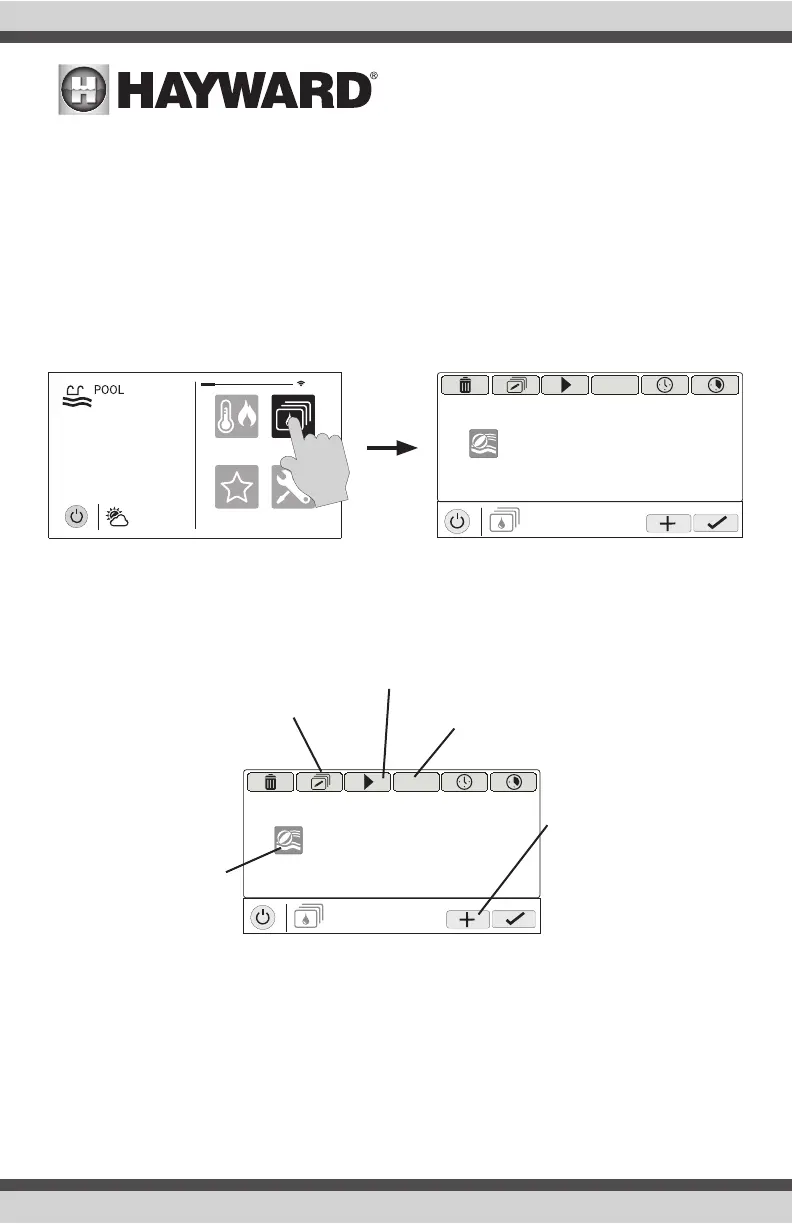
Themes allow you to execute many pool functions with just one button. This can be handy for
functions that require interaction with various pool equipment. For example, spending an evening
in the spa might require you to turn on the spa jets, set the heater to 104ºF, and turn on the spa
lighting. Rather than manually performing these functions, they can be saved as a Theme and
executed with just one button. To create a Theme, put all of the equipment into the desired state.
In the example above, you would set all the equipment as described. When creating Themes, the
OmniHub takes a “snapshot” of the system state/settings. This snapshot is saved as a Theme.
Refer to the following diagrams and information for creating and running Themes.
Create a Theme
To create a Theme, put all of the equipment into the desired state and refer to the diagram on the
top of the next page.
favorites
heat/cool
themes
º
F
air
71º F
82
cong
MANAGE
themes
OFF
pool party
MANAGE
themes
OFF
pool party
Edit Theme - After selecting
a Theme, touch this button
to edit the Theme. You can
rename, change icon and set
as favorite.
Start Theme - After se-
lecting a Theme, touch this
button to start the Theme.
End Theme - After selecting a Theme,
touch this button to end the Theme.
Create a Theme - Touch
this button to create a
Theme. Before creating,
make sure all pool/spa/
backyard equipment is in
the desired state. NOTE: If
a Spa Side remote control
is configured, you’ll have
the option to assign the
Theme to one of its but-
tons.
Select Theme - Touch
this button to select
the desired Theme. You
can now turn it on/off,
edit, set a schedule, set
a countdown timer, or
delete the selection using
the buttons above.















 To Next Page