USE ONLY HAYWARD GENUINE REPLACEMENT PARTS
26
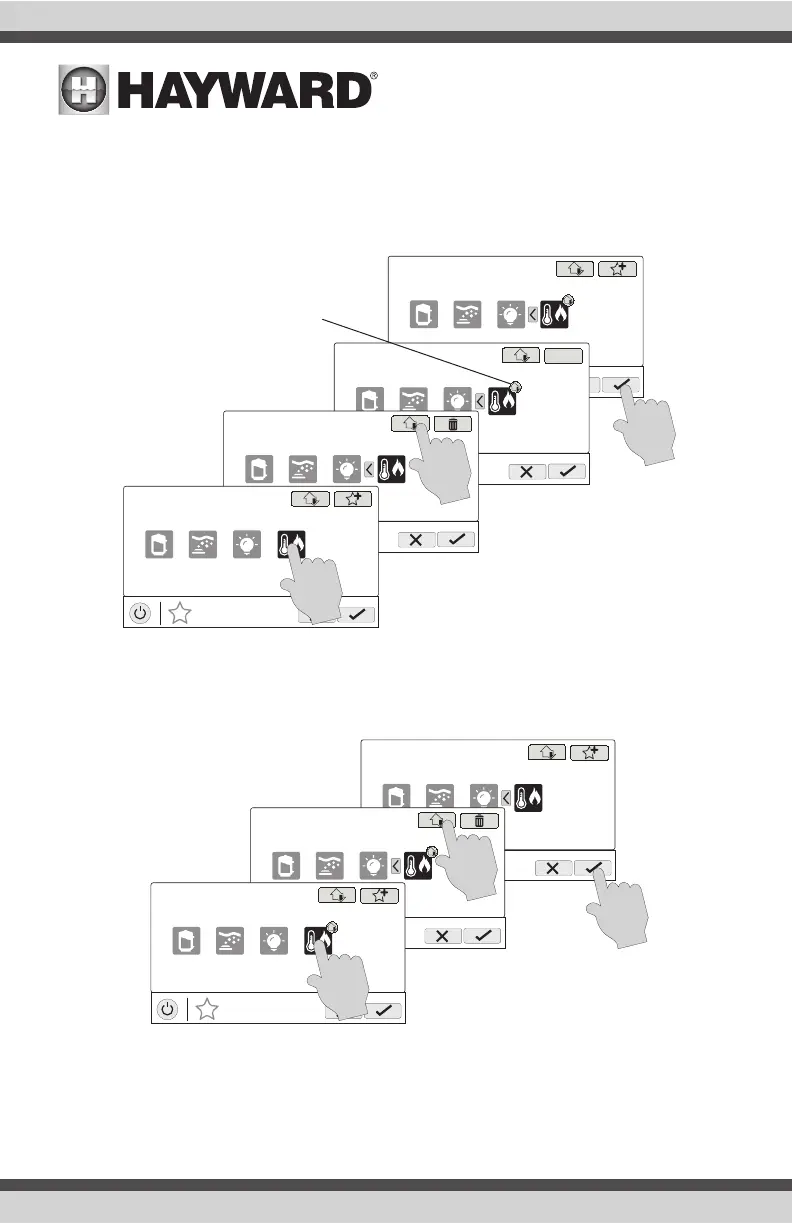
Adding Favorites to Simple Mode
For more information on Simple Mode, refer to page 37. Most Favorites can be added to Simple
Mode but not all. Follow the procedure below. NOTE: If the Favorite has been added to Simple
Mode, moving the button location on the Favorites screen will affect its position on the Simple
Mode screen.
Deleting Favorites from Simple Mode
Deleting Favorites from Simple Mode is similar to adding Favorites to Simple Mode.
MANAGE
favorites
deck lights
vsp jets
S
heat/cool
S
MANAGE
favorites
deck lights
vsp jets
S
heat/cool
S
MANAGE
favorites
deck lights
vsp jets
S
heat/cool
MANAGE
favorites
deck lights
vsp jets
S
heat/cool
Indicates that item has been
added to Simple Mode.
MANAGE
favorites
deck lights
vsp jets
S
heat/cool
MANAGE
favorites
deck lights
vsp jets
S
heat/cool
MANAGE
favorites
deck lights
vsp jets
S
heat/cool
S
S















 To Next Page