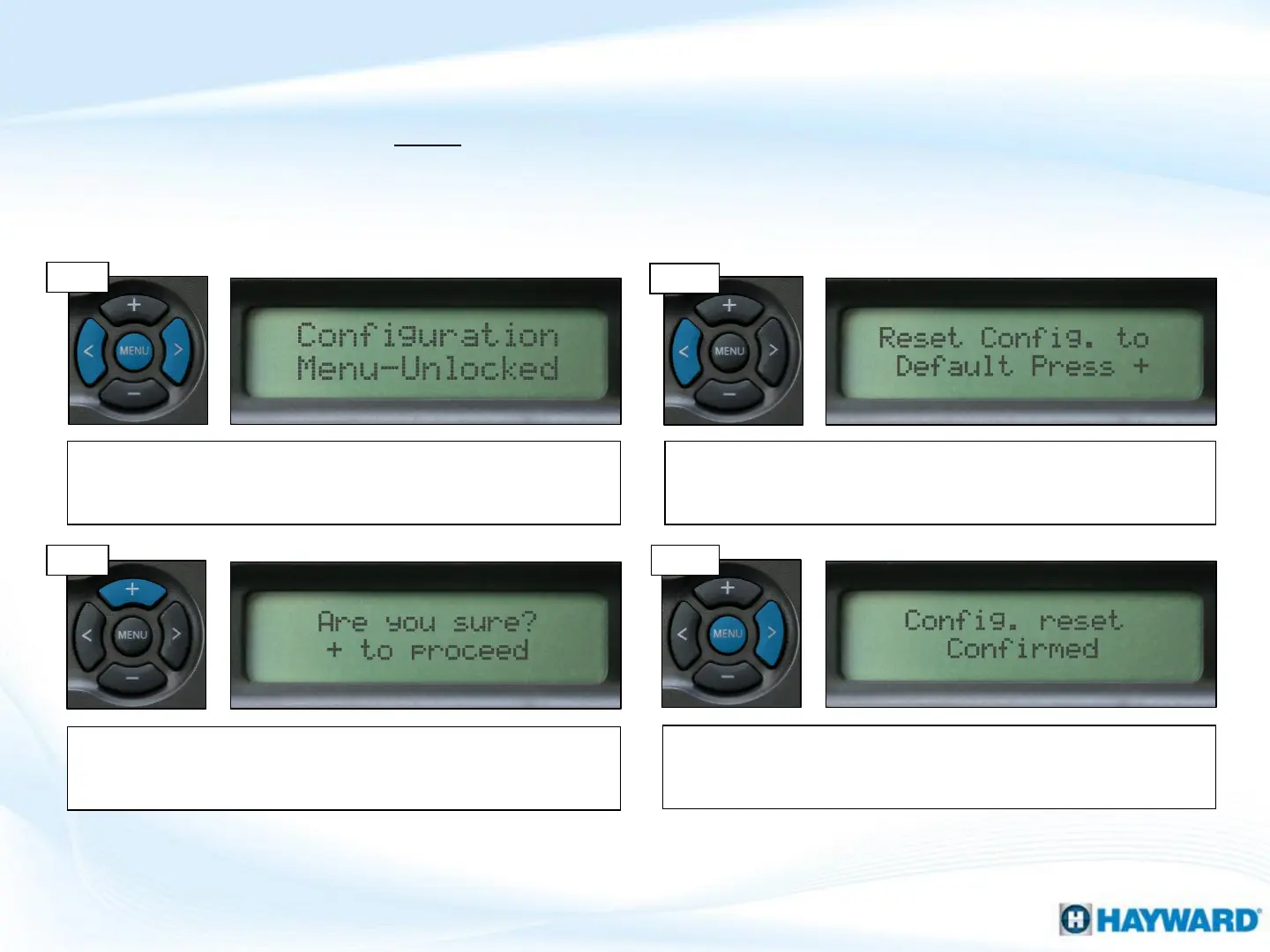
Follow these steps ONLY if you wish to restore the system to factory default.
WARNING: Resetting the system to factory default will wipe out all configuration
changes, schedules, and settings preferences.
Once the reset has been completed, the display will report
‘Config. Reset Confirmed’. To exit Config., press the ‘Menu’
button, to continue programming press the (>) button.
How To: Reset Config. to Default
7
Step 3
Step 4
Step 1
Press the ‘Menu’ until, ‘Configuration Menu-Locked’ appears. To
unlock, press and hold the (<) & (>) keys until the text on the
display changes from ‘Locked’ to ‘Unlocked’.
Press the (<) one time, ‘Reset Config. to Default’ should appear
on the display. Note: pressing the (>) repeatedly in configuration
also eventually lead to this screen.
Note: It is important to write down the system’s configuration, settings, and timers prior to resetting the
Configuration to Default.
Step 2
Press the (+) key to reset. The system will ask ‘Are you sure?’,
press ‘Menu’ to cancel, OR the (+) button again to confirm.
Warning: Once confirmed, all stored information will be erased.











 To Next Page