7 Cleaning and servicing the heating system – Procedure
80
CLEANING THE IGNITION FAN
1. Switch the heating system off.
✎ See the “HDG controls” operating manual, chapter “5 Using the
control unit”, section “5.3 Switching off the heating system”.
2. Allow the fire in the heating system to burn out and cool down.
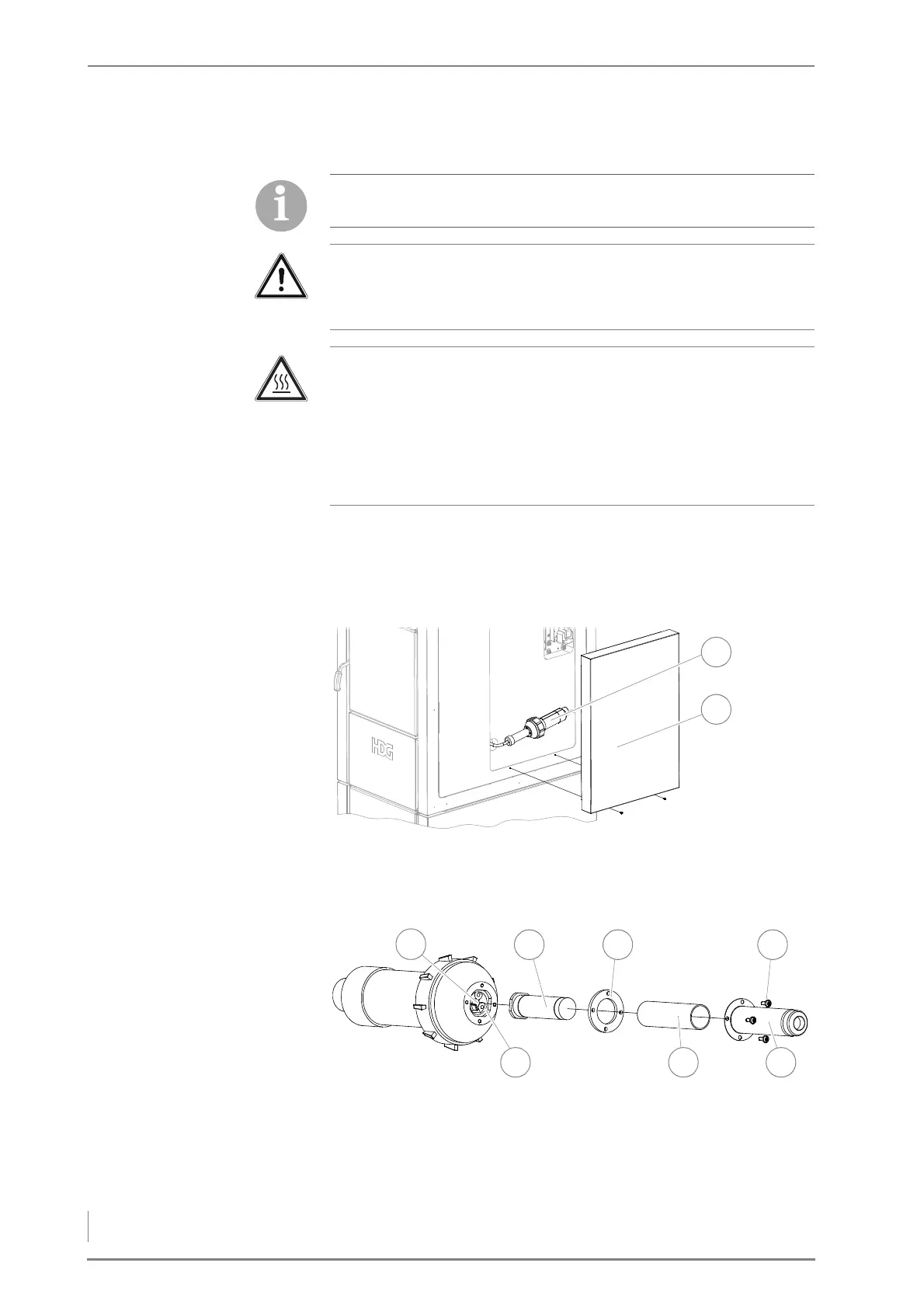
3. Undo the fastening screws and remove the side cover (2).
4. Pull the ignition fan (1) out of the retainer.
5. Unscrew the four M4 stainless steel slotted screws (4) of the hot air
nozzle (5).
6. Pull off the hot air nozzle (5).
7. Remove the insulating tube (6) and the seal (3).
The ignition fan is only available in connection with the HDG
automatic ignition system.
Important!
✎ Observe the “Generally applicable safety instructions” in this
section.
Caution!
Danger of burns from hot surfaces
The hot air nozzle of the ignition fan becomes very hot during
operation. Even when turned off, it only cools down slowly.
Switch the heating system off and only start with the cleaning and
maintenance work once the hot air nozzle has cooled down.
Figure 7/18 - Removing the cover
Figure 7/19 - Checking and cleaning the ignition fan



 To Next Page