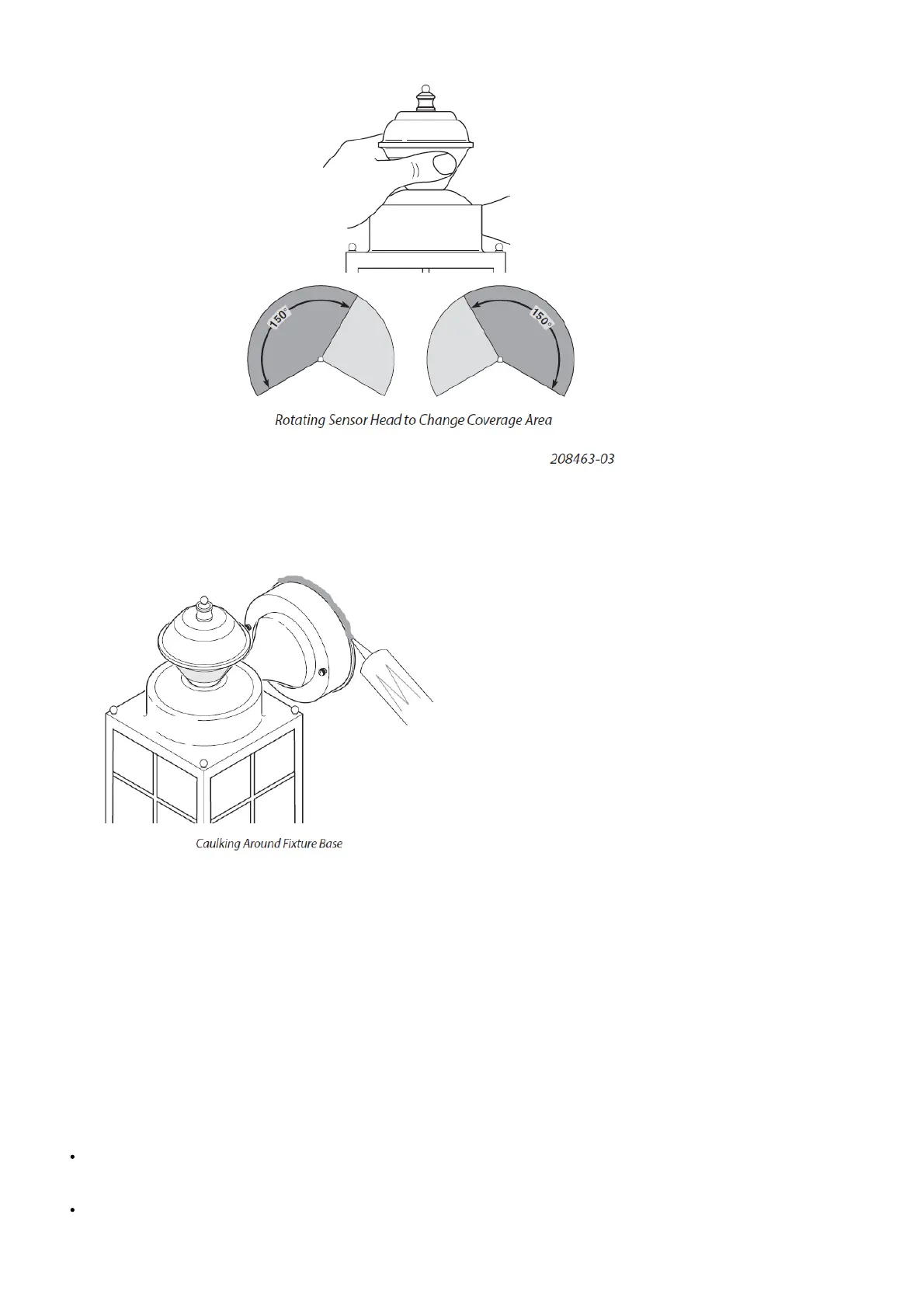
Move the sensor head left or right to change the coveragearea.
Note: Grasp the sensor only as shown and turn the entire sensor. Any other method may damage the sensor. Do
not force it past the stops. Final Setup
1. Adjust the sensitivity (SENS) to increase or decrease the range as needed. Too much sensitivity may cause false triggering due to
heat sources in the coverage area (see Testing and Adjustments or Troubleshooting section).
2. Set the amount of ON-TIME you want the light to stay on after motion is detected (1, 5, or 10 minutes).
3. Caulk around fixture base with silicone weather sealant after all Testing and Adjustments are complete.
Operating Modes
Mode: On-Time Works: Day Night
Test 5 Seconds x x
Auto 1, 5, or 10 Minutes x
Manual To Dawn* x
resets to Auto Mode at dawn
Note: When first turned on wait about 1 1/2 minutes for the circuitry to calibrate.
Motion Sensor (AUTO) – This light fixture is designed to automatically turn on when the sensor detects a temperature difference
moving across the front of the motion sensor. The light will turn off automatically after a set amount of time. The ON-TIME control
should be set to 1, 5, or 10 minute setting and the wall switch should be left in the ON position at all times.
Manual Mode – This light can be activated to stay on full bright after dusk (sunset) for only one night at a time. It automatically
resets to motion sensing at dawn (sunrise). Manual mode must be re-activated each night. Note: If power to the light fixture is off
for more than 5 seconds, allow the electronic circuitry in the sensor to calibrate (90 seconds) prior to switching to manual mode.



 To Next Page